I am using version 2.0.0-pre.11, when
using Unity.AppUI.Redux;
It shows
The type or namespace name ‘Redux’ does not exist in the namespace ‘Unity.AppUI’ (are you missing an assembly reference?)
Is there something wrong?
I am using version 2.0.0-pre.11, when
using Unity.AppUI.Redux;
It shows
The type or namespace name ‘Redux’ does not exist in the namespace ‘Unity.AppUI’ (are you missing an assembly reference?)
Is there something wrong?
Content from that belongs to the Unity.AppUI.Redux assembly which is not specified as auto-referenced. You can’t use this from predefined assemblies like Assembly-CSharp etc. You can use this in code that belongs to an assembly definition that specifies the Unity.AppUI.Redux assembly under “Assembly Definition References”
how can I mark it as auto-referenced? I see the Unity.AppUI.Navigation is also not auto-referenced, but I can use it without errors
Edit:
I mark it as auto-referenced, and it works now.
Why is there an APP UI tag in Discussions. Was it added for this internal(!!) unity package or for some hyper-general “app” UI tagging?
Why is it on the home page under UI section if it is for an unreleased internal package?
Anyway the package itself might be interesting but looks like an easier way to use the (complex?) UI Builder/Toolkit bringing in (enterprise like?) patterns and helpers…
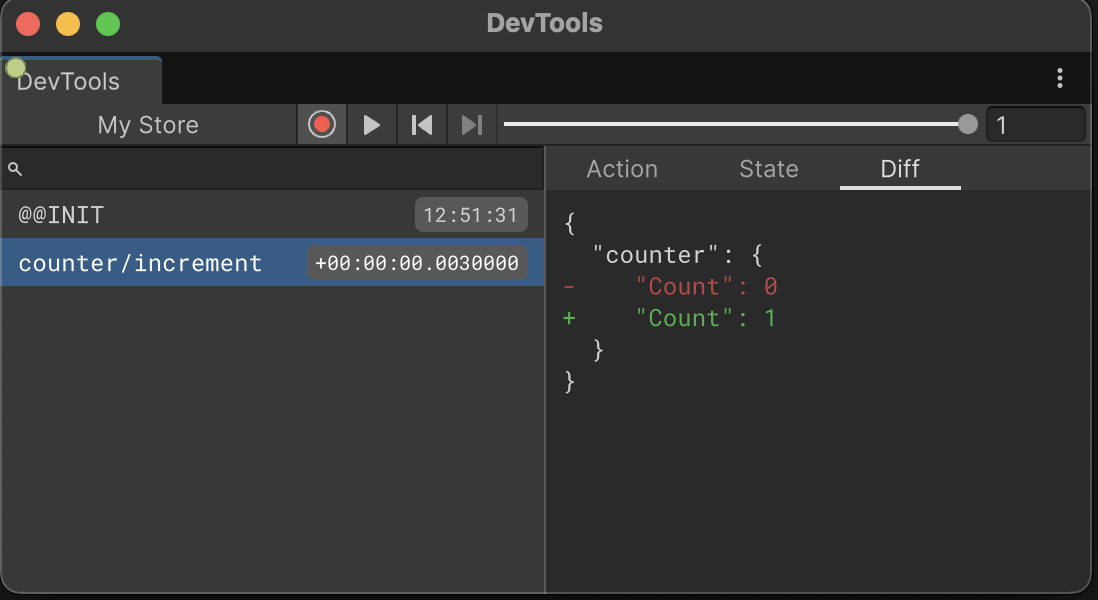
I know this is unsupported and all but has anyone gotten the Redux DevTools window to work? I’m using App UI 2.0.0-pre.17
A store created this way should show up in the DevTools window.
Just make sure you have an asmdef that references AppUI.Redux assembly.
using System;
using Unity.AppUI.Redux;
using UnityEngine;

namespace MyNamespace
{
    public class StoreMonoBehaviour : MonoBehaviour
    {
        IStore<PartitionedState> m_Store;

        static readonly ActionCreator increment = "counter/increment";

        void Start()
        {
            m_Store = StoreFactory.CreateStore(
                new []
                {
                    StoreFactory.CreateSlice("counter", new CounterState(), builder =>
                    {
                        builder.AddCase(increment, (state, _) => state with { Count = state.Count + 1 });
                    })
                }, StoreFactory.DefaultEnhancer<PartitionedState>(new DefaultEnhancerConfiguration
                {
                    devTools = { enabled = true, name = "My Store" }
                }));
            m_Store.Subscribe("counter", (CounterState s) => Debug.Log($"Counter: {s.Count}"));

            Increment();
        }

        public void Increment()
        {
            m_Store.Dispatch(increment.Invoke());
        }

        [Serializable]
        public record CounterState
        {
            public int Count { get; set; }
        }
    }
}
Ah. StoreFactory.DefaultEnhancer is nowhere in the documentation. Got it going now. Thanks!
After just moving our main products over to UI Toolkit using C# builders (no uxml) and the ongoing issues we are facing, I’m surprised to learn this even exists, even more (well not really) that this is a V2 release, even as a pre-release and still not a thing.
I would be very wary even considering this considering UI Toolkit still doesn’t feel finished and the team are already pivoting to something else, just feels like uGUI all over again.
Does this also mean with the teams focus on “yet another” “in preview” UI solution that the focus has gone from UI Toolkit, which seems fully focused on Editor changes and fixes, leaving the runtime player with “mostly” working functionality?
This is built on top of UI Toolkit. It just adds new features on top of it, but it is still the UI Toolkit.
Thanks, that is good to know @Jonathan-Westfall-8Bits
Apparently, App UI v2 has been released. Would be nice to have some information about its roadmap.
And will it become an actual supported package (and not just made for internal use)?
I also can’t understand this package like other users.
Looking at it, it could be a rosetta stone for all of us who work in “serious” 3D apps for industry and such in unity, it has built in all the components you may need for a windows or smartphone app.
Can’t understand why this is not a fully supported package.
I want to use it but at the same time it confuses me. There are implementations here that are on the UITK roadmap and have been for ages, like shadows and grid layout. At the same time it seems to have its own implementation of bindings via context, so, are two teams at unity working in the same problems without a bit of communication? Seems like a problem.
Also it seems to not be up to date… For example, the test scene seems to not have been updated for the scrolling behaviour because the scroll is awfully slow on desktop.
This would be great and save days if not weeks of work, but I can’t understand why it exists outside of UITK core and/or what is the expected usage on conflicting patterns between UITK core and AppUI, like binding.
Clearly it is not an abandoned package either, as its last update is from this august…
It would be great if someone from inside unity would shine the light on this.
Hey @Yishar,
The package is still supported but just internally. That just means feedbacks from Unity employees are prioritized for now to improve the package (since it is used by some teams internally). We cannot give the guarantee to end users to solve all the issues they found in the package due to the small amount of persons working on this project. But as you can see the package still release bug fixes here and there.
App UI components support UITK runtime bindings. It is really up to the user if they want to adopt others concepts provided in the package, such as ObservableObject for MVVM patterns, the Context API for propagating data into your visual tree, or Redux implementation for app state management. They are completely optional and should be conflict-free with any UITK initiative.
App UI package has been created for internal 3D apps development at the beginning. Now it is used more widely for different cases. If some features look similar to what is in the UITK roadmap, it is just because we needed them urgently, without the “feature complete” stamp. But still they usually cover 90% of the cases.
Thanks for the awnser @mickael-bonfill
So, we can expect the package to be kept up to date for the foreseeable future with core UITK features, making it not too risky to use? As long as we’re fine with not getting direct support from you guys at Unity and knowing that it isn’t thoroughly tested, hence the “as is” statement.
If that’s the case, the risk works for me. We can try using AppUI components first, and if they fail or don’t fit, we’ll just create our own instead. But the package seems to cover a lot of use cases already.
In any case, this is a package that I bet many of us would love to see fully featured. Core components are still limited and require a lot of USS overrides and/or complementary code for a full-fledged app. If there’s any way to request more resources for your team and/or push for it to become official, it would definitely have my vote 
Hi, if any of the devs see this.
Im new to UIToolkit and got recomended AppUI for GridView. And i wanted to make a grid view but had trouble getting items to allign into a row and then wrap around. Anything i tried just did nothing. UNTIL
i came across GridView.columnCount. I had to do a manual calulation (made it a function) for it to set the default number of items in a row before being creating a new column. The default is 1 making it basicly the default ListView.
So would it be possible to expose “columnCount” as a atribute or make it be set automatic insted to 1.
Thanks for the package
BagiIT
Considering it’s an unsupported package, the developers have responded very quickly to fixing issues for me if I report a bugs, like the recent missing [CreateProperty] on the [ICommand] source generator. Very happy they fixed this.
Anyway I still have a few issues similar to what you post, in particular I have a wrapper around GridView to fix up a few binding issues and expose these values as you mentioned
    /// <summary>
    /// Gets or sets the number of columns for this grid.
    /// </summary>
    [CreateProperty]
    [UxmlAttribute]
    public new int columnCount
    {
        get => base.columnCount;

        set
        {
            if (base.columnCount == value)
            {
                return;
            }

            base.columnCount = value;
            this.NotifyPropertyChanged(ColumnCountProperty);
        }
    }