Applying force to a rigidbody relative to the direction of another GameObject and player input

Hi,

So as the title suggests, I’m looking to find a way to add force to a rigid-body, based on the direction of another object, using player input. For example, if the player pressed w then it would move towards the forward direction the other game object is looking. Same for a, s and d respectively.

This is what I have so far. Please note that is is designed to work in VR hence the first two lines. This shouldn’t affect the input as I am using D-pad input.

//Set size and position of the capsule collider so it maches our head.
        Collider.height = Head.transform.localPosition.y;
        Collider.center = new Vector3(Head.transform.localPosition.x, Head.transform.localPosition.y / 2, Head.transform.localPosition.z);

        moveDirection = new Vector3(0, 0, 0);//(Head.transform.forward*trackpad);
        if (StandardisedControlScript.Dpad(Hand, "w"))
        {
            moveDirection = new Vector3(moveDirection.x+1, moveDirection.y, moveDirection.z);
        }
        if (StandardisedControlScript.Dpad(Hand, "a"))
        {
            moveDirection = new Vector3(moveDirection.x, moveDirection.y, moveDirection.z+1);
        }
        if (StandardisedControlScript.Dpad(Hand, "s"))
        {
            moveDirection = new Vector3(moveDirection.x-1, moveDirection.y, moveDirection.z);
        }
        if (StandardisedControlScript.Dpad(Hand, "d"))
        {
            moveDirection = new Vector3(moveDirection.x, moveDirection.y, moveDirection.z-1);
        }
        gameObject.transform.rotation = Quaternion.Euler(new Vector3(0, Head.transform.rotation.y, 0));
        Debug.Log(moveDirection);
        updateInput();
        //GetComponent<Rigidbody>().MoveRotation(Quaternion.Euler(new Vector3(0, Head.transform.rotation.y, 0)));
        GetComponent<Rigidbody>().velocity = new Vector3(GetComponent<Rigidbody>().velocity.x/2, GetComponent<Rigidbody>().velocity.y, GetComponent<Rigidbody>().velocity.z / 2);
        GetComponent<Rigidbody>().AddRelativeForce(moveDirection * accellSpeed);

Any help will be appreciated. I’ve tried using AddForce and AddRelative force but despite much googling, I’m not sure I have been implementing them correctly.

If you need more info on anything, please ask and I’ll get back to you ASAP

1 Like

Hi JamesGamesInc,

I’ve made a small demo script for this. Tell me if you have difficulty using it, or it’s not quite what you want.

Cheers.

using UnityEngine;
using UnityEngine.SceneManagement;

public class GameManager : MonoBehaviour
{
    [SerializeField]
    private KeyCode resetSceneKeyCode;

    [SerializeField]
    private KeyCode verticalMovementKeyCode;

    [SerializeField]
    private KeyCode directionInputKeyCode;

    [SerializeField]
    private KeyCode rollKeyCode;

    [SerializeField]
    private Transform directionTransform;

    [SerializeField]
    private Rigidbody movingRigidbody;

    [SerializeField]
    private float movementForceScale;

    [SerializeField]
    private ForceMode movementForceMode;

    [SerializeField]
    private float directionInputScale;

    private Vector3 movementVector;

    private Vector3 directionInput;

    private void Update()
    {
        UpdateInput();
        UpdateRotation();
    }

    private void FixedUpdate()
    {
        var direction = directionTransform.TransformDirection(movementVector);

        movingRigidbody.AddForce(
            direction * movementForceScale,
            movementForceMode);
    }

    private void UpdateRotation()
    {
        directionTransform.Rotate(
            directionInput * directionInputScale * Time.deltaTime,
            Space.World);
    }

    private void UpdateInput()
    {
        UpdateResetInput();

        if (Input.GetKey(directionInputKeyCode))
        {
            movementVector = Vector3.zero;
            UpdateDirectionInput();
        }
        else
        {
            directionInput = Vector3.zero;
            UpdateMovementInput();
        }
    }

    private void UpdateResetInput()
    {
        if (Input.GetKey(resetSceneKeyCode))
        {
            SceneManager.LoadScene(SceneManager.GetActiveScene().buildIndex);
        }
    }

    private void UpdateMovementInput()
    {
        movementVector.x = Input.GetAxisRaw("Horizontal");

        var isVerticalMovementKeyDown = Input.GetKey(verticalMovementKeyCode);
        var verticalInputAxis = Input.GetAxisRaw("Vertical");
        movementVector.y = isVerticalMovementKeyDown ? verticalInputAxis : 0;
        movementVector.z = isVerticalMovementKeyDown ? 0 : verticalInputAxis;
    }

    private void UpdateDirectionInput()
    {
        directionInput.x = Input.GetAxisRaw("Vertical");

        var isRollKeyDown = Input.GetKey(rollKeyCode);
        var rollInputAxis = Input.GetAxisRaw("Horizontal");
        directionInput.z = isRollKeyDown ? -rollInputAxis : 0;
        directionInput.y = isRollKeyDown ? 0 : rollInputAxis;
    }
}

Works a treat. I’ll go about converting it to work with my current system etc and let you know if there are any issues. Thanks for putting in the time to write that up
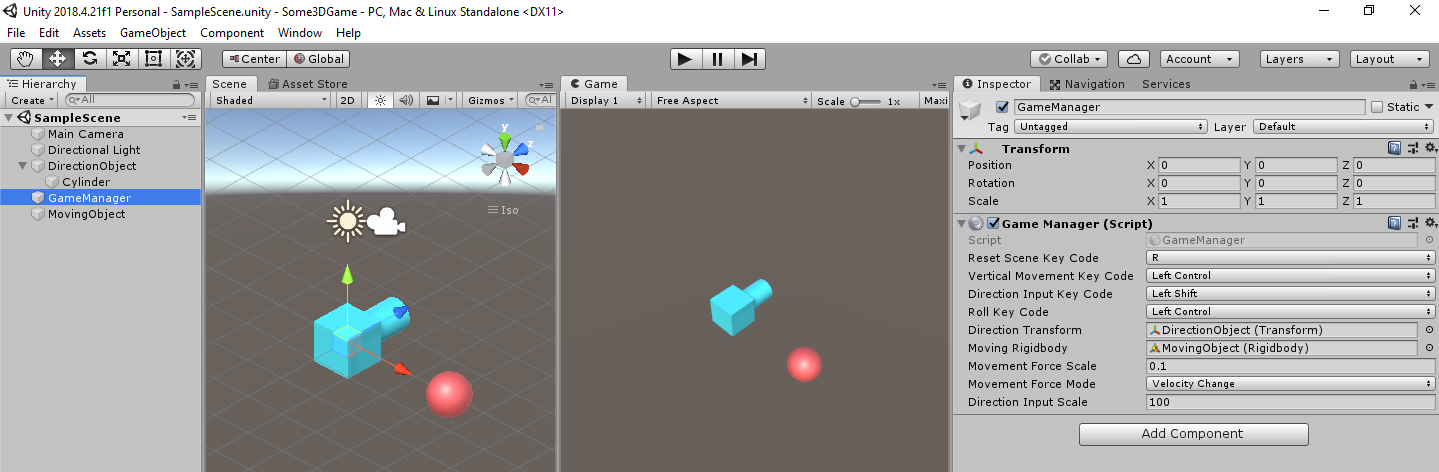
1 Like

Good to hear :slight_smile: Fixed a small bug, one of the KeyCodes was still hard-coded. Maybe someone else will also find this of use.