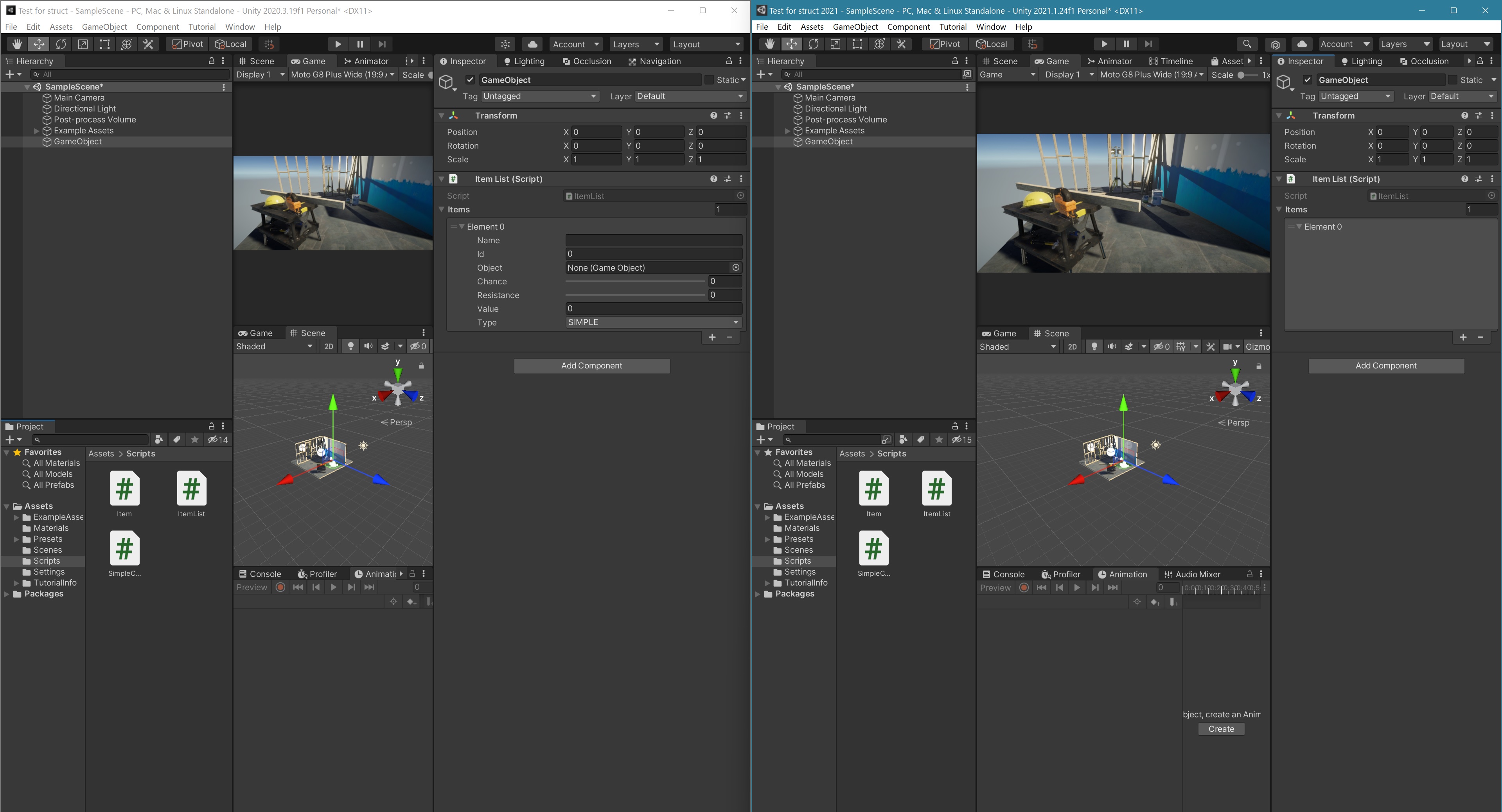
Hello everyone,
i have a serialization problem, i used an array of structs for my item list but now i have a problem, in the inspector i see the elements of the array but not the parameters, if I declare a single item then I can see them.
This is the code:
using UnityEngine;
using LogHandler;
public class ItemList : MonoBehaviour
{
    #region SingletonVar
    public static ItemList I = null;
    #endregion
    private void Awake()
    {
        if (GameManager.I == null)
        {
            Log.Error("Item List", "Fail to access GameManager instance, this object will be disabled!");
            gameObject.SetActive(false);
        }
        #region Singleton - DontDestroy
        if (I == null)
        {
            DontDestroyOnLoad(gameObject);
            I = this;
            Log.Normal("Item List", "ItemList was instantiated!");
        }
        else if (I != this)
        {
            Log.Warn("Item List", "Another instance of ItemList has been found, this will be destroyed!");
            Destroy(gameObject);
        }
        #endregion
    }
    public Item[] Items;
}
[System.Serializable]
public struct Item
{
    public string Name;
    public int Id;
    public GameObject Object;
    [Range(1, 25)]
    public int Chance;
    [Range(1, 10)]
    public int Resistance;
    public int Value;
    public ItemType Type;
    public enum ItemType
    {
        SIMPLE,
        REUSABLE,
        COLLECTIBLE,
    }
}
I have tried in many ways, I have also updated to unity 2021.1.24 but nothing changes … What I cannot understand is: why without array it works.
I have already tried to make a new project but nothing changes … Do you know any tricks? any settings to change?
For now… thank you
I created two new projects, one with unity 2020 and the other with unity 2021, i reduced the code, inserted it the same way in both projects and i found that with unity 2020 it works.
Can I do something about it?
I just tried it in my 2021.1.24f1 installation and it also works as it should. My guess would be that you may have somehow corrupted serialized data. Maybe you initially had a different data type in that array? Try to rename the variable temporarily to something else.
Note that Unity may still has the serialized data in your scene file. If you can not solve the issue by Resetting your component, you could try opening the scene file in a text editor and see what the serialized data for your array looks like. So you could potentially fix it there. Though usually removing the component and reattaching it should usually fix such issues as well.
First of all, thank you for the reply!
After several attempts, I also checked the scene file with a text editor, I decided to reinstall unity, then the hub and visual studio, I created a new project with just that code attached, I didn’t fix the problem … I upgraded to windows 11 a few days ago, can it be derived from that?
I highly doubt that, but there is a tiny possibliity. Do other inspectors work normally? Usually when it’s a graphics driver incompatibility you usually have more issues at once. Though as I said it’s quite unlikely.
Are you sure you don’t have any other packages or scripts that may include custom editors or property drawers what may mess up the display of your array? It’s hard to tell from the other side.
What else have you tried? Replace the array with a List? Try implementing a custom inspector or property drawer for your class and see if it makes any difference.