using UnityEngine;
using System.Collections;

public class SoundEmitterGO : MonoBehaviour
{
    [Header("Setup")]
    [SerializeField] AudioSource _audioSource;

    [SerializeField] AnimationCurve _highPassCurve;
    [SerializeField] AnimationCurve _pitchCurve;

    [SerializeField] AudioLowPassFilter _lowPassFilter;
    [SerializeField] AudioHighPassFilter _highPassFilter;

    [Header("DEBUG / INFOS")]
    [SerializeField] float _distanceToCamera;
    [SerializeField] bool _destroyComponentAfterSoundPlays;
    [SerializeField] bool _usePitchCurve;
    [SerializeField] float _pitch = 1f;

    /// <summary>
    /// Starts the coroutine to play the sound delayed by distance to camera. Make sure you run the Setup() function before playing any sound.
    /// </summary>
    public void Play()
    {
        StartCoroutine(CR_PlaySound());
    }

    /// <summary>
    /// Will remove / set to null the outputAudioMixerGroup of this audiosource component
    /// </summary>
    public void DisableAudioMixer()
    {
        _audioSource.outputAudioMixerGroup = null;
    }

    /// <summary>
    /// Sets the audiosource min and max heard distance
    /// </summary>
    /// <param name="p_minDistance"></param>
    /// <param name="p_maxDistance"></param>
    public void Setup(AudioClip p_audioClip, SoundTypes p_soundType, Weapon p_weapon, bool p_destroyAfterSoundPlays)
    {
        _destroyComponentAfterSoundPlays = p_destroyAfterSoundPlays;

        _audioSource.clip = p_audioClip;

        CustomAudioSourceCurve customAudioSourceCurve = CustomAudioSourceCurve.NONE;

        switch (p_soundType)
        {
            case SoundTypes.GEAR_RATTLE:
                _audioSource.minDistance = 1.5f;
                _audioSource.maxDistance = 50f;
                _lowPassFilter.enabled = false;
                break;

            case SoundTypes.PARACHUTE_INTERACTION:
                _audioSource.minDistance = 3f;
                _audioSource.maxDistance = 50f;
                _lowPassFilter.enabled = false;
                break;

            case SoundTypes.WEAPON_RELOAD:
                _audioSource.minDistance = 1.5f;
                _audioSource.maxDistance = 50f;
                _lowPassFilter.enabled = false;
                break;

            case SoundTypes.DRY_FIRE:
                _audioSource.minDistance = 1.5f;
                _audioSource.maxDistance = 50f;
                _lowPassFilter.enabled = false;
                break;

            case SoundTypes.MELEE:
                _audioSource.minDistance = 3f;
                _audioSource.maxDistance = 15f;
                _lowPassFilter.enabled = false;
                break;

            case SoundTypes.HIT:
                _audioSource.minDistance = 1f;
                _audioSource.maxDistance = 75f;
                _lowPassFilter.enabled = false;
                break;

            case SoundTypes.BARBED_WIRE:
                _audioSource.minDistance = 1.5f;
                _audioSource.maxDistance = 50f;
                _lowPassFilter.enabled = false;
                break;

            case SoundTypes.GRENADE_COLLISION:
                _audioSource.minDistance = 1.5f;
                _audioSource.maxDistance = 75f;
                _lowPassFilter.enabled = false;
                break;

            case SoundTypes.HIT_FLESH:
                customAudioSourceCurve = CustomAudioSourceCurve.HIT_FLESH;
                _audioSource.minDistance = 1f;
                _audioSource.maxDistance = 75f;
                _lowPassFilter.enabled = false;
                break;

            case SoundTypes.MORTAR_WHISTLE:
                _audioSource.minDistance = 10f;
                _audioSource.maxDistance = 650f;
                break;

            case SoundTypes.VEHICLE_EXPLOSION:
                _audioSource.minDistance = 5f;
                _audioSource.maxDistance = 300f;
                break;

            case SoundTypes.EXPLOSION:
                if (p_weapon.Type == WeaponType.GRENADE)
                {
                    _audioSource.minDistance = 1.5f;
                    _audioSource.maxDistance = 400f;
                }
                else if (p_weapon.Type == WeaponType.MORTAR)
                {
                    _audioSource.minDistance = 3f;
                    _audioSource.maxDistance = 850f;
                }
                else
                {
                    _usePitchCurve = true;
                    customAudioSourceCurve = CustomAudioSourceCurve.EXPLOSION;
                    _audioSource.minDistance = 10f;
                    _audioSource.maxDistance = 2000f;
                }
                break;

            case SoundTypes.SHOOT:
                if (p_weapon.Type == WeaponType.GUN)
                {
                    customAudioSourceCurve = CustomAudioSourceCurve.GUN;
                    _audioSource.minDistance = 3f;
                    _audioSource.maxDistance = 1500f;
                }
                else if (p_weapon.Type == WeaponType.HIGH_CALIBER_MG)
                {
                    _usePitchCurve = true;
                    customAudioSourceCurve = CustomAudioSourceCurve.HIGH_CALIBER;
                    _audioSource.minDistance = 1.3f;
                    _audioSource.maxDistance = 1500f;
                }
                else if (p_weapon.Type == WeaponType.SMALL_ARM)
                {
                    _usePitchCurve = true;
                    _highPassFilter.enabled = true;
                    customAudioSourceCurve = CustomAudioSourceCurve.SMALL_ARM;
                    _audioSource.minDistance = 1.3f;
                    _audioSource.maxDistance = 1500f;
                }
                else if (p_weapon.Type == WeaponType.ROCKET)
                {
                    customAudioSourceCurve = CustomAudioSourceCurve.ROCKET;
                    _audioSource.minDistance = 5f;
                    _audioSource.maxDistance = 2000f;
                }
                else if (p_weapon.Type == WeaponType.ROCKET_LAUNCHER)
                {
                    _lowPassFilter.enabled = false;
                    customAudioSourceCurve = CustomAudioSourceCurve.ROCKET_LAUNCHER;
                    _audioSource.minDistance = 1f;
                    _audioSource.maxDistance = 100f;
                }
                break;
        }

        SetCurves(customAudioSourceCurve);
    }

    void SetCurves(CustomAudioSourceCurve p_shotWeaponType)
    {
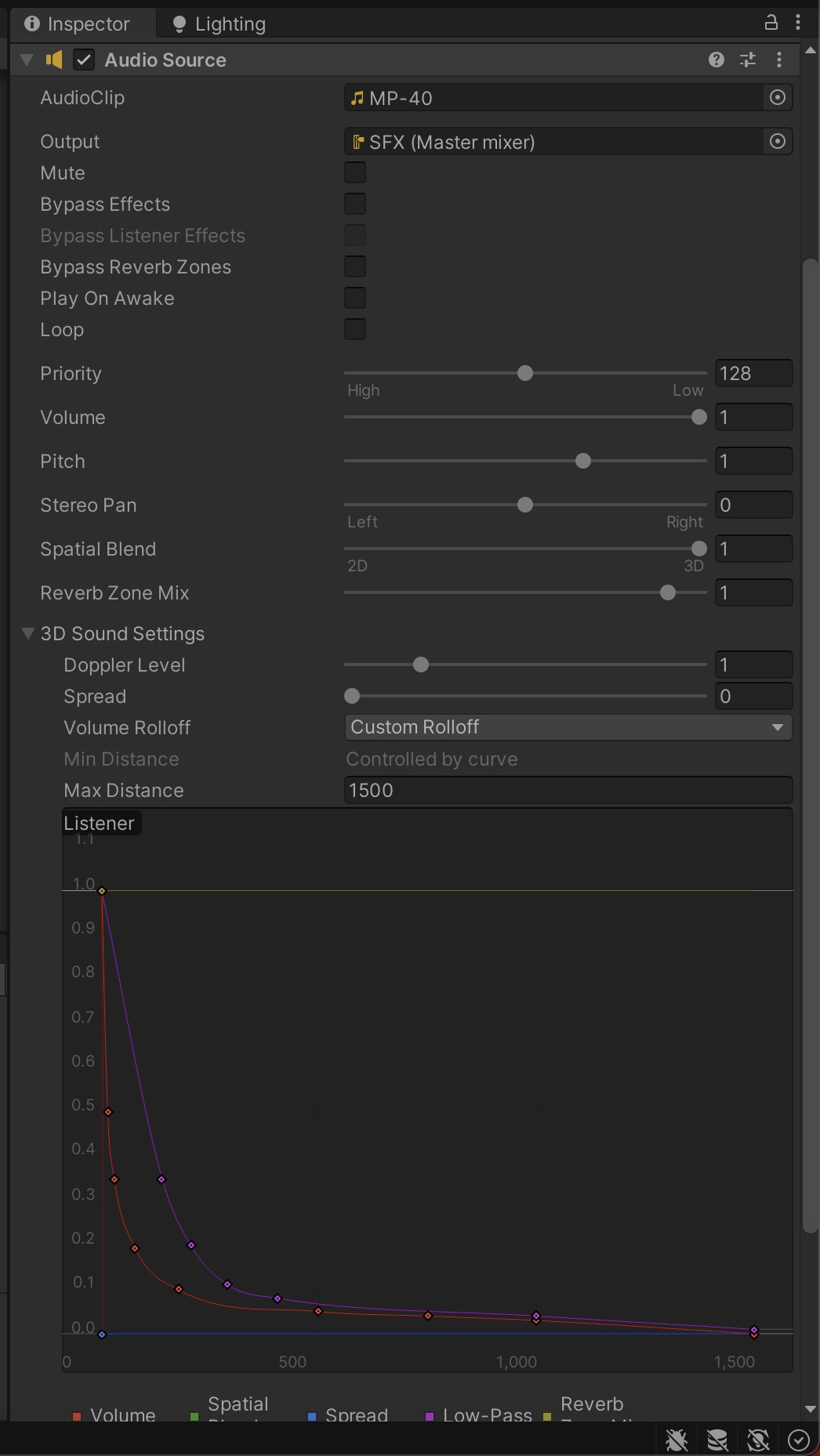
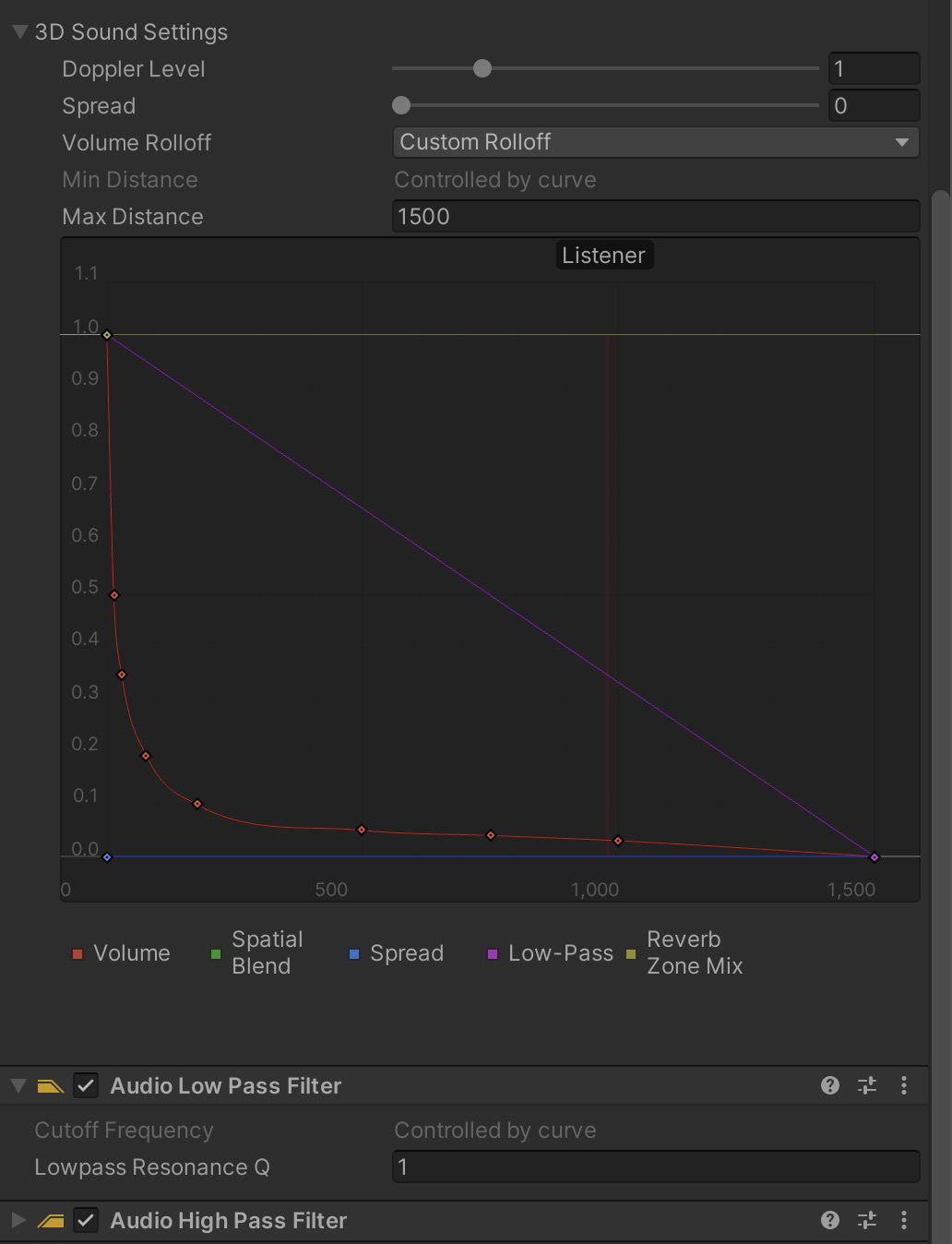
        _audioSource.rolloffMode = AudioRolloffMode.Custom;

        // Setting up High Pass filter
        if (_highPassFilter.enabled)
        {
            _highPassCurve.keys = null;
            _highPassCurve.AddKey(300f, 10f);
            _highPassCurve.AddKey(_audioSource.maxDistance, 2000f);
        }

        if (_lowPassFilter.enabled)
        {
            AnimationCurve curve = new AnimationCurve();
            curve.AddKey(_audioSource.minDistance, 1f);

            if (p_shotWeaponType == CustomAudioSourceCurve.SMALL_ARM || p_shotWeaponType == CustomAudioSourceCurve.HIGH_CALIBER)
            {
                curve.AddKey(_audioSource.maxDistance / 10.7f, 0.35f);
                curve.AddKey(_audioSource.maxDistance / 7.3f, 0.2f);
                curve.AddKey(_audioSource.maxDistance / 5.15f, 0.11f);
                curve.AddKey(_audioSource.maxDistance / 3.7f, 0.08f);
                curve.AddKey(_audioSource.maxDistance / 1.5f, 0.04f);
                curve.AddKey(_audioSource.maxDistance, 0.02f);
            }
            else
            {
                curve.AddKey(_audioSource.maxDistance / 10f, 0.35f);
                curve.AddKey(_audioSource.maxDistance / 4.5f, 0.16f);
                curve.AddKey(_audioSource.maxDistance / 2f, 0.04f);
                curve.AddKey(_audioSource.maxDistance / 1.5f, 0.02f);
                curve.AddKey(_audioSource.maxDistance, 0f);
            }

            _lowPassFilter.customCutoffCurve = curve;
        }

        AnimationCurve audioSourceCurve = new AnimationCurve();
        audioSourceCurve.AddKey(_audioSource.minDistance, 1f);

        switch (p_shotWeaponType)
        {
            case CustomAudioSourceCurve.HIT_FLESH:
                audioSourceCurve.AddKey(_audioSource.maxDistance / 10f, 0.5f);
                audioSourceCurve.AddKey(_audioSource.maxDistance / 3, 0.1f);
                break;

            case CustomAudioSourceCurve.SMALL_ARM:
                audioSourceCurve.AddKey(_audioSource.maxDistance / 100f, 0.5f);
                audioSourceCurve.AddKey(_audioSource.maxDistance / 50f, 0.35f);
                audioSourceCurve.AddKey(_audioSource.maxDistance / 19f, 0.19245f);
                audioSourceCurve.AddKey(_audioSource.maxDistance / 8.5f, 0.1f);
                audioSourceCurve.AddKey(_audioSource.maxDistance / 3f, 0.05f);
                audioSourceCurve.AddKey(_audioSource.maxDistance / 2f, 0.04f);
                audioSourceCurve.AddKey(_audioSource.maxDistance / 1.5f, 0.03f);
                audioSourceCurve.AddKey(_audioSource.maxDistance, 0);
                break;

            case CustomAudioSourceCurve.HIGH_CALIBER:
                audioSourceCurve.AddKey(_audioSource.maxDistance / 100f, 0.5f);
                audioSourceCurve.AddKey(_audioSource.maxDistance / 50f, 0.35f);
                audioSourceCurve.AddKey(_audioSource.maxDistance / 19f, 0.19245f);
                audioSourceCurve.AddKey(_audioSource.maxDistance / 8.5f, 0.1f);
                audioSourceCurve.AddKey(_audioSource.maxDistance / 3f, 0.05f);
                audioSourceCurve.AddKey(_audioSource.maxDistance / 2f, 0.04f);
                audioSourceCurve.AddKey(_audioSource.maxDistance / 1.5f, 0.03f);
                break;

            case CustomAudioSourceCurve.GUN:
                audioSourceCurve.AddKey(_audioSource.maxDistance / 40f, 0.6f);
                audioSourceCurve.AddKey(_audioSource.maxDistance / 20f, 0.3f);
                audioSourceCurve.AddKey(_audioSource.maxDistance / 6.3f, 0.1f);
                audioSourceCurve.AddKey(_audioSource.maxDistance / 3f, 0.045f);
                audioSourceCurve.AddKey(_audioSource.maxDistance / 1.33f, 0.025f);
                break;

            case CustomAudioSourceCurve.ROCKET:
                audioSourceCurve.AddKey(_audioSource.maxDistance / 40f, 0.6f);
                audioSourceCurve.AddKey(_audioSource.maxDistance / 20f, 0.3f);
                audioSourceCurve.AddKey(_audioSource.maxDistance / 6.3f, 0.1f);
                audioSourceCurve.AddKey(_audioSource.maxDistance / 3f, 0.045f);
                audioSourceCurve.AddKey(_audioSource.maxDistance / 1.33f, 0.025f);
                break;

            case CustomAudioSourceCurve.ROCKET_LAUNCHER:
                audioSourceCurve.AddKey(_audioSource.maxDistance / 10f, 0.35f);
                audioSourceCurve.AddKey(_audioSource.maxDistance / 4f, 0.1f);
                audioSourceCurve.AddKey(_audioSource.maxDistance / 3f, 0.05f);
                audioSourceCurve.AddKey(_audioSource.maxDistance / 1.5f, 0.015f);
                break;

            case CustomAudioSourceCurve.EXPLOSION:
                audioSourceCurve.AddKey(_audioSource.maxDistance / 16f, 0.5f);
                audioSourceCurve.AddKey(_audioSource.maxDistance / 5f, 0.15f);
                audioSourceCurve.AddKey(_audioSource.maxDistance / 2.85f, 0.05f);
                break;

            default:
                audioSourceCurve.AddKey(_audioSource.maxDistance / 30f, 0.5f);
                audioSourceCurve.AddKey(_audioSource.maxDistance / 10f, 0.15f);
                audioSourceCurve.AddKey(_audioSource.maxDistance / 5f, 0.1f);
                break;
        }

        audioSourceCurve.AddKey(_audioSource.maxDistance, 0f);

        _audioSource.SetCustomCurve(AudioSourceCurveType.CustomRolloff, audioSourceCurve);
    }

    /// <summary>
    /// Delays the play of the sound by the time it would take the sound to reach the camera
    /// </summary>
    /// <param name="p_audioClip"></param>
    /// <returns></returns>
    IEnumerator CR_PlaySound()
    {
        _distanceToCamera = Vector3.Distance(this.transform.position, CameraGO.instance.transform.position);

        yield return new WaitForSeconds(_distanceToCamera / StaticClass.SPEED_OF_SOUND);

        if (_distanceToCamera <= _audioSource.maxDistance)
        {
            if (_distanceToCamera <= _audioSource.minDistance) _lowPassFilter.enabled = false; // Unity bug, even if within minimum distance and max low pass value, sound gets cropped somehow...
            if (_highPassFilter.enabled) _highPassFilter.cutoffFrequency = _highPassCurve.Evaluate(_distanceToCamera);
            if (_usePitchCurve) _pitch = _pitchCurve.Evaluate(_distanceToCamera / _audioSource.maxDistance);

            _audioSource.pitch = _pitch;

            _audioSource.Play();
        }

        if (_destroyComponentAfterSoundPlays) Destroy(this.gameObject, _audioSource.clip.length);
    }
}