I’m glad I could help with this.
Thanks a lot!

Just a quick heads-up that Amplify Shader Editor is 50% OFF during the The Dev Days of Summer event. This includes FREE access to the Amplify Shader Pack as well.
Check it out: Asset Store
v1.9.6.2- New build uploaded to our site ( http://amplify.pt/download/ ) and Unity Asset Store ( Amplify Shader Editor | Visual Scripting | Unity Asset Store )
Editor
- Fixed ASE material inspector preview broken when using custom meshes (#324)
Templates
- Fixed invalid subscript probeOcclusion errors in URP 17x (#326)
Nodes
- Added “Exposure” node (#72)
- Added “Apply Exposure” (def:ON) to “Fetch Lightmap Value” and “Sample Lightmap”
- Fixed “Fetch Lightmap Value” and “Sample Lightmap” not respecting exposure
2 Likes
Hi there, I recently bought ASE and was wondering if you could help me create retro simple vertex lighting shader that supports textures as well as vertex colors for lightbakes and other stuff (multiplying by texture like in old school games) and opacity and a custom “ambient color that either multiplies a texture by a color (similar to toon shading where we can usually tint the shadowed area by a color) or if its not using any texture and just vertex colors it should use the vertex color as the ambient that we can also multiply by a color so we can darken/tint/change its appearance irrespective of the world ambient light.
Basically like a toon shader but its a retro vertex shading system, if it makes sense.
I am new to shaders and was hoping I could achieve something like this with ASE. Hope it wasnt confusing
Hello,
I suggest you consider joining the Amplify Discord as we have over 7,000 members. In this discord you will find more community interactions.
For Amplify I also suggest download and have a look thru the amplify shader pack. This extra pack is free for your download and study if you already own copy of the editor.
Came across this asset “Made with Amplify Shaders” that you may find interesting 
ToxiRetro Shader Pack | VFX Shaders | Unity Asset Store
2 Likes
I found another error in the Unity 6000.0.5f1 (URP) template.

Errors
Shader error in ‘Toby Fredson/The Toby Foliage Engine/(TTFE) Roots’: ‘OUTPUT_SH4’: Too many arguments for a macro call. at Assets/Toby Fredson/The Toby Foliage Engine/(TTFE)_Core/Shaders/Default/(TTFE) Roots.shader(2446)
Compiling Subshader: 0, Pass: GBuffer, Vertex program with
Platform defines: SHADER_API_DESKTOP UNITY_ENABLE_DETAIL_NORMALMAP UNITY_ENABLE_REFLECTION_BUFFERS UNITY_LIGHTMAP_FULL_HDR UNITY_LIGHT_PROBE_PROXY_VOLUME UNITY_PBS_USE_BRDF1 UNITY_PLATFORM_SUPPORTS_DEPTH_FETCH UNITY_SPECCUBE_BLENDING UNITY_SPECCUBE_BOX_PROJECTION UNITY_USE_DITHER_MASK_FOR_ALPHABLENDED_SHADOWS
Disabled keywords: DIRLIGHTMAP_COMBINED DOTS_INSTANCING_ON DYNAMICLIGHTMAP_ON FOG_EXP FOG_EXP2 FOG_LINEAR INSTANCING_ON LIGHTMAP_ON LIGHTMAP_SHADOW_MIXING LOD_FADE_CROSSFADE PROBE_VOLUMES_L1 PROBE_VOLUMES_L2 SHADER_API_GLES30 SHADOWS_SHADOWMASK UNITY_ASTC_NORMALMAP_ENCODING UNITY_COLORSPACE_GAMMA UNITY_FRAMEBUFFER_FETCH_AVAILABLE UNITY_HARDWARE_TIER1 UNITY_HARDWARE_TIER2 UNITY_HARDWARE_TIER3 UNITY_LIGHTMAP_DLDR_ENCODING UNITY_LIGHTMAP_RGBM_ENCODING UNITY_METAL_SHADOWS_USE_POINT_FILTERING UNITY_NO_DXT5nm UNITY_NO_SCREENSPACE_SHADOWS UNITY_PBS_USE_BRDF2 UNITY_PBS_USE_BRDF3 UNITY_PRETRANSFORM_TO_DISPLAY_ORIENTATION UNITY_UNIFIED_SHADER_PRECISION_MODEL UNITY_VIRTUAL_TEXTURING USE_LEGACY_LIGHTMAPS _MAIN_LIGHT_SHADOWS _MAIN_LIGHT_SHADOWS_CASCADE _MAIN_LIGHT_SHADOWS_SCREEN _MIXED_LIGHTING_SUBTRACTIVE _RECEIVE_SHADOWS_OFF
Thank you for reaching out
At time of this post ASE v1.9.6.3 is updated for 6000.0.14 and higher
6000.0.5 is not supported
2 Likes
Where can I access the old terrain examples? The one from 2019? I see it has been removed from the samples.
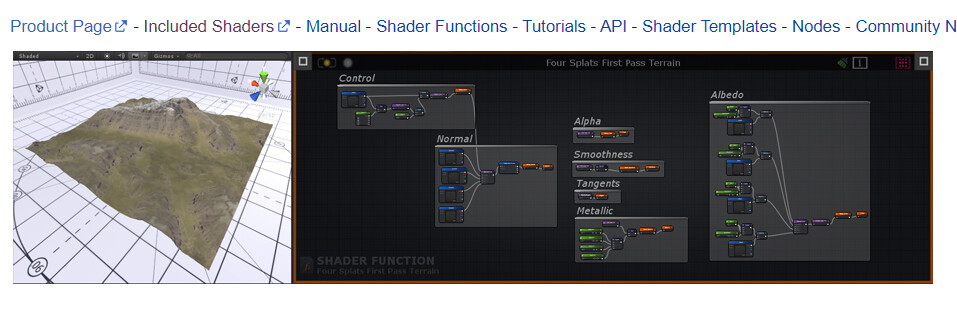

All samples have been moved to the Amplify Shader Pack
This extra pack is free for your download if you already own copy of the editor
1 Like
Hello,
It seems there is a bug in the last version (1.9.6.3) and 1.9.4.2.
using “Screen Depth” and “Dither” node is the same shader seems to cause compilation errors, like this one: Shader error in ‘TestLit’: invalid subscript ‘screenPosition’ at line 376 (on d3d11)
Doing the same in shader graph is working well

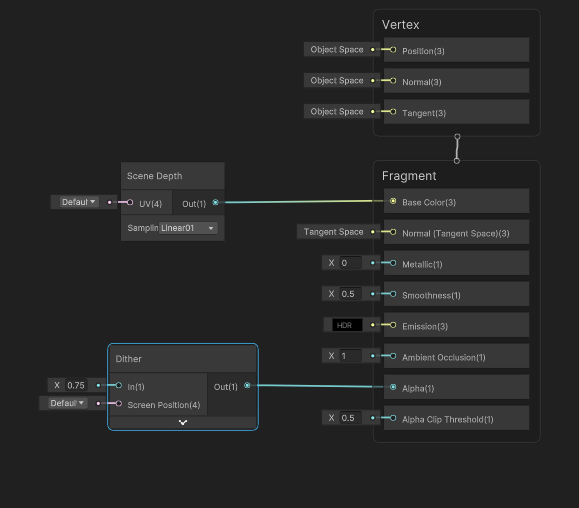
thank you for the report
We are already tracking this same issue in item #333
Issues · AmplifyCreations/AmplifyShaderEditor-Feedback (github.com)
Hi, its just me or the Sample Lightmap node don’t work with Unity 6 GPU Resident Drawer, for some reason the shader graph node for lightmap works fine.
getting several errors in gles2.0 projects for unity during my tests on latest Amplify Editor Version 1.9.6.3
GLSL compilation failed for shader Hidden/TemplateShaderProperty:
0(9) : error C7532: global type sampler3D requires “#version 300” or later
Shader error in ‘Hidden/Templates/CustomRTUpdate’: SV_VertexID semantic is not supported on GLES 2.0 at line 16 (on gles)
Shader error in ‘Hidden/Templates/CustomRTInit’: SV_VertexID semantic is not supported on GLES 2.0 at line 16 (on gles)
Shader error in ‘Hidden/VertexIdVariableNode’: SV_VertexID semantic is not supported on GLES 2.0 at line 7 (on gles)
Shader error in ‘Hidden/PrimitiveIDVariableNode’: Input signature parameter (1-based Entry 2) type must be a scalar uint. at Assets/AmplifyShaderEditor/Plugins/EditorResources/Previews/Preview_PrimitiveIDVariableNode.shader(12) (on gles)
Is this intentional?
thanks
Hello
what unity version?
see
Removing support for GLES2 and WebGL1 in 2023.1a - Unity Engine - Unity Discussions
Hello
what Unity version within Unity 6 are you having issues with ?
We have not had any reports about this yet
please post a bit more info including
— Verify you are with the latest ASE version ?
— verify in unity 6 you are in 6000.0.14 or higher ?
— any errors ?
— verify windows, macOS or other ?
Hello! After shipping multiple games using ASE and the Built In Renderer (and really enjoying Amplify), I’ve been playing around with using URP now that it seems more mature. One thing I’ve been missing is how in the Built In node output there was a Debug slot that would ignore all lighting, fog, etc. The URP Lit shader doesn’t seem to have this equivalent.
Is there an easy way to “early return” the results of a node for preview in a Unity scene without all of the lighting, fog, etc. applied?
The nodes of course have their own previews, but this isn’t always ideal when I need to debug things on specific meshes, or with various shader globals applied in the scene. I basically just want the Debug slot back.
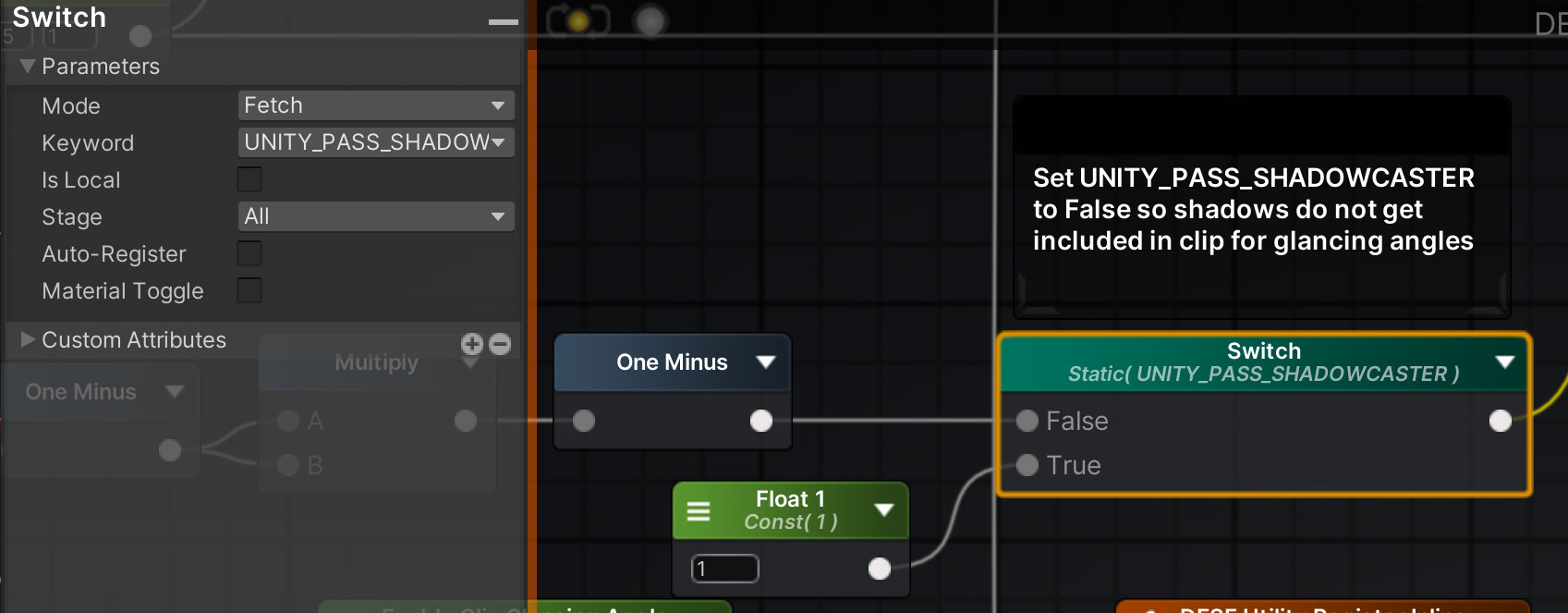
A second question is: is there a way for me to separate out the ShadowCaster pass from the main passes? I’m clipping away parts of the mesh, but I’d like the ShadowCaster pass not to do the clipping.
hello, thank you for the feed back
I do see they have an action coming up to add “Master node Debug input for URP and HDRP” , however I am not certain if it will land in this next update or after.
For shadow caster it should be the same as BIRP UNITY_PASS_SHADOWCASTER
http://paste.amplify.pt/view/raw/3e8e76ae
example
1 Like
Thank you for the quick reply, and for the shadow caster solution.
Hi guys!
I’m using the version 1.9.7.1 of amplify.
Because I have a WebGL project I needed to update the Shading Model to 4.0 to render correctly assets. I can successfully update the shader model in amplify but when I close and re-open the shader it selects the Shading Model 4.5.
Am I missing something here?