BEST WAY OF MAKING GRASS! looks a lot like speed tree grass, runs as fast and looks just as good!

So recently after learning more about speed tree but having no money to afford it i didn’t want shant looking grass, so i have discovered this unique way of making beautiful grass that renders better than billboard and mesh and can have an LOD attached! so without further ado…


so on the right we have billboard grass… looks bad, They only look good when they are in conjunction with planes and crosses. In the middle is a grass mesh 4 planes facing outward to look like a group of grass leaning out, looks ok in one clump but not alone or up close. The grass on the left is simply planes shot up in a straight line to simulate a blade of grass. You notice none are casting shadows and if you have ever used grass much then you know the wind isn’t very realistic.

The answer is below… Unity’s tree editor.
So as most of you already know unity’s tree creator isnt the easiest to work with to make trees and often doesn’t have 100% quality, but what about making grass with unity’s tree editor? No-one said you cant…
So here’s the step to making brilliant grass!

  • Make sure you have imported the “terrain assets” included with unity located under
    Assets>Import Package>Terrain assets and then create a tree game object by selecting GameObject>3D Object>Tree or Create>3D Object>Tree
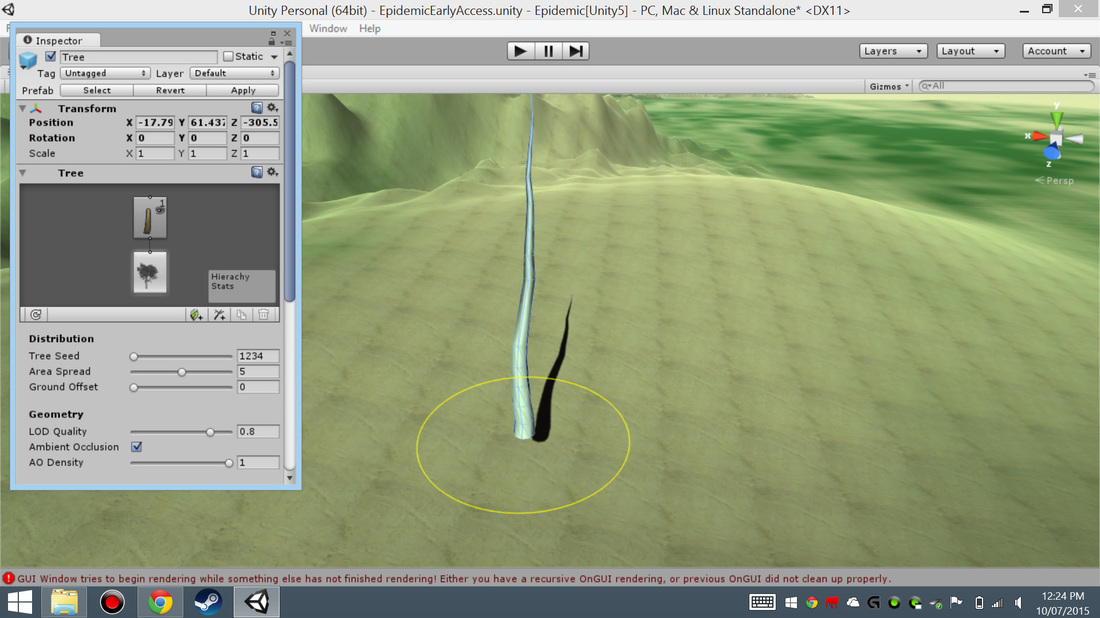

#1
-Remove the first branch (stump) so that there is only the single tree gameobject.

#2
-Create a “leaf” game object by clicking the leaf symbol under the “Tree” Hierarchy.

#3
-After creating the leaf, select the leaf in the Hierarchy and change its “Geometry Mode” to cross (from billboard)

#4
-Select a shader with a 2D image attached, unity will automatically modify it.

#5
-Rotate the cross section until it is upright. The rotation tool is back to front while doing this for some reason.

#6
-Select the tree in the Hierarchy and modify “Alpha Cutoff” until the shadow no longer has the shadow of the planes.


#7
-You can now modify the shadow on/off and the quality as-well as wind settings to your choice

#8

  • Once you are done select unity terrain and go to trees and add your grass as a tree mesh prefab. You will then be able to pain on the grass.

This is what it loooks like and it can be clumped together more.

So, easy on your CPU/GPU, looks better, can cast or receive shadows, can be effected by windzones (for grass displacement when player steps on it), completely free and easy to make different kinds… hope you guys like and find this useful.

19 Likes

How have you measured this?

1 Like

Yes i measured the heat difference rendering (on cpu) i haven’t tested gpu but i assumed if it was easier on one than it would be for the other, i opened a scene with the grass and let it be for 15 mins (timed) then checked the temperature, with mesh grass it was at 57.8 degrees Celsius whereas 15 minutes with this grass ran at 49.4 degrees Celsius (there may have been some unwanted influence from the air-con but there was definitely less stress on the processor) and the computer was left to cool after the first test for about an hour to make sure that the processor was back at room temperature to go again and there were no programs running differently at either time.

Have you measured a framerate difference with a decent amount of this grass?

billboard grass (detail distance max), about 130fps
plane grass (detail max), about 160fps
billboard and plane mixed, about 120fps
new grass(tree distance set to detail distance and billboard distance past it), about 180fps

see for yourself, put some in a scene…

Thanks for sharing! There’s just a few pictures that are noy showing up.

eh? what do you mean?

Second, third, fourth, and fifth images on the initial post are not appearing.

oh, they were when I posted it, I will fix this, thank you for letting me know.

“Yes i measured the heat difference rendering (on cpu)”

Why would you measure heat difference instead of just checking the grass render time in the profiler? Seems like a difficult way of doing something simple with less accurate results.

6 Likes

could’ve/ should’ve

3 Likes

Fair enough. At least it was inventive :smile: The grass looks pretty good by the way.

2 Likes

Yeah, thanks for sharing. I know Unity game that had problems with lots of grass so they removed it. Will link them to this thread.

1 Like

I’ll may appear awkward, but still: where’s the tree creator in Unity 5 ?
Can’t find it…

1 Like

first make sure you have imported unity’s included asset “terrain assets” located “assets” > “Import package”> “terrain assets” then Inside your Heirachy (usually located on the left) click “create” then hover over “3D object” and select “tree” or alternatively select"gameobject" tab up the top and hover over “3D object” and select “tree”, the editor is attached to the tree game object when it is made.

1 Like

Awesome glad i could help.

Ah thank you very much!
I was following the Unity docs but it seems it’s kind of outdated as it’s told it’s a separate asset…

1 Like

It is actually a separate asset but is included in unity when you download (the same as mono develop), as long as you have imported the “Terrain assets” package then you are all set…

Well yes I have “Terrain Assets” already.
Just have seen you reuploaded pictures, many thanks!

1 Like

Very creative solution that is utilizing some of the built in optimizations from the tree system. Kudos!

3 Likes