I’m not sure I completely understand what behaviour you’re after but:
ShereCastAll() projects a sphere in a line and returns all physics colliders that intersect with it. This is much like RaycastAll() only the ray has thickness so to speak.
I think what you want to use is Physics.OverlapSphere() That checks if objects intersect with a sphere at the given position and radius.
Assuming what you are trying to do is only return results that are completely inside the sphere, youll have to do some magic (dont worry its easy magic - if you are only using sphere colliders at least)
SphereCast
Check distance less than center to center less radius of colliding object.
Pretty much, but it return an array of Collider, although I need the GameObject. I saw the Inherited members of Collider have it. Can i access the GameObject hit from the collider?
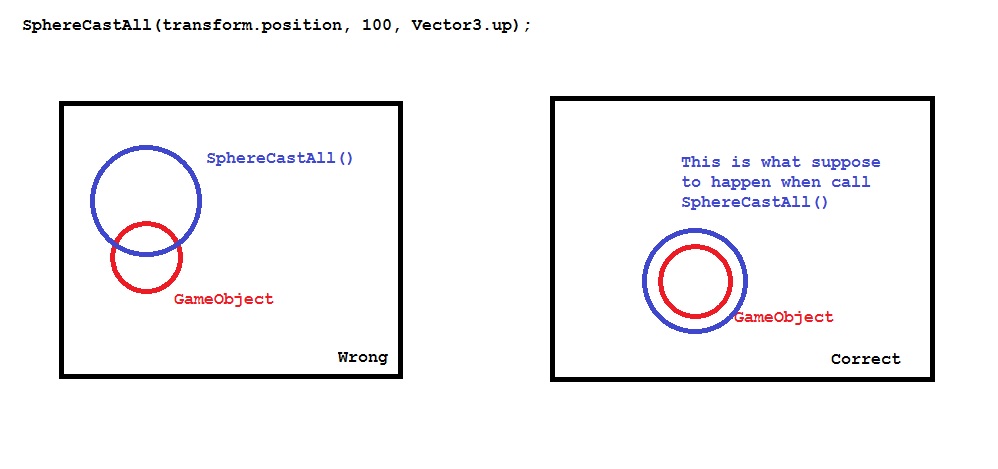
I didn’t get it. I’m using SphereCastAll to apply a planetary gravity, so i get all the objects in the range of gravity field (SphereCast), but this cast is not at the center of my planet (SphereObject). The main problem is not the objects result that the method return, but yes the position of the SphereCastAll(). The image i posted up there shows exackly the wrong position the cast is.
Well unfortunately the image up there just shows some circles. It’s not really clear at all as to what they mean.
Anyway…
Yes, you can access the GameObject to which a Collider is attached.
For your purposes I think that there may be a better approach. I’d personally stick a giant trigger around the planet. On entering the trigger I’d attach a script which applies the gravity based on distance from the planet, and on exiting the collider I’d remove it. If the planet is a dominant object in the scene I wouldn’t even worry about the trigger. I’m not sure what you’re using the sphere cast for, but it’s not something I’d turn to when doing something like this.
Edit: Oh, I get your image now. I thought that the red circle was a thing that you wanted your sphere cast to detect, but it’s the object you want to sphere cast from. In that case I suggest checking where the object’s pivot is (make sure that the pivot display is set to “pivot” rather than “center”). My guess from looking at that is that the pivot of your planet is on the top, not in the center.
sorry about the misunderstanding guys.
angrypenguin was right. the red circle is the object that i want to cast from.
And angrypenguin, that’s a primitive sphere created by Unity. I’m using primitives to do tests. the pivot is on the center of the object by default. i didnt change it! the situation is simple:
a created a primitive sphere (with Scale(10, 10, 10)) and create another 1 cube (scale(1, 1, 1)) for each face (up, back, left, right, all faces).
when i use the cast function, looks like it’s exackly the same as the representative image above.
the example show i’m using Vector3.up as Direction parameter, so only the cube which was on top of the “planet” was detected.
I thought in a solution with each object will have the main terrain which is the planet as a variable, then it’ll always calculate the distance between then. if the distance is less than my global variable, then it will work the same way, but I think it’ll consume more CPU than let only one object cast a sphere and detect all the objects.