Hi All
I thought I would have my fist go with the Unity Burst and Jobs system. I have a script that deforms a mesh and with my test object of 20,000 vertices it takes 2.81ms to deform the mesh. I then did the same system using Jobs and BurstCompile and indeed it goes down to 2.67ms. I then turned on the threading system on the original code and I get 0.58ms. So after reading a lot about Jobs and Burst I was kinda expecting it to at least perform better than normal C# threading system, and was actually expecting a big improvement over that system. So question is is there some trick I am missing or is reality to expect Unity Jobs and Burst to underperform a basic threading system.
1 Like
Hey, in my experience Bursted jobs performance is comparable to optimized C++ code.
It is hard to guess why it didn’t work out in your case without seeing the code.
For sure using Bursted jobs in the middle of normal C# code might be slowed down by inefficient managed-native memory copying and it would be the first place I’d check.
Second thing: how do you schedule your jobs? What is your job interface?
About threading system: I’ve observed that job scheduler could do better, since when you run multiple different jobs IParallelForJobs with multiple cores, jobs like to jump between processor cores, thus its add cost of context switching.
But I’ve observed it in exteeme environment with hundreds of scheduled jobs and few dozens of job types. It should do good enough for simple jobs.
Was this done with System.Threading? If so, I have had mixed results using that. In some cases it has worked pretty well (especially for really boring enterprise applications), but due to limitations within Monobehaviour and Unity we could only take it to a certain extent. Did you try this on an external application, and if so which platform did you try? We used this mostly for UWP and Windows alonestanding.
The code is below, the Job part I did to add to an existing system. Below is my Job version of the mesh deform. The existing threading system that is used is using the System.Thread system for its jobs.
    [BurstCompile]
    struct BendJob : IJobParallelFor
    {
        public NativeArray<Vector3> jvertices;
        public NativeArray<Vector3> jsverts;
        public float        angle;
        public float        dir;
        public bool            doRegion;
        public float        from;
        public float        to;
        public float        r;
        public Matrix4x4    tm;
        public Matrix4x4    invtm;
        public Matrix4x4    tmBelow;
        public Matrix4x4    tmAbove;
        public float        oor;

        public void Execute(int i)
        {
            if ( r == 0.0f && !doRegion )
                jsverts[i] = jvertices[i];
            else
            {
                Vector3 p = tm.MultiplyPoint3x4(jvertices[i]);

                if ( doRegion )
                {
                    if ( p.y <= from )
                        jsverts[i] = invtm.MultiplyPoint3x4(tmBelow.MultiplyPoint3x4(p));
                    else
                    {
                        if ( p.y >= to )
                            jsverts[i] = invtm.MultiplyPoint3x4(tmAbove.MultiplyPoint3x4(p));
                        else
                        {
                            if ( r == 0.0f )
                                jsverts[i] = invtm.MultiplyPoint3x4(p);
                            else
                            {
                                float x = p.x;
                                float y = p.y;
                                float yr = 3.14159274f - (y * oor);

                                float c = math.cos(yr);
                                float s = math.sin(yr);
                                p.x = r * c + r - x * c;
                                p.y = r * s - x * s;
                                jsverts[i] = invtm.MultiplyPoint3x4(p);
                            }
                        }
                    }
                }
                else
                {
                    if ( r == 0.0f )
                        jsverts[i] = invtm.MultiplyPoint3x4(p);
                    else
                    {
                        float x = p.x;
                        float y = p.y;
                        float yr = 3.14159274f - (y * oor);

                        float c = math.cos(yr);
                        float s = math.sin(yr);
                        p.x = r * c + r - x * c;
                        p.y = r * s - x * s;
                        jsverts[i] = invtm.MultiplyPoint3x4(p);
                    }
                }
            }
        }
    }
And here is where I create the Job.
            bendJob = new BendJob()
            {
                oor            = this.oor,
                tmAbove        = this.tmAbove,
                tmBelow        = this.tmBelow,
                tm            = this.tm,
                invtm        = this.invtm,
                r            = this.r,
                angle        = this.angle,
                dir            = this.dir,
                doRegion    = this.doRegion,
                from        = this.from,
                to            = this.to,

                jvertices = mc.jverts,
                jsverts = mc.jsverts,
            };

            jobHandle = bendJob.Schedule(mc.jverts.Length, 1);
            jobHandle.Complete();

            bendJob.jsverts.CopyTo(sverts);
I have tried different values in the Schedule call but see no change in times. Just find it hard to believe that the Unity jobs and burst performs so badly against a normal threaded version of the code. I must be missing something. The timings are just in the Editor play mode at the moment.
1 Like
Check with larger sets of data and see if it is a constant value or when it increases? There is some overhead with using Jobs, but so is with System’s threading as well, however I wouldn’t expect Unity’s Jobs to require the most overhead.
btw, I am doing something similar myself and Matrix4x4 has been an issue for me due to memcpy so I am looking into the shared array: GitHub - stella3d/SharedArray: Zero-copy sharing between managed and native arrays in Unity
Without seeing how you implement the manually threaded version, it’s hard to comment, but ParallelFor jobs are not good for processing arrays with thousands of items like that, because there is an overhead of invocating execute() for each item. I find it better for arrays with at most a couple dozen elements and where the processing of each individual element is far more expensive than the overhead.
For thousands of elements, you should use the ParallelForBatch jobs, where each job processes a range of array elements instead of just one. This way you can schedule far less jobs (no need to split the work in more jobs than the number of CPU cores).
2 Likes
Two things: your batch size in Schedule (line 19) is 1, that is after each iteration job returns control to job system and takes another element from queue. Try using setting e.g. 256.
Also, have you checked in profiler whenever any worker threads have started? Unity recommends leaving some space between Schedule and Complete (preferably Schedule in Update and Complete in LateUpdate), otherwise whole job may run only on main thread anyway.
PS. It seems you could move a lot of ifs out of the job.
E.g. when “r == 0.0f && !doRegion” you could not run any job, but fall back to simple memcpy.
PPS. @Neto_Kokku In this case ParalllelFor and ParallelForBatched should yield the very same assembly. ParallelFor works in batches, but simply does not expose them in its interface. Internally, there is for loop which calls Execute(i) for whole batch (and Execute() call is inlined by optimizer)
Note: I was about to make a hint about using Unity.Mathematics types in place of Vector3 and Matrix4x4, but apperently Burst handles them without problems.
1 Like
As I said in the post I have tried changing that value and it seemed to make no difference. And yeah I haven’t optimized the code in the job just wanted to do a side by comparison with unthreaded, using the existing threading system and trying out Jobs and Burst. At the moment with the level of performance Burst and Jobs are giving I am way way better off sticking with the normal C# threading.
Well, if it makes no difference, I’d double check in Profiler whenever any worker thread have been started. In profiler you will also see whenever it is the job that takes 2ms or some operations around it (CopyTo?).
You might also want to disable safety checks in Jobs/Burst menu. Good luck 
Do you really need that part? Can you not assign sverts directly to a job?
Are s certs Native Array or just array?
Also, how do you assign verts back to mesh? This can be expensive part.
Try time job and mem copy with stopwatch, out of curiosity.
The vertices are being assigned back to the mesh in all the different cases, the timings are excluding that part purely the actual deformation of the vertices is what the timings show. The vertices need to be in a NativeArray for the job, so have to be copied back at some point to be able to apply them to the mesh as I didn’t see any way to do it with a NativeArray.
To double check, as R2-RT mentioned. You have the safeties disabled? Also, if you’re testing timings, ideally attach to a build. There may be reasons it’s slower than expected but good to verify it’s not the easy explanations first.
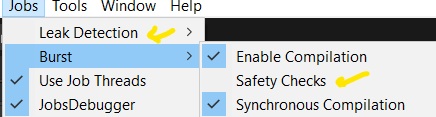
[Leak Detection → Off & disable Burst → Safety Checks]
Vector3 and Matrix4x4 will not benefit from burst. you need to use float3 and float4x4 from math.
so you will benefit from SIMD.
also, any of if/else branches will stop burst from auto vectorizing your scalar operations.
4 Likes
Thanks for that, that is understood and I found that out by not having the BurstCompile attribute on the job. Doesn’t explain why the Job system is having next to zero effect on CPU usage.
Also what is the correct way to get a float3 or better a float4 array from a Vector3 array and back again, if you have to iterate through the entire array building a float4 array thats just going to make the whole use of Burst redundant for changing Vector3 data,
Don’t copy Vector3 of vertices every time. Do it only once and cache vertices in Native Array, for future use.
Use mesh.SetVertices (myNativeArrayWithVertices) ;
Is much faster and GC free.
There is even faster way, but I don’t remember syntax of top of my head.
Thanks again, didnt know about setting vertices from a NativeArray, but how to set the data back to the mesh is not the real issue here, the issue is Unity Jobs have next to zero effect on the CPU usage, where as a basic System.Threading job system gets 4 times the performance. As I said the timings above are not including setting the arrays up or copying them back to the mesh it is purely to execute the deformation code.
Mike,
I would start look from this suggestion and see what you get.
1 Like
Yes I will get to the Burst side later but again the question is why do Unity Jobs not perform anywhere near as well as a simple System.Threading job system. I would have assumed that the Unity system should at least be comparable to bog standard C# threading but in this test I only get a few percent improvement in performance compared to 400% improvement with System.Threading. I will get to Burst and Unity.Maths when I can see its going to be worth it, but I cant see Burst giving 400% performance improvement alone.
I can add some context here. Mike is a user of my MegaFiers asset, he contacted me to ask why I hadn’t done a version using Dots/Jobs etc. I replied saying I did a test a long time back and saw worst performance than my own threading system so I did not bother. He suspected that I had done something wrong or there was an issue with the Unity Job system so he took an example I did and tried it for himself and it seems got the same results I did that the Unity Jobs did next to nothing performance wise compared to my own threading job system.
Please show us profiler timeline of that job. Both single threaded and multi threaded.