Hello, I need to call the JavaScript function from my game on WebGL. I need to send the information in the form of Json to the js function in index.html. I thought to use Application.ExternalCall(), but it is deprecated. How I can do this?
4 Likes
I have the same question
I have the same question
Call the JS method from a method in a .jslib file
1 Like
I know you said this and I don’t want it.
how to call JavaScript function in index.html from WebGL?
example;
You already got your answer. Use .jslib file. ExternalCall is deprecated. The only way you have is to use DllImport, Call from C# to a method in .jslib file, and from that method to call the JS method in the web page.
1 Like
Found any solution ?
Sorry but no…
it’s problem stands on one side 
Hi, did you find an answer to your question?
Use .jslib file…
1 Like
yes, but i don’t know how to reference a function from index.html file.
If there’s only one instance of unity in the page, and there are no other functions with that name, you can set the function as a global function in the page. something like:
window.yourFunctionName = function () { ... };
And then inside a function in the .jlib file you can call:
window.yourFunctionName();
You can check if it exist, just to be sure:
if (window.yourFunctionName)
{
  window.yourFunctionName();
}
3 Likes
Can you clarify with a working example? Doesn’t appear to do anything.
Check out the following guide: Unity - Manual: Interaction with browser scripting . Does that help?
Yes I’ve read through that guide, and I’ve been able to call functions in .jslib plugin folder from unity c#.
My issue (possibly unrelated to unity) is I need the jslib function to call functions in a different .js file (processing.js, which is located in the same folder as the index.html).
I have referenced the .js file in index.html
However, when I attempt to call a function located in processing.js from .jslib I get the following:
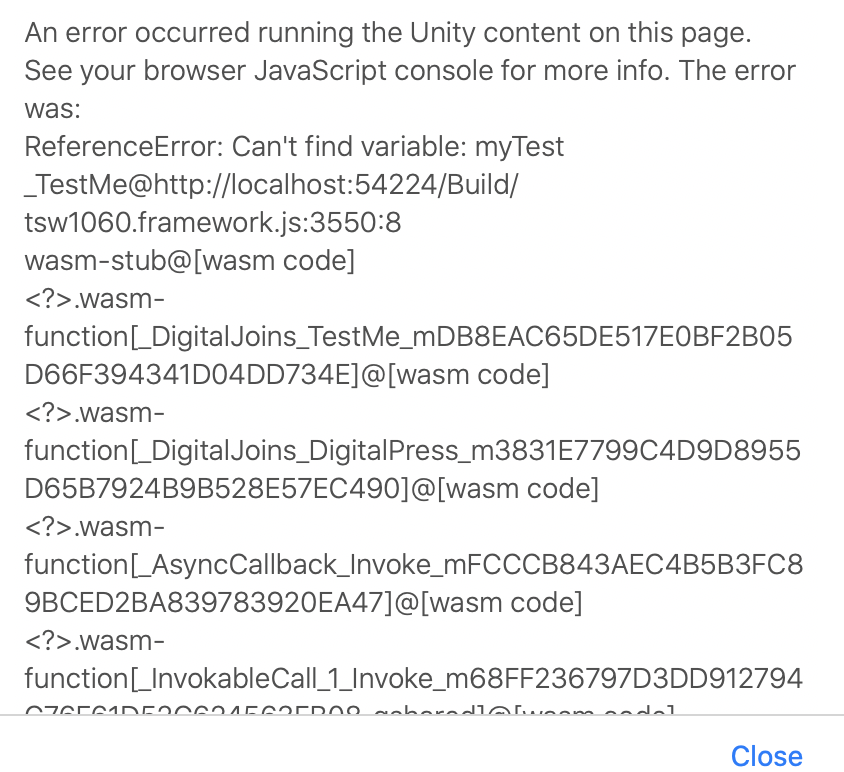
What would be the correct way for me to call functions in processing.js from .jslib?
if you get an error “Can’t find variable: myTest”, then it means that the JavaScript global scope does not contain that variable. This is not a Unity issue, but a general JavaScript development issue. Your script file processing.js should have in its global scope a line
var myTest = 10;
or a statement window.myTest = 10;
and it should load up before the function that references it is executed.
You can test what variables you have available in the JS global scope by using the Chrome DevTools Console (Narzędzia deweloperskie w Chrome | Chrome DevTools | Chrome for Developers)
2 Likes
Why is it looking for a variable?
This is the function in my .js file I want to call:
function myTestFunc()
{
alert("myTestFunc() in processing.js called!")
}
I am using this to call that function from .jslib:
mergeInto(LibraryManager.library, {TestMe: function () {

             window.alert("Hello .jslib' ");
             myTestFunc();

          },


});
window.alert("Hello .jslib’ "); pops up just fine
myTestFunc(); can’t find var myTestFunc error
It is not looking for a variable specifically, but because it does not see the thing, it does not know what type it is even supposed to be.
Try changing that to
console.log('is this code even executed?');
function myTestFunc()
{
alert("myTestFunc() in processing.js called!")
}
console.log('what scope am I currently in:');
console.log(this); // Should print out "Window".
window.myTestFunc = myTestFunc; // If the above does not print out Window, we are in a nested scope in this .js file, so export myTestFunc out to global scope.
and then open up the browser console after loading. You should see the above log prints occur, and the this variable print out Window. If not, then your .js file is not creating a function in the global scope.
Try changing that to
mergeInto(LibraryManager.library, {TestMe: function () {
              console.log(typeof myTestFunc); // should print out 'function'
              console.log(typeof window.myTestFunc); // should print out 'function' as well.
              window.alert("Hello .jslib' ");
             myTestFunc();
          },
});
If typeof window.myTestFunc prints undefined, then the processing.js code did not properly execute. If typeof window.myTestFunc prints out ‘function’ but typeof myTestFunc prints out something else, then you have somehow managed to shadow the definition by introducing an extra variable in the local scope.
4 Likes
I’ve already tried adding print logs which is how I determined I can only trigger local functions inside of jslib.
As another route, is it possible to find button presses through the html script? For instance if I press a button with the tag “Button/myTestBtn” how can I find if that was triggered in the index.html file unity generates?
You ignored the most important part…
Did you tried to set the method under the window scope?
In the js
window.myTestFunc = myTestFunc;
and then in the jslib call
window.myTestFunc();