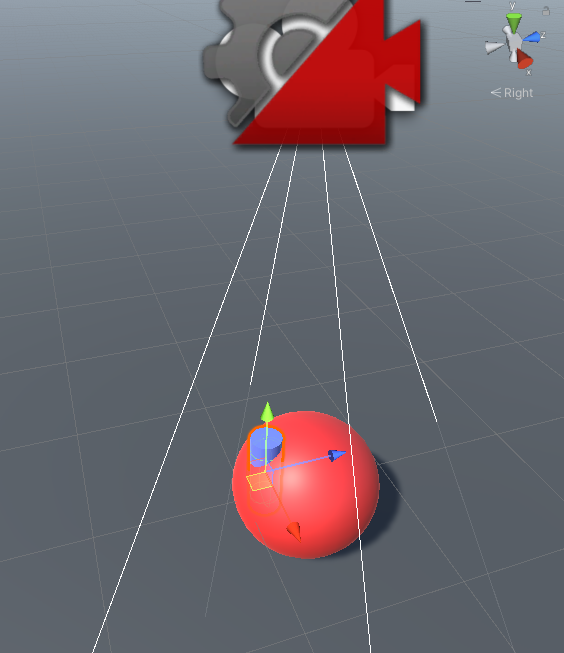
I am making a lock camera, right cylinder is player, red sphere is target.
It’s possible that player move across target in actual gameplay.
Link to video in case it can’t auto play:gfycat.com/uncommonmediocrefreshwatereel
uncommonmediocrefreshwatereel
But when they overlap, camera rotate above target(red path), that’s not what I want, I want camera rotate around target(green path).
How can I make this happend?
Here’s virtual camera settings:
Project file in attachment.
8789590–1194190–CinemachineLockRotate.rar (30.5 KB)
When you say “overlap”, do you mean that they are on the same spot, like this?
Yes, player and target are almost at same position, that’s possible in actual gameplay, player cast a skill and move cross target, they will overlap for 0.5s.
But this will make camera above target and rotate around 90 degrees, I hope its vertical angle limited below 45 degrees, and camera won’t move above target, instead, move around target, just like a circle.
With this setup, there is nothing out of the box to limit the camera movement in the way you want. The actual camera path is an emergent property of this combination of behaviours: you’re asking to have the LookAt target be at one spot on the screen while looking “through” the Follow target placed at another spot on the screen. The control that you can exert is to adjust the screen positions. Putting the LookAt target very low on the screen does prevent the camera from going high up.
To control the camera placement more fully, you might have to investigate other options. One possibility is to use a TargetGroup with a Composer/Transposer combination in the vcam.