Hi, im new to unity and im having some problem with my project that wont let me drag and drop filles from explorer to editor or files that are in the project to another folder in the project. Im using version 2019.2.17f1. I tried deleting the library folder, executing explorer.exe and unity both as admin or not admin like i saw in other posts and it doesnt work. If i create a new project in that version or 2018.3.0f2 i can drag and drop normally. It only happens with that project. I dont know if i need to upload some file here for someone to see or i need to give some more info, so if i needed just tell me.
Thanks.
What happens when you just try to drag/drop files all within the editor?
hi, mouse pointer is replaced with a prohibited icon like this one
I just got this too, and it seems to be only for certain folders. Can’t Figure out why. Would love to hear if anyone has solved it
This happens to me when I have something in the search box.

I’m pretty sure that any folders that I’ve specifically created outside of unity, and placed directly into the asset hierarchy (to be imported next time I opened the project) seemed to cause this issue.
I solved it by duplicating the folders within unity and deleting the old ones, removing the lil “1” unity places on the end -
fixed it for me! Though I only had to do this for objects that weren’t being directly referred to anywhere else. Could be dangerous if you have lots of files in there being referred to.
Im running into this issue now. Same as turkowski, duplicated folders work fine, but standard ones dont. Large project with lots of prefabs that would break if I had to do it this way. Pulling my hair out trying to find the difference between the folders (permissions, metadata, etc).
Same here. Sometimes moving stuff around is not possible. This used to happen when you had a file with the same name but now I can’t even drop files from outside…
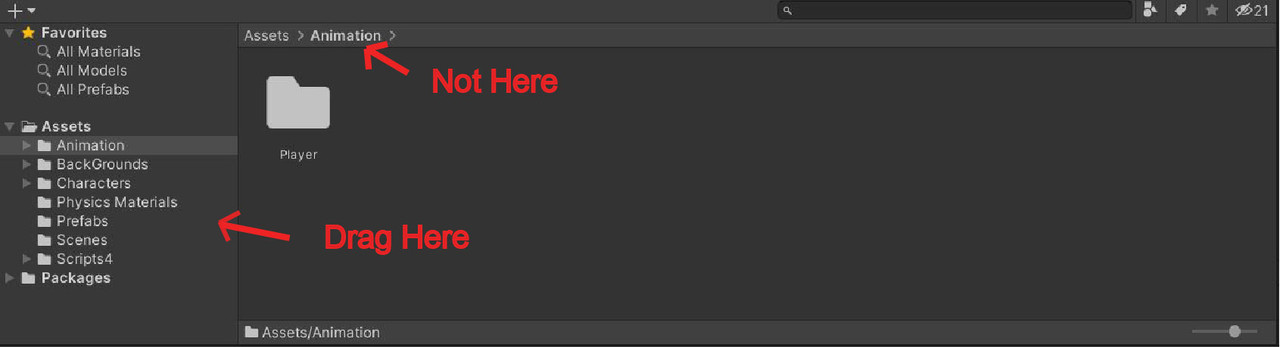
I’m new to unity myself but I figure it out that when I was trying to drag files between folders I dragged them into the bar on top of them which was showing the path rather than dragging them to the panel or window (I don’t know what it’s called) on left which shows you your assets folders and packages folders
Hi, looks like i never commented again. I noticed that this happened in the project where i was using google drive sync and it sort of locked the folders. When i stopped using it and deleted the files it created in each folder i was able to drag and drop files normally.
Oh. I’m using Google Sync too. O_O… Probably that? Thanks!
Same problem, as someone pointed out this is probably because I have my project in Google Drive.
What worked for me though is: Right-click file you want to move > Show in Explorer > Move from the explorer to desired location
I Encounterd this issue, it was because unity hub was running by default with administrator, change the settings and it should work fine
I’m here has issue but the issue is I cannot drop to a folder named Fonts. Then when I checked it, the folder containt .txt file. When I delete txt file, now I can drop a file again. Also the full folder path is Resources/Fonts. Maybe Resources folder that cause disable drag and drop if had a txt file.
ANSWER: You have a cloud sync enabled for the folder your unity project is in. Move it to your hard drive (C:\UnityProjects).. make a folder there called UnityProjects in your C:. You will have full access to your Unity project.
Cheers