I am extremely new to unity and csharp coding. I have completed a simple Cube game by following Brackeys how to make a game tutorial (
)
I have it working on all aspects except when i play it on my Android i cannot control as i have it set for keyboard WASD controls. I cant seem to understand how to make this work on touch screens.
tried using a few different methods but i get errors. Below is my script for movement that currently has no errors and works fine on PC’s keyboards just not on Android touch screens(if possible without a “joystick” or “button UI” if at all possible;
I appreciate any help and thank you in advance.
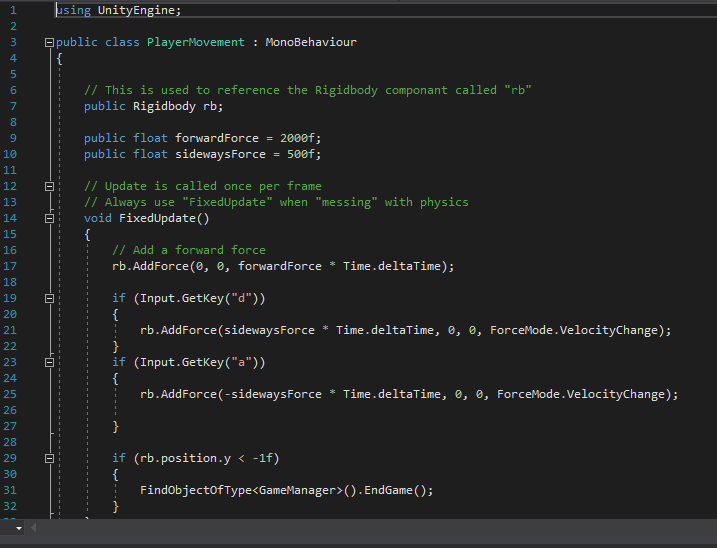
using UnityEngine;
public class PlayerMovement : MonoBehaviour{
// This is used to reference the Rigidbody componant called “rb”
public Rigidbody rb;
public float forwardForce = 2000f;
public float sidewaysForce = 500f;
// Update is called once per frame
// Always use “FixedUpdate” when “messing” with physics
void FixedUpdate()
{
// Add a forward force
rb.AddForce(0, 0, forwardForce * Time.deltaTime);
if (Input.GetKey(“d”))
{
rb.AddForce(sidewaysForce * Time.deltaTime, 0, 0, ForceMode.VelocityChange);
}
if (Input.GetKey(“a”))
{
rb.AddForce(-sidewaysForce * Time.deltaTime, 0, 0, ForceMode.VelocityChange);
}
if (rb.position.y < -1f)
{
FindObjectOfType().EndGame();
}
}
}
i should note im not asking to have someone write the code for me but rather explain how to implement a touch input instead or as well as WASD(keyboard) or reference a page or thread to point me in the proper direction.
Thanks again
Unity has movements script you only have to import (Assets - Import Package - Characters).
Brackeys has a couple of tutorials about touchscreen controls but I can also recommend the “touch control” ones by DitzelGames (he also explains looking around, not just movement).
If you don’t want to distinguish between the two controls (keyboard and touchscreen) yourself, it would also be worth looking into input managers.
Thanks for the help. I am not sure how to follow along with RafaelF82 link. It has a bunch of stuff I have no clue about.
So by the sounds of it I need to remake my whole movement script. Yah I tried those free movement scripts but I always get errors saying gameManager not having a definition or something. I might just be in for a redo of my entire game. hours down the drain lol
Do you mean the Input Manager? Before you can use something like “Input.GetAxisRaw (“Horizontal”)” you have to set up that axis in the Input Manager (Edit - Project Settings - Input) first.
If the above code works, leave it and look at tutorials to get a feeling for how touch input works (it’s basically about looking at a vector of where you touch the screen and in what direction you then move your finger). Personally I like working with just setting the position forward because it’s easy but then, I’ve never worked with force, so I can’t really point in a direction about what’s wrong with your above code, sorry.
i (following the Brackeys tutorial above) created a script for something i labeled GameManager (gameManager) and it controls all that stuff … i think…
here is the script for it…
all these scripts work perfect i just don’t have a clue how to change it so it can be controlled via Android. I know its not as simple as changing the player movement script from Input.GetKey to Input.Touch… but can i do something similar or do i need a whole new script? Sorry I am so new at this stuff. I am really eager to learn but have no idea where to learn most of the required coding( so that i understand rather than just copy videos word for word)
Again I really appreciate the help
Did you check out the touchscreen videos I mentioned?
I created the touchscreen controls for my app by following DitzelGames’ videos (he has multiple ones which include looking around, a virtual joystick,…). You basically use the code to get the touchscreen’s input, then apply that to your player character.
I simply move my character with: x = (Input.GetAxis("Horizontal") + joystick.Horizontal) * -1f; //*-1f to go the opposite direction
This moves it along the x axis by x units after a single press of the “a” or “d” key (so the “Horizontal” axis). The good thing about this is that I can also use it with a gamepad because I can simply set the Horizontal axis to left/right of the link analog stick. I do that for x, y and z and then also do some “fancy” math to be able to walk in the direction my character is facing but afaik that’s all already part of Unity’s movement scripts you can import.
I’ve never used “Force” before but it looks like it’s similar to what I’m doing except that you give your character a push, while I simply teleport mine to the new position.
can u guys help me also…is there a way to trigger wasd keys through touching buttons my character movement works fine on wasd how can i use it for touch…need help!
I was looking for the same problem as yours as I followed Brackeys tutorial too!!
I found this vid and it worked for me, Well after modifying the code a little!
Here’s my code that’s making the player move, when I touch either side of my screen to take the player left or right!
using System.Collections;
using System.Collections.Generic;
using UnityEngine;
public class Movement : MonoBehaviour
{
//variables
public float moveSpeed = 120;
public GameObject character;
private Rigidbody rb;
private float ScreenWidth;
// Use this for initialization
void Start()
{
ScreenWidth = Screen.width;
rb = character.GetComponent();
}
// Update is called once per frame
void Update()
{
int i = 0;
//loop over every touch found
while (i < Input.touchCount)
{
if (Input.GetTouch(i).position.x > ScreenWidth / 2)
{
//move right
RunCharacter(100f);
}
if (Input.GetTouch(i).position.x < ScreenWidth / 2)
{
//move left
RunCharacter(-100f);
}
++i;
}
}
void FixedUpdate()
{ #if UNITY_EDITOR
RunCharacter(Input.GetAxis(“Horizontal”)); #endif
}
You could make this post even more awesome by learning how to use code formatting so it doesn’t look like a giant barf-wall of unformatted text, which I assure you hardly anyone will take the time to download because they can’t simply study it.