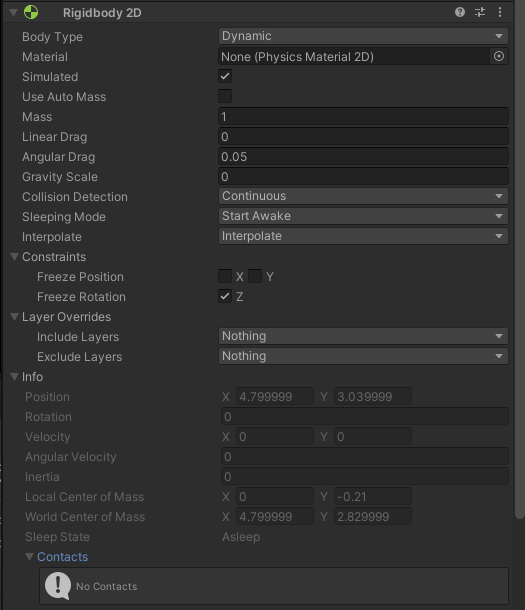
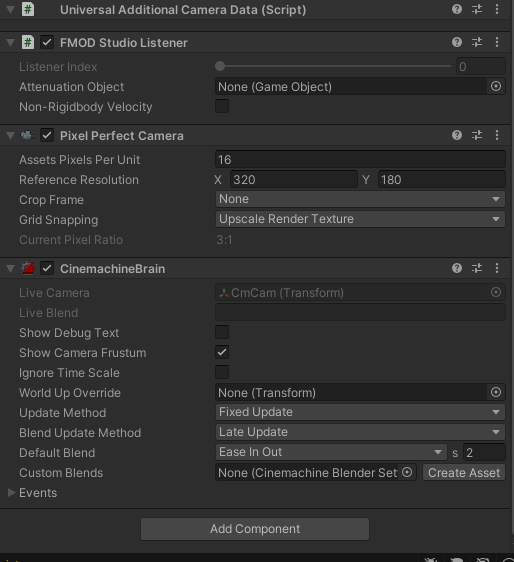
Hey everyone, I’m attempting to use Cinemachine to track my player, but whenever the camera pans to track the player’s movements the player object jitters around. I’m using a rigidbody2D and velocity to move my player around; I’ve seen jittering issues attributed to calling movement for a rigidbody in Update() instead of FixedUpdate(), but I’m calling all player movement functions inside of FixedUpdate(). (Video link)


using System.Collections;
using System.Collections.Generic;
using UnityEngine;
using Yarn.Unity;

public class PlayerController : MonoBehaviour
{
    // Our dialogue system parameters
    public bool _canInteract = false;
    public bool _canMove = true;

    // Our parameters for where to start each scene in coordinates (assigned via LoadNewScene script)
    public Vector2 _newScenePosition;


    // Our speed & speed limit values
    float _moveSpeed = 5f;
    float _speedLimiter = 0.8f;

    // Our empty floats for our movement vector
    float moveX;
    float moveY;
    Vector2 _moveDirection;

    [SerializeField] Rigidbody2D _rb;
    [SerializeField] CircleCollider2D _c2D;


    void Update() // Calling our ProcessInputs function
    {
        if (_canMove)
        {
            InteractionOffset();
        }

    }

    void FixedUpdate()
    {
        // Physics calculations

        if (_canMove)
        {
            ProcessInputs();
        }

        Move();
    }


    void ProcessInputs() // Checking to see which direction the player wants to move
    {
        moveX = Input.GetAxisRaw("Horizontal");
        moveY = Input.GetAxisRaw("Vertical");

        _moveDirection = new Vector2(moveX, moveY);
    }


    void Move()  // Moving our player based on ProcessInputs()
    {

        if (moveX != 0 && moveY != 0) // If moving diagonally, we slow down the player with our speed limiter
        {
            _rb.velocity = new Vector2(_moveDirection.x * _moveSpeed * _speedLimiter, _moveDirection.y * _moveSpeed * _speedLimiter);
        }


        else if (moveX != 0 || moveY != 0) // If moving horizontally or vertically, we don't use the speed limiter
        {
            _rb.velocity = new Vector2(_moveDirection.x * _moveSpeed, _moveDirection.y * _moveSpeed);
        }

        else // If not moving, we stay still!

        {
            _rb.velocity = new Vector2(0, 0);
        }

    }


    // Checking if our player is in an interactable area

    public void OnTriggerEnter2D(Collider2D col)
    {
        _canInteract = true;
    }

    public void OnTriggerExit2D(Collider2D col)
    {
        _canInteract = false;
    }

    void InteractionOffset()
    {
        if (Input.GetKeyDown(KeyCode.A))
        {
            _c2D.offset = new Vector2(-1.05f, 0.0f);
        }

        else if (Input.GetKeyDown(KeyCode.D))
        {
            _c2D.offset = new Vector2(1.05f, 0.0f);
        }

        else if (Input.GetKeyDown(KeyCode.S))
        {
            _c2D.offset = new Vector2(0.0f, -1.05f);
        }

        else if (Input.GetKeyDown(KeyCode.W))
        {
            _c2D.offset = new Vector2(0.0f, 1.05f);
        }

    }

}

`