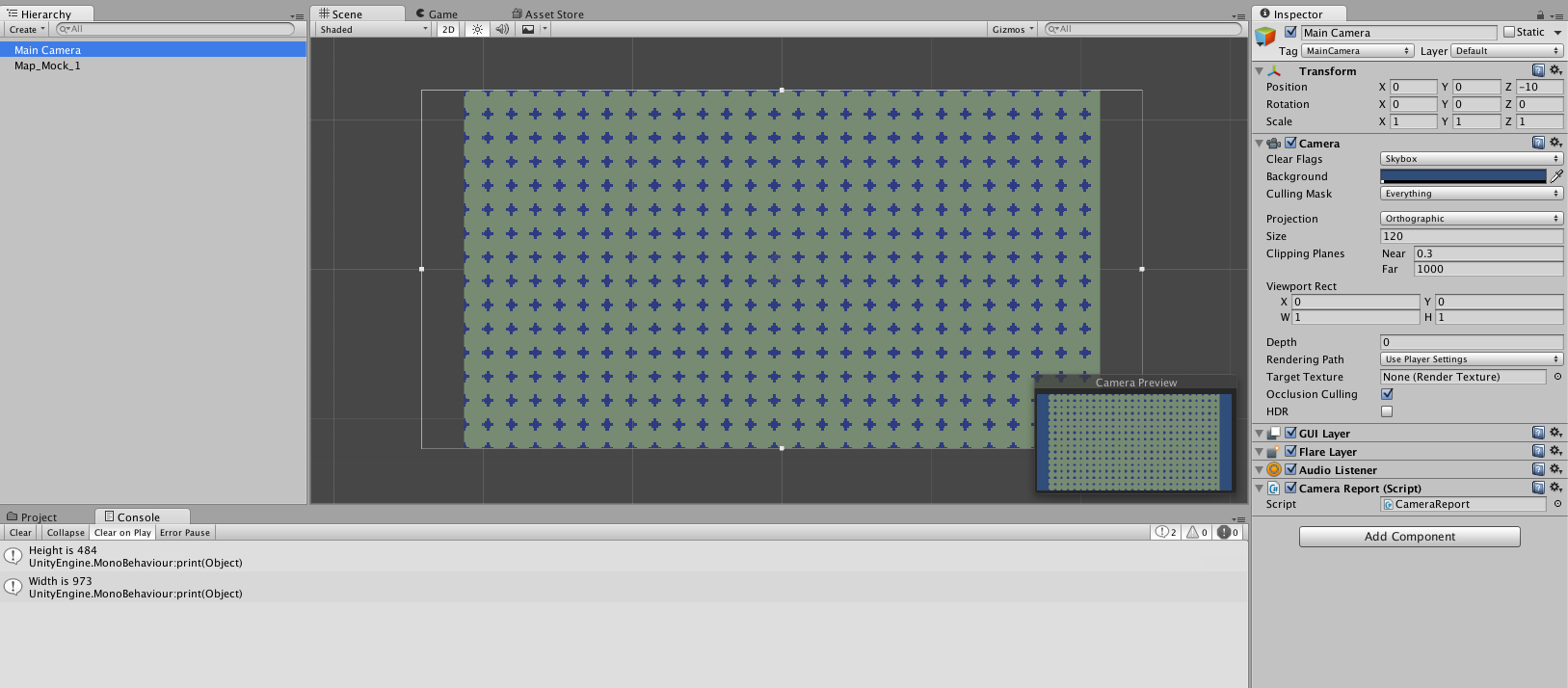
Hi, everybody! This is my first day using Unity, sorry if this isn’t quite the right Unity forum for this question-
I’m starting a 2D game with a small aspect ratio, 426 x 240. (Aiming for a “widescreen version” of NES dimensions)
I set those dimensions in PlayerSettings. Then, I imported a test PNG asset with those exact dimensions and dropped it into my scene at the origin point. However, my camera’s aspect ratio is wider than the PNG.
I wrote a script to print the PixelHeight and PixelWidth of the camera to the console. Evidently, in my window the height is 484 and the width is 973. Those numbers aren’t in the same aspect ratio as the dimensions I set in PlayerSettings. It’s 2:1 instead of 16:9. If I make a new camera, I get the same results.
I’m sure there’s a raft of cringe-worthy mistakes in the above description, but for starters, why doesn’t my Main Camera’s aspect ratio match what I set in PlayerSettings? Am I changing settings in the wrong place?
I’m attaching a screenshot of the problem. Thanks in advance!