Ok, so I am just developing my first real game in unity and to make my room-preset editor easier to understand I decided to replace two ints (width & length) with two custom sliders.
I created a custom Vector2Int class and a drawer. Worked fine. After a bit of struggeling I even maaged to stop the slider from lagging.
Then I resized my window. Big mistake. It looks like my slider is not always lined up with the unity fields.
Can someone provide my with the correct values to fix this?
Problem
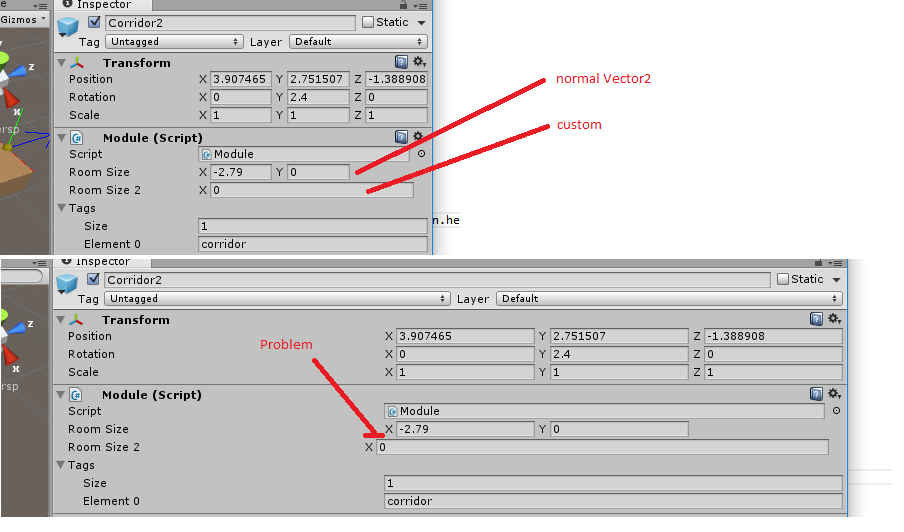
Code:
using UnityEngine;
using UnityEditor;

[CustomPropertyDrawer(typeof(Vector2Int))]
public class Vector2IntDrawer : PropertyDrawer
{
        float fx =3;
    int ix = 3;

    public override void OnGUI(Rect position, SerializedProperty property, GUIContent label)
    {

        SerializedProperty x = property.FindPropertyRelative("x");
        SerializedProperty z = property.FindPropertyRelative("z");


        EditorGUI.LabelField(new Rect(position.xMin, position.yMin, position.width, position.height), label);

        // Check if modified, to avoid overwriting the property constantly
    EditorGUI.BeginChangeCheck();
        int newX = EditorGUI.IntField(new Rect(position.x + position.width * 0.4f, position.y, position.width, position.height), "X", x.intValue);
        if (newX < 0) newX = 0;
        if (EditorGUI.EndChangeCheck())
        {
            x.intValue = newX;
        }


    }

    public override float GetPropertyHeight(SerializedProperty property, GUIContent label)
    {
        return base.GetPropertyHeight(property, label);
    }
}
