Hey everyone,
Ive got a system ive been working on for what feels like years and i feel like im so close to completion. I have managed to obatain a users position in a given physical space and have interpreted this to an XYZ co ordinate. This co-ordinate is translated into the unity co-ordinate system and is currently moving a camera (locked with lookat. this is controlling the pitch of the camera) within my scene.
everything works up to the point of manipulating the cameras output to create an off-axis projection.
so i have implemented the code for the custom projection matrix from here :
My real question is what manipulations would i need to perform on the code to obtain the correct anamorphic distortion so the user sees the image correctly based on there perspective. I basically suck at matrices and have realised this now but if anyone could help me to understand the relationship between the cameras XYZ position and the distortion required i would be really grateful.
Ive been tearing my hear out with this projection matrix stuff so any help would be amazing.
just a litle background:
the display is a montior layed on its back and facing right upwards (layed on a table) The user walks around the table to view the object in 3D.
I’ve done a fair bit of work with 3D viewport projection manipulation like this, but unfortunately my implementation was working to a fixed viewer distance, so I don’t have any experience firsthand with your problem. It would help to know exactly how much you’ve implemented so far though.
My instincts tell me that FOV is a big part of what you’re trying to achieve. As the user gets further away, you want to narrow the FOV, then widen it as they get closer. But I’m not sure how that would turn out in practice, or if it would achieve all of what you’re trying to do here. But you should play around with m[0,0] and m[1,1] to adjust your FOV, if you’re not doing it already.
I think there are a number of factors that might need to be considered, however i just dont know what needs to change and in relation to what in order to get the correct manipulation.
Which uses an asymmetrical viewing frustum to achieve the distortion. my implementation keeps the camera in the same place however the monitor is mounted horizontally. so technically the distortion should increase.
the projection code has been applied to the camera and if i change the certain properties i do get a change in the view. however i need this to occur automatically when the user moves. I just have no clue where to start with the matrix.
maybe I missed something, but it looks to me that all you need to do is keep the near clip plane fixed and move the camera around, based on where your ‘head’ is in the the real world. Not sure if you need to rotate the camera as well, say if you are looking at an angle. My guess is no.
So if you can somehow tell your computer where your head is, then just set a custom projection matrix as in the code that you linked to.
Eric is using it here: http://www.unifycommunity.com/wiki/index.php?title=OffsetVanishingPoint as an example.
Also set the near clip plane to be the shortest distance of your head position to the plane of the monitor.
Let us know how it goes.
the link you posted me is nearly there but its difficult to fully explore given the controls.
That video above is using a top down camera to track the user. which would give the X and Y from the tracking of the frame. when translated into unity however the Y value would be substituted to become the Z value with the Y being made a constant value.
So in unity this would provide an X and a Z the X value would determine any horizontal movement in concentric circles around 0,0,0 with Z determining how close to dead centre the user is.
I can assume that if i set the camera to always look towards 0,0,0 and place my object on that point also, the camera will always look towards the object and the pitch will be forced due to lookat()
my system has X,Y and Z so if a user crouches/jumps the view changes (which isnt apparent in the system above)
now i know from observation that the object should stretch more the further away the user gets and the closer they get to the ground the taller they get or the closer to the origin should cause the opposite to happen.
its a really abstract technique and ive fried my brain countless times thinkig about it all.
do you think the method you showed would work for the system in that video?
thanks again. its really great to have other minds pondering on this also, i greatly appreciate it!
I am not sure I follow what you are trying to achieve. All that I did was fix the near clip plane. So it’s kinda like you are looking through a window, but not really, since things get distorted. I think this is what is shown in the first youtube video that you posted.
I am not sure what is shown in your second video, but it looks really cool
Anyway, pm me your e-mail adress if you want and I will send you the full project, so you can see exactly what I did. (I am not able to attach it here for some reason)
Can you give more detailed description on what you are trying to do? How should this cube be drawn? Just by changing the projection matrix based on the viewer’s position?
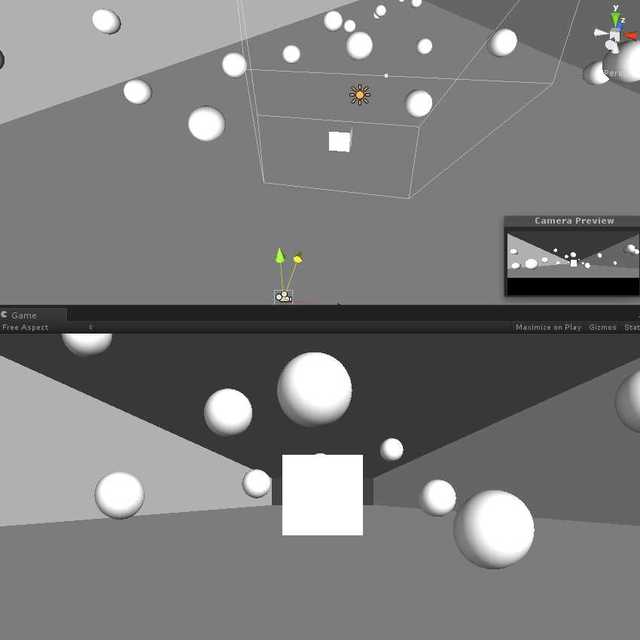
Ithanks, i just had a go, in the editor, Ive placed a cube in the scene and moved the camera around but i cant see the distortion occuring when i run the application and manipulate the camera from the viewports.
am i doing this right??
Just waiting on a video i made to upload to vimeo and ill be able to show you what my system does at the moment.
just hit play and then move the camera, either by using wasd or directly in the editor. The near clip plane will stay in the same place as you move the camera around
The actual screen is slightly tilted but the final version the screen will be mounted fully horizontal. What i want to have is the object in the scene to be stationary. currently the system exactly replicates the users wherabouts in space but given that i have accomplished that i know each of the co-ordinates are coming through accurately.
The system is meant to simulate real objects on the surface. like the previous vimeo video.
so here is a quick sketch of the sorta distortion and the setup i aim to create.
i think i would need to somehow fix the frustum to the edges of the screen somehow but that is the point at which i think i aim failing.
Im willing to give anything a go to get this working.
Just got it working. I accidently didnt wait for it to all copy over so something went a little weird.
That looks pretty similar to what I am after doing. i cant tell if the distortions seem to distort based on the position of the camera which is what i was after doing. I might try porting my tracking code to this sample to see how it reacts. what would happen if it was the far clip plane that was fixed?
moving back, the frustum would get narrower. You see less things when you get further form the window, but they are bigger. (so it feels like you moved forward)
In your picture above this would correspond to putting the camera to the viewer position. Whereever the viewer goes, the camera follows him. The camera projection matrix is modified, so that the window the viewer is looking at (i.e. the screen) stays fixed, that is the position of the near clip plane is not changed and things are distorted based on the viewer’s position.
That pretty much sums up what i am trying to do I think.
So you are saying to obtain the required distortion i would need to fix the near clipping frame to the edges of the screen (a clipping plane of correct aspect ratio, fixed to the edges of my scene i wish to view) and then manipulate the cameras XYZ positioning as before.
Im therefore assuming I would take the lookat function out as the clippling plane is fixed the cameras general orientation is irrelivent as what is viewed is largely dictated by the location of the frustum?
dont know if you managed to view the video i submitted earlier but thats my current system.
yes. you need to supply the camera world position and then transform this to local position relative to the clip plane. I do this in the LateUpdate() function. You would take out the look at function.
I just saw the video. So the ?camera? (is it a camera?) that is mounted on the notes board is what you use to pass the viewer position to unity? How does this work?
To be honest though, I don’t think that you would benefit a lot from having a custom projection matrix, since this will distort things too much if you are too far away from the center. Maybe what you already have is actually better, since it won’t stretch the image and it will still show it from all sides.
the camera is a modified playstation 3 camera and is using a Face tracking software called FaceAPI. this can estimate 6DOF which are piped into unity through a UDP port. unity picks up the string of data and there you have it. I am only using the XYZ portion currently.
the idea is the monitor is meant to be totally flat so the image should appear to be either on the top of the surface of the display or directly underneath it. the extent of the distortion is generally irrelevant provided the image always appears correct to the user. the end result should convey something similar in technique to this:
the image although distorted appears perfect from this point in space. I had previously asked the same question on the OpenGL forums as I originally had contemplated performing this with openGL directly which was a bad move, but i learned lots about how OpenGL works as a result. alot of their comments were directed towards the creation of a projection matrix. however i have no idea to this day as to how they seem to work.
either way i am willing to learn and understand for the sake of this projects completeness
Ive read that a good few times. I think i will attempt to see what effect the near clipping plane will have. I wont be hitting my deadline on this one but for the sake of my own understanding and experience i will be concluding this system in my own time. Ill revisit this thread with my progression.
hi Kshaaban
to day i have been able to try do to this in vvvv
for your system ,
i think you have to position you object above the position 0 of the Y axis ,
i think it would help if you made a scene with a cube and a plane and position your camera above the scene ,
then do not move the camera , but just change the perspective matrix
if i can do it from the example of Ivkoni , i ll keep you informed
Sure. It didn’t work last time, but I will try to upload the project here, when I get home; Otherwise just, pm me your e-mail address and I will send it to you.