ECS code overhead for mobile games

I’m building for mobile a pretty simple game I converted from MonoBehaviour.
Rough stats are 60 entities (not all gui) across 25 chunks, 80 components, 70 systems and 40 jobs (not all running constantly). My heaviest entity has about 25 components.
Nearly all entities are unique so there’s no contiguous mem or burst benefits in such a game.

It all updates in SimulationGroup (0.02 timestep) and the bottleneck from the start has been the code loop which averages around 9ms with burst. I’ve been gradually optimising over weeks but am still struggling to get stable 60fps.

So I decided to run some basic tests to see what’s the starting point for ecs for normal games and it’s pretty dire, lest I’ve got something wrong. I don’t know if it’s just too much code overhead in the ecs mechanics or whether it’s thread related waits.

Test
I created 50 components, ComponentSystems and JobSystems. There are 50 entities each with 1 of the components so every system processes a single entity using either IJobForEach or Entities.ForEach(Comp) and just inc’s a couple of variables. (code at bottom)
Test phone is Galaxy s4.

50 JobComponentSystems ~6ms
50 Burst jobs = 1.5ms
5 instances of GatherChunks = 0.85ms
52 instances of GatherChunksAndOffsetsJob = ~1ms
14 ECB.PlayBack = 0.275ms
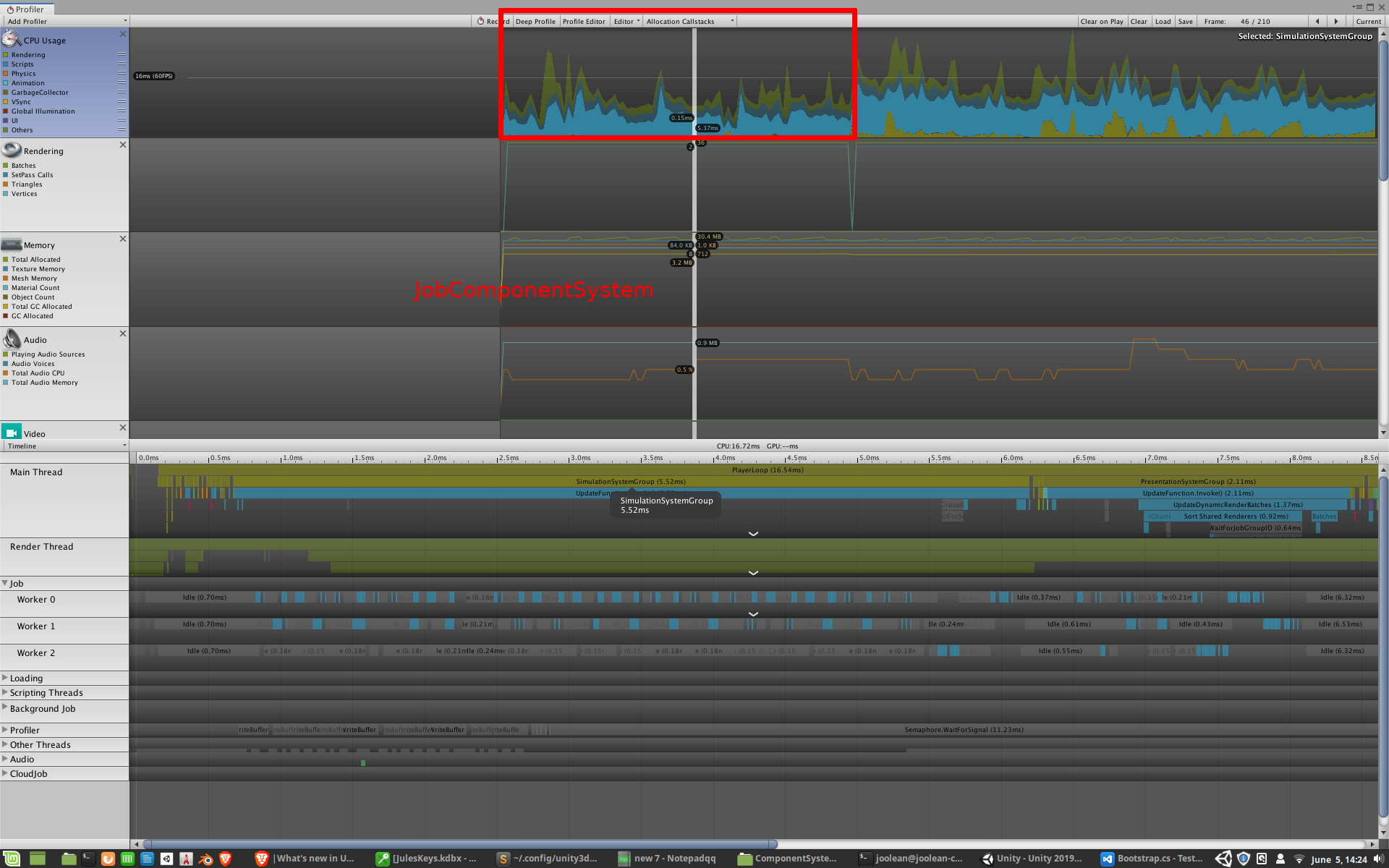
50 ComponentSystems ~8ms
212 instances of GatherChunks = ~3ms
64 ECB.PlayBack = ~1ms

50 GameObjects ~0.3ms
50 MonoBehaviour.Update() = 0.275ms

For the most part, individual jobs/functions only take about 0.03ms each (I think that’s min res of the timer) so that’s not the problem, It’s all the overhead surrounding them. The user code is doing virtually nothing (100 value increments) so all those milliseconds are pure overhead.
On PC and for large games, these overheads would be dwarfed by the positives of dots as megacity showed but for normal games on mobile, this is a problem.

If Job/ComponentSystems.OnUpdate() are to be the functions that replace MonoBehaviour.Update(), I wonder if Unity is keeping an eye on this overhead and whether its something that’s optimisable above where it currently is?

My game is still very early stages and only going to get more complex but there’s nothing I can do to get stable 60fps with ecs itself eating up 6-8ms every frame.

[UpdateInGroup(typeof(SimulationSystemGroup))]
public class JobSystem0 : JobComponentSystem
{
    [BurstCompile]struct Job : IJobForEach<Comp0>
    {
        public void Execute(ref Comp0 c0)
        {
            c0.value++;
            c0.value2++;
        }
    }

    protected override JobHandle OnUpdate(JobHandle inputDeps)
    {
        return new Job().Schedule(this, inputDeps);
    }
}

[UpdateInGroup(typeof(SimulationSystemGroup))]
public class ComponentSystem0 : ComponentSystem
{
    protected override void OnUpdate()
    {
        Entities.ForEach( (ref Comp0 c0) =>
        {
            c0.value++;
            c0.value2++;
        });
    }  
}

public struct Comp0 : IComponentData {public int value; public float value2;}
public struct Comp1 : IComponentData {public int value; public float value2;}
...
public struct Comp50 : IComponentData {public int value; public float value2;}

These systems are duplicated for each component but they don’t both run at the same time. I strip out either all ComponentSystems or all JobComponentSystems for tests.

1 Like

Without describing what the game is, it’s rather hard to get what you mean.

I also wonder why you have 50 comps with the same typed values. What do you want to achieve with this? With just 2 additions. Do you also have multiple systems that just add?

To address your underlying question: Yes, we will be addressing overhead issues. Doing nearly nothing should cost you nearly nothing.

If you have a project to share that would also be great.

4 Likes

Thanks for responses and glad to hear Mike.

This code is just a test, it’s not code from my game. The point I was making with it is that it simply runs 50 Job/ComponentSystems and all each one does is two additions on a single component, yet it takes 6-8ms.
The equivalent MonoBehaviour.Update() takes 0.275ms.

My game follows a similar access pattern where it is deep (many systems) not wide (contiguous entities) and I’ve hit a road block cos I can’t optimise away the heavy cost of just running systems.

The benefit of dots for contiguous component sets is obvious and many ecs demos like to show doing one thing thousands of times, but I’d say most games have dozens of unique things instead and the cost of this access pattern needs to be considered.

2 Likes

Well it’s good stress test but a weird one as it is designed for ECS to fail. It’s basically the same as oldschool MB design without utilizing the ECS benefits of scale. Some of the overhead will be optimized by the DOTS team but the performance hit will still be there. At the end of the day it’s not in-line for ECS.

ECS is built around scale, but if you interpret scale as in, I have 1 million individual entities with 1 million different systems you are better off sticking to Monobehaviour as ECS would be nearly useless and would produce more overhead than it actually optimizes.
Your stress test can be optimized with 1 system that does the addition. You’d even put it below 0.275ms with 50 entities and at numbers like 10k+ the MB solution would go up in flames and the ECS one still runs under 0.275 ms. You see, there’s no linear scaling so you can’t interpret code that has 50 systems of some arithmetic with 50 systems of real game code.

In my belief I think you’re off in making the assumption that most games would end up being designed that way. In fact, most genres, even the most complicated ones revolve around very few systems and those are usually massively batched.
Not every system has constant writes and when they do, batching processes and memcpy goes way faster than individualy.
I’ve programmed a few genres now and most end up in some kind of trickle down of workload. The more main mechanics don’t have read-write on a per-frame basis, the further down in the layers you get more systems work on a lot of entities, ending in something like the renderer or presentation layers that do massive work on something like Translation->LocalToWorld.

3 Likes

Thanks for your detailed response Enzi.
This comes down to the question of what are we supposed to use ecs for? Are we not meant to be writing all of our code in ecs or just core systems that will benefit from it? Isn’t Project Tiny pure ecs solution?
I’m coming from the assumption that we write everything in ecs so maybe I’ve gone down wrong track. Once you start doing that, you easily end up with dozens of systems. Look how many Unity already has for their own systems.

For example I have engines that have Temperature, FuelConsumption, StartupShutdown, GroundThrust, Turbo, Transmission, SpringGear, SliderGear, Damage components to name a few. These are all seperate systems dealing with seperate components.
Then you also have lots of custom code related to collisions between varying entities. What happens when ship enters fuel station trigger, when ship lands, when ship passes a toll gate, when containers enter/exit cargo bay, when fuel sucking creatures impact fuel containers. Then there’s input systems, recording/playback systems, audio modifier systems. That barely touches the extent of all the other kinds of systems/interactions going on. It all clocks up.

If I wanted to, I guess I could combine many components and make heavy systems but that wasn’t my understanding of dod approach. Not that I have much understanding of dod approach. :slight_smile:

My test is to demonstrate the cost of running a mere 50 systems which modify some data. That’s not a lot. Most systems write data otherwise what are they doing?
I get that systems are more expensive than monobehaviour due to overheads but even so, the cost seems very steep to me. How many should we be able to run?
I’m a babe in the woods when it comes to dod and don’t doubt I’ve got lots of things wrong and can be improved but this is just my current feedback on roadblock I’ve hit trying to write a mobile game in all ecs.

I’d be really interested to know the system/job/component counts of others that are building full games (big or small) in all ecs.

1 Like

No problem!
I think with ECS it’s even more important to talk about approaches. What we have to program ends in the same instructions but there are a lot of angles how to get there. With ECS it’s often the total opposite of what you’d do in OOP.

Your components are very specific. Can you not summarize them? GroundThrust, Turbo, Transmission sound very much like a Motor component and a MotorSystem. Also think about components as kind of states the systems runs on so you can filter them out automatically with the correct queries.
For example, the MotorSystem doesn’t run on entities with MotorOverheated component or NoFuel. For every game I think a good amount of filters exist so systems don’t have to run every time on every single entity.
In that sense, I’d also not make a global FuelConsumption system. Specific systems like Motor which needs fuel can consume fuel itself.

The next part is pretty much handled by the Unity.Physics system and on triggers, components that resemble more an event, gets put on the entity. So if an entity moves into the triggerzone of a fuelstation, you just need a system that handles this single event from physics. This system would make the motor stop and put a FuelRefilling component on the entity which gets handled by another system.
Point is, in those examples, systems don’t run all the time. Only a few systems will be constant and all others work on demand when something happens, stretched out over time and controlled by the game speed.

In my projects I have around 20-30 systems, lots of components, least a 100+. My biggest project has 37 systems which is based on the Unity FPS Sample.
I’d say, the amount of systems isn’t actually that big unless you abstract too much. In my city builder I have one system that pretty much handles all logic for buildings on those queries:

 EntityQuery moveBuildings;
    EntityQuery missingConnections;
    EntityQuery selectedBuildings;
    EntityQuery deselectedBuildings;
    EntityQuery createBuildings;
    EntityQuery createBuildingsComplete;
    EntityQuery createBuildingsCompletePhase2;
    EntityQuery destroyBuildings;

As systems tend to schedule more than 1 job, the complexity can’t be seen with just the amount of systems.

Anyway, hope this helps. Please upload your project, it’s always interesting to profile something like that in more detail.
I question some of those numbers, could be a lot of editor overhead involved. At least I never have such high numbers in my systems even when they are working on 1k+ entities. Another possibility could be that the Entity Debugger was open.

3 Likes

Awesome feedback Enzi.

You are right about the engine in that I could group several of those into the engine component. It’s something I’d already done in the past. In fact I’ve gone through multiple dod approaches but mostly to find the best modular design solution as opposed to performance.
My approach of smaller components was partly due to Unity’s own advice about quantising data and using discrete systems to operate on a particular task. Temperature calculation would only operate on ships that have Temperature components for example. It’s not something that ai ships care about.
I think you’re right though and I’ve broken it apart too fine.

I also took the tag approach (as opposed to the polling approach) so that my queries/systems don’t run if the components aren’t present. I have ~35 systems running most of the time atm and an equivalent amount that only run temporarily. All my systems are query based so nothing runs at all without relevant components.

This is pretty much how I do it which is why I currently have seven custom handler systems. They do only run on the specified collision event though so they’re not a big problem I don’t think.

This was very insightful for me. I’ve had systems before where I processed several queries and found they got quite complex from a code perspective with all the jobs, CDFE’s, BFE’s, ECB’s etc.
I will definitely revisit this approach. I probably just need better code formatting.

This is on mobile remember and I also never noticed the overhead before because the timings Unity showed were all small and the jobs themselves are super quick. It was the entire SimulationGroup update cycle itself that was taking so long hence why I made test to try find the problem.

I will put your feedback into practice though and will run some more refined tests to try ping where the milliseconds are going.
Thanks again. It was very helpful feedback for me. I’m mostly flying dark on what’s best approach cos it’s all new and there’s many ways to do things.

1 Like

Maybe you’ve already realized this, but a system can have multiple queries and multiple jobs. So, you can still have a job that handles temperature components specifically but it can be in the same system the thrust job etc.
you can also use static methods to contain the logic and have jobs that handle specific combinations but call on those static methods to prevent code repetition. For example if there is an interdependence between fuel and temp, but not all entities have both, make a job that handles temp+fuel and a job tha t handles fuel if there is no temp.

Entities with the same components are grouped in memory as chunks anyway so this is efficient, or so I understand.

1 Like

Thanks pakfront, yes but I never really considered it cos I thought it was better to have small modularised systems as I find them easier to refactor, manage dependencies and change system ordering. I will change this though as you’ve both mentioned cos I can probably group all my engine related jobs into a single system for starters.

That’s a good point and I will try factor that in more. I don’t have any duplicate code, but one problem I find is when you make a structural change to how you store data, like switching from components to buffers or shared components, or changing from tagging strategy to polling, you have to refactor all related jobs and systems and often in deep ways. How you access and process data in buffers is very different than to components.
I’ve found it very time consuming making design changes because of this but I guess is to be expected while I’m getting to grips with this paradigm. I swear I spend 80% of my time in last few months just refactoring. :slight_smile:

Anyway this has all been great information and I will do more testing before I make too many drastic changes.

1 Like

I read the posts in this thread and I’m confused
In my work projects there are about 500 thousand lines of code and these are medium-sized projects.
We are talking about several thousand classes.
In my opinion, using the ecs approach creates the same number of systems. I use Entitas(
sschmid/Entitas-CSharp) with 1k systems and all works fine.
Attempting to create systems in which a lot of huge jobs its like create classes with thousands of lines of code(very bad practice).
Not SRP. Not testable. Not refactorable.
In my current hobby mobile project ~400 systems and i want create 1k-2k.

2 Likes

We expect that it will be possible to create games with 1-2k systems on mobile in a 60 FPS game. Optimising Unity.Entities to ensure it is possible is on our radar.

7 Likes

I’ve done further testing on this and few vs many systems has some effect but I think is overall unrelated to the problem I’m having with ecs.
It doesn’t matter whether I test 1 system with 50 jobs or 50 systems with 1 job, the times vary anywhere from 1ms to 15+ms over the course of each second.

The fact that there are frames where it completes in under a millisecond means the problem is not one of code overhead as I initially thought. I can only assume it’s something related to threading that doesn’t work so well on my mobile and is generating loads of wait times. At least I know there’s nothing I can do about it from my side so I’m just continuing with development.

It’s good to hear what Unity expects for mobile so for now I’m just trusting it’ll get resolved in future release.

Yes I agree. Enzi was just suggesting to group where it makes sense and under the assumption I’d made that too many systems was causing slowness.
Modular systems is awesome, hence why I have so many, but over quantizing can be problematic too.

Hello,
I use hybrid-ecs approach (v0.1.0 currently) in mobile project and I experience performance problems too.

First problem: too slow entities filtering. I have just ~50 entities at the moment. Here is one of my systems, it is super simple.

public struct RigidbodyVelocity : IComponentData
{
   public float3 Value;
}

public struct BindToTransform : IComponentData
{
   public readonly Entity TargetEntity;

   public BindToTransform(Entity targetEntity)
   {
      TargetEntity = targetEntity;
   }
}

public class RigidbodyCancelVelocitySystem : ComponentSystem
{
    private EntityQuery _cancelQuery;

    protected override void OnCreate()
    {
        _cancelQuery = GetEntityQuery(ComponentType.ReadOnly<BindToTransform>(), ComponentType.ReadWrite<RigidbodyVelocity>());
    }

    protected override void OnUpdate()
    {
        Entities.With(_cancelQuery).ForEach((ref RigidbodyVelocity velocity) => velocity.Value = float3.zero);
    }
  }

And on Honor 8 it takes more than 2ms to search in just 50 entities! Why? Here is profiler from device:


Here is deep profile in editor of same system, EntityQueryBuilder.ForEach takes 0.17ms:

Second problem: allocations in EntityCommandBuffer.Playback.
Another simple system:

[InternalBufferCapacity(4)]
public readonly struct GeometryCollision : IBufferElementData
{
    public readonly float3 ContactPoint;
    public readonly int Layer;

    public GeometryCollision(float3 contactPoint, int layer)
    {
        ContactPoint = contactPoint;
        Layer = layer;
    }
}

public class CleanUpGeometryCollisionsSystem : ComponentSystem
{
    private EntityQuery _query;

    protected override void OnCreate()
    {
        _query = GetEntityQuery(ComponentType.ReadOnly<GeometryCollision>());
    }

    protected override void OnUpdate()
    {
        Entities.With(_query).ForEach(e => { PostUpdateCommands.RemoveComponent<GeometryCollision>(e); });
    }
}

Each frame it generates 6.2kb of garbage!


Deep profile in editor:

I have jobified some systems and their execution time decreased from ~2ms to ~0.8ms. Better but still bad.

What causing these performance issues?
Do you have plans to fix it on ECS package side? If yes - do you have any estimates?
Can I fix or at least workaround these problems myself right now?

Thanks!

Did your jobified systems are using burst?

Entities.ForEach was changed to accept structural changes without the need to use PostUpdateCommands. The change increase the overhead when using Entities.ForEach independently if you was using PostUpdateCommands or not. The goal for Entities.ForEach is ease of use and not performance. To be honestly (my opinion here), you should never use Entities.ForEach in live code unless performance is not a concern. But, that said, Entities.ForEach is amazing for prototyping systems.

Other thing to have in mind that the number of the entities have less impact that the number of different archetypes the belong. The query search for archetypes, not entities.

In your second case, try to use the batch api whatever you can.

For your first case can you try this?

public class RigidbodyCancelVelocitySystem : JobComponentSystem
{
    //[BurstCompile]
    [RequireComponentTag(typeof(BindToTransform))]
    struct RigidbodyCancelVelocityJob : IJobForEach<RigidbodyVelocity> {
        public void Execute(ref RigidbodyVelocity rigidbodyVelocity) {
            rigidbodyVelocity.Value = 0;
        }
    }
 
    protected override JobHandle OnUpdate(JobHandle inputDeps)
    {
        return new RigidbodyCancelVelocityJob().Schedule(this, inputDeps);
    }
}

For your second case you should use this:

public class CleanUpGeometryCollisionsSystem : ComponentSystem
{
    private EntityQuery _query;
 
    protected override void OnCreate()
    {
        _query = GetEntityQuery(ComponentType.ReadOnly<GeometryCollision>());
    }
 
    protected override void OnUpdate()
    {
        EntityManager.RemoveComponent(_query, typeof(GeometryCollision));
    }
}

Edit: Wrongly typed DestroyEntity instead of RemoveComponent in the last system.

[ ]'s

@elcionap , thank you for your reply!

Yes.

I use hybrid approach so I can’t move all my systems to jobs. I didn’t expect performance boost but I also didn’t expect such enormous performance drop.

Ok but if I have 50 entites then I have <= 50 different archetypes. Why it takes so long time to search withing <50 archetypes?

Some of my another non-job systems rely on results of this system. How can I resolve dependencies in this case? And even if I could these systems will force main thread wait the job.

I did as you suggested but nothing changed =( same amount of garbage each frame.

@Joachim_Ante_1 , Do you have some (at least rude) estimates on this?

@Joachim_Ante_1 , also I’d like to ask if I can expect <100 different archetypes with low chunks fill rate to work 60 FPS on mobile.
I understand that it is not ECS designed for. But ECS is not only about performance. I want to use same code both on client and server (on server I expect to have much better chunks fill rate and get ECS performance advantages) and for networking.

Yes. Currently we bad performance with low entity count, but we are actively working on it. Our expectation is that even in the case of 1 entity being processed by one system, and having many systems. We will still significantly beat MonoBehaviour performance. Just requires specific optimisations for it and until recently that hasn’t been the focus.

We now built detail benchmarks so we can measure the whole spectrum from operating 1, 100, 10000, 1M entities. And drive the numbers down.

I expect big optimisations in this space to land in the next 2 months.

9 Likes

@Joachim_Ante_1
On a related theme:
Do you have any plans for entity-based component change detection? (Low entity count, high interest in reactive systems)

is there a way to specify batch size for jobs inheriting from IJobForEach ?
in some cases a system is wasting more performance creating those jobs than the work itself.

eg: zombie type games,
let’s say a ZombieManagerSystem is driving 10k zombies and it will be a pure waste of performance creating 10k threads on mobile when each job calculation is too small. i know it’s possible to use the IjobParallelFor but it’s like this job type is not confortable to work with when using ECS, cant directly specify useful Components or using Requirement Attributes like ( [RequireComponentTag(typeof(x))] , [ExcludeComponent(typeof(z))], but instead we need to use EntityQueryDesc and EntityQuery. im not even sure if it’s possible to use IjobParallelFor index argument with parallel NativeContainers.

it’s just my opinion!!!