Editor DrawDefaultInspector issue

So when I use the “DrawDefaultInspector()” function in my OnInspectorGUI() of my custom editor (Material), I indeed get a bunch of public variables spat out onto my inspector but all I really want it to do is look EXACTLY the same as the default Material inspector. All I want to do is add a button to the bottom. Is this possible or am I just screwed into just attaching the button to my custom script on the object?

I also tried the “base.OnInspectorGUI()”, that just does the same thing as the above. Also used “EditorGUIUtility.LookLikeInspector()” in despair, but that just did what I thought and made the actual fields look inspectory.

Thanks in advance!

You should be able to do something like this:

public override void OnInspectorGUI()
{
	DrawDefaultInspector();
	EditorGUILayout.LabelField("My Label", "My Value");
}

Just use a button instead of a LabelField.

:confused: My problem is that it looks completely different than the default inspector.
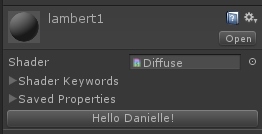
  • Before custom editor
    1287046--58618--$screen_0.jpg

  • After custom editor with DrawDefaultInspector()
    1287046--58619--$screen_1.jpg

I’m wanting it to look exactly the same as the original and just to add the buttom (in this case the “Hello Danielle” button.

using UnityEditor;
 
 public class CustomMaterialInspector : MaterialEditor {
 	public override void OnInspectorGUI () {
 		base.OnInspectorGUI ();
 	}
 }

Found this page (http://docs.unity3d.com/Documentation/Components/SL-CustomMaterialEditors.html). Seems to be what you were looking for.

1 Like

Ugh, sorry. I was doing a very generic search looking for how to fix “DrawDefaultInspector” rather than looking for the material editor itself.

Thanks for this! Its working now :slight_smile: