From my understanding, to enable foveated rendering on the Quest/Go, you must use “OVRManager.fixedFoveatedRenderingLevel = OVRManager.FixedFoveatedRenderingLevel.High” or similar to enable foveated rendering in a Unity Project. This also requires having at least one OVRManager on a gameobject in the scene.
I would like to know if it is possible to enable the foveated rendering without the need for the OVRManager in the scene or having Oculus Utilities/Integration imported into the Unity Project at all?
Like is there anything we can add to the android manifest or call something from the Oculus(Android) integration from the package manager in Unity?
We want to simply use the Oculus (android) and Oculus (Desktop) packages from the package manager in our application but not include too much of the Oculus Integration asset from the Unity Asset store as it contains lots of code that conflicts with other plugins we are using.
Currently, no, but it’s in our plans. We’re working with Oculus to expose the necessary data from their OVR plugin upstream so that we can apply it to our render targets, which is required to enable the reduced-rate rendering that FFR uses.
Interestingly enough, this Oculus Connect talk mentions how Vulkan allows for cross-platform Fixed Foveated Rendering (FFR) due to the extension no longer being Qualcomm only. This means that once Vulkan is working for Quest/Go, we may well see FFR cross-platform between Vulkan on Windows platform headsets as well as Mobile VR.
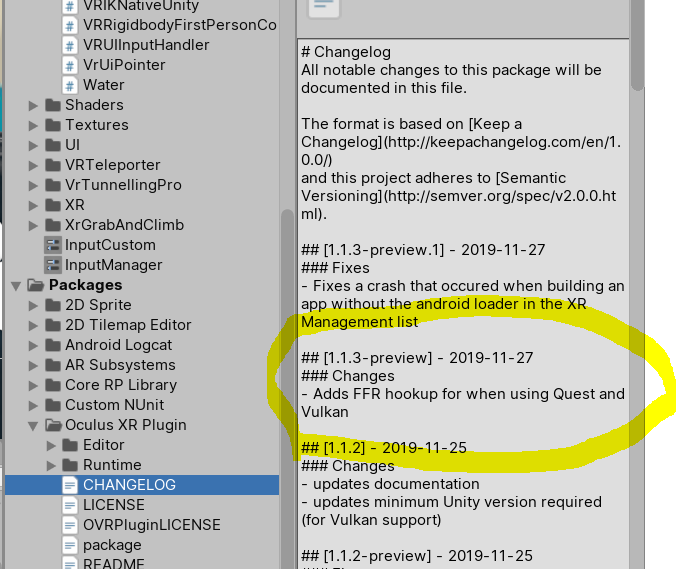
It seems that the v1.1.3 listing mentioning FFR hookups for Vulkan on Quest has been removed since I posted about it on the forums… very spooky. I think we will have to wait a bit longer. I can’t get a build to run with Vulkan on Quest on 2020.1.0.14a
I think it is good, to have both options. Because for 2x VR cases. One for low-cost / hardware VRs and one with the high-level / hardware VRs. On my quest i expirienced this FFR with only inside the middle. So i recognized a very high jump between regula pixels and the outside lower resolution. It was a lil bit strange, but after a few min. you adopt to it and you forget about it. Best way is, to have two options for FFR: 1x static, 1x dynamic for eye-tracking devices.
I hear you but it helps in the meantime with performance. Id like to use it eventually for say, so have a huge instancing of a lot of particles. Turn on FFR for a few dozen frames while they load and you likely wouldnt notice as a player but it could help keep the frames up.
I used it in games and never noticed it until it was pointed out, then I noticed it all the time.
I got Vulkan running on my Quest in Unity 2019.3.9f1 and was looking for the FFR but still do not see. I read above that this is in 2020 version which I am going to try next. I shall report back.
I made a copy of my project and tried 2020 last night with Vulkan before I saw your message. I see what you mean. Only the left eye rendered (at least on multiview as I did not try multipass) and the resolution was very low despite being on Ultra settings. Also, no FFR option to be found anywhere. Do you have any idea of when this will all be implemented? Thanks for the reply.