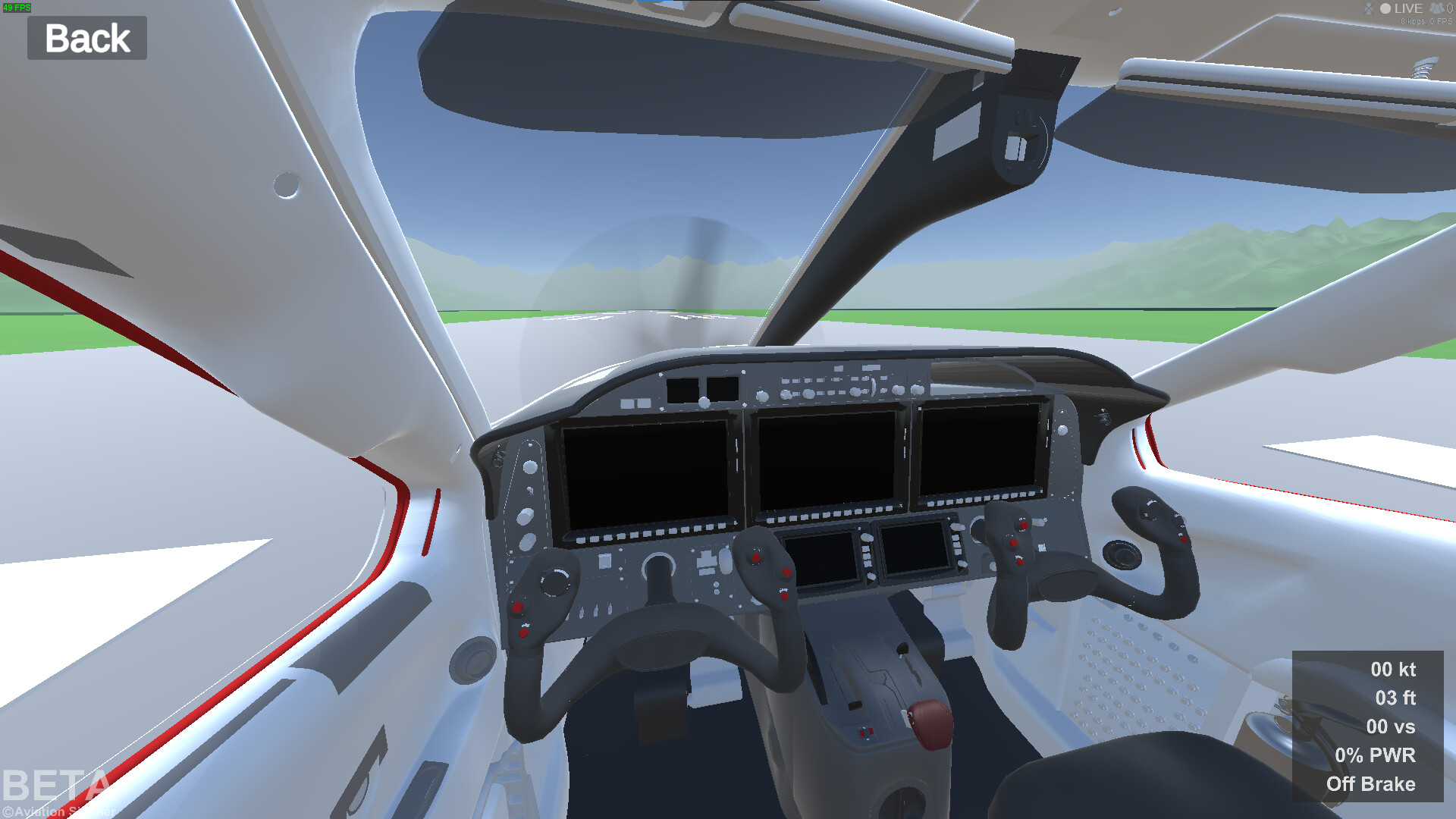
I have a script, which looks like it’s working. But somehow the plane starts doing weired stuff. physics are getting weired etc. I’ve looked up for multiple scripts in the social media, but i haven’t found a solution. and it doesn’t help to make the float origin update every 10 or 1000 meters. But if the number get’s higher, the effects become higher too! and if I turn it down to only 10 or 1, it’s still not better, and the fps are very bad. is it because it’s a rigidbody? Do I have to add a delay before it moves the float origin? Here’s a video with updateing every 100 meters.
Here’s my script:
// Based on the Unity Wiki FloatingOrigin script by Peter Stirling
// URL: http://wiki.unity3d.com/index.php/Floating_Origin

using UnityEngine;
using UnityEngine.SceneManagement;
using UnityEngine.VFX;
using UnityEngine.Experimental.VFX;

public class FloatOrign : MonoBehaviour
{
    [Tooltip("Point of reference from which to check the distance to origin.")]
    public Transform ReferenceObject = null;

    [Tooltip("Distance from the origin the reference object must be in order to trigger an origin shift.")]
    public float Threshold = 1000f;

    [Header("Options")]
    [Tooltip("When true, origin shifts are considered only from the horizontal distance to orign.")]
    public bool Use2DDistance = false;

    [Tooltip("When true, updates ALL open scenes. When false, updates only the active scene.")]
    public bool UpdateAllScenes = true;

    [Tooltip("Should ParticleSystems be moved with an origin shift.")]
    public bool UpdateParticles = true;

    [Tooltip("Should TrailRenderers be moved with an origin shift.")]
    public bool UpdateTrailRenderers = true;

    [Tooltip("Should LineRenderers be moved with an origin shift.")]
    public bool UpdateLineRenderers = true;

    private ParticleSystem.Particle[] parts = null;

    VisualEffect[] visualEffect = null;


    void LateUpdate()
    {
        if (ReferenceObject == null)
            return;

        Vector3 referencePosition = ReferenceObject.position;

        if (Use2DDistance)
            referencePosition.y = 0f;

        if (referencePosition.magnitude > Threshold)
        {
            MoveRootTransforms(referencePosition);

            if (UpdateParticles)
                MoveParticles(referencePosition);

            if (UpdateTrailRenderers)
                MoveTrailRenderers(referencePosition);

            if (UpdateLineRenderers)
                MoveLineRenderers(referencePosition);
        }
    }

    private void MoveRootTransforms(Vector3 offset)
    {
        if (UpdateAllScenes)
        {
            for (int z = 0; z < SceneManager.sceneCount; z++)
            {
                foreach (GameObject g in SceneManager.GetSceneAt(z).GetRootGameObjects())
                    g.transform.position -= offset;
            }
        }
        else
        {
            foreach (GameObject g in SceneManager.GetActiveScene().GetRootGameObjects())
                g.transform.position -= offset;
        }
    }

    private void MoveTrailRenderers(Vector3 offset)
    {
        var trails = FindObjectsOfType<TrailRenderer>() as TrailRenderer[];
        foreach (var trail in trails)
        {
            Vector3[] positions = new Vector3[trail.positionCount];

            int positionCount = trail.GetPositions(positions);
            for (int i = 0; i < positionCount; ++i)
                positions[i] -= offset;

            trail.SetPositions(positions);
        }
    }

    private void MoveLineRenderers(Vector3 offset)
    {
        var lines = FindObjectsOfType<LineRenderer>() as LineRenderer[];
        foreach (var line in lines)
        {
            Vector3[] positions = new Vector3[line.positionCount];

            int positionCount = line.GetPositions(positions);
            for (int i = 0; i < positionCount; ++i)
                positions[i] -= offset;

            line.SetPositions(positions);
        }
    }

    private void MoveParticles(Vector3 offset)
    {
        var particles = FindObjectsOfType<ParticleSystem>() as ParticleSystem[];
        foreach (ParticleSystem system in particles)
        {
            if (system.main.simulationSpace != ParticleSystemSimulationSpace.World)
                continue;

            int particlesNeeded = system.main.maxParticles;

            if (particlesNeeded <= 0)
                continue;

            bool wasPaused = system.isPaused;
            bool wasPlaying = system.isPlaying;

            if (!wasPaused)
                system.Pause();

            // ensure a sufficiently large array in which to store the particles
            if (parts == null || parts.Length < particlesNeeded)
            {
                parts = new ParticleSystem.Particle[particlesNeeded];
            }

            // now get the particles
            int num = system.GetParticles(parts);

            for (int i = 0; i < num; i++)
            {
                parts[i].position -= offset;
            }

            system.SetParticles(parts, num);

            if (wasPlaying)
                system.Play();
        }

        var particles2 = FindObjectsOfType<VisualEffect>() as VisualEffect[];
        foreach (VisualEffect system in particles2)
        {


            int particlesNeeded = system.aliveParticleCount;

            if (particlesNeeded <= 0)
                continue;

            bool wasPaused = !system.isActiveAndEnabled;
            bool wasPlaying = system.isActiveAndEnabled;

            if (!wasPaused)
                system.Stop();


        }
    }
}
Use Debug log and break points, to search for issues and narrow down the problem.
One of things here may be happening. Your scale is wrong, and chances are your plane is in position greater than 10k.beyond that, floating point looses the precision. All weird stuff starts to happen. Further you go, even graphics starts to glitch out.
Observe values of the plane positions.
Is well known problem, with floating point and shifting origin.
Thanks! I know that i have a very large world. but with that script, it can be unendless. But with the rigidbody, even if i’m only 1unit away, as soon as it updates its float origin position, the plane gets glitched out! pls watch the video!
Assuming thats true, then the code you are using is broken.
But seeing the rendering issue on the vid, besides physics, I don’t believe it. It looks like it was far more greater than 10k.
Where you got script from?
Did you try to debug it?
Also, If you scale things down, so 1m is 0.1 Unity unit, then you should be able play physics without issue up to 100 km.
if i don’t use the code, i can fly 5km, till the float pecision is very bad. but the script changes it, that the world of center is at the position of the plane. everytime it updates, it does that weired thing.
Please start debugging it, and tell us what your results are at various point.
No one will be debugging code for you.
Also, I ask question again, where you got code from?
Please print to console world position, scale and rotation.
Can you print to console positions before, offset and after is position is set, using MoveRootTransforms?
Please show results.
Another problem you may have is, that you use physics and rigid bodies, while you try set position using transform. This may potentially screw physics behaviour.
Rigid Body has own function to move object, if I recall correctly.
Also, try your script with simple cube, without rigid body.
For sake of debugging, I would comment out anything to do with particles. But line renderer may potentially help. Or comment it out too.
it does not help! but if i do the same thing with a cube, no rigidbody, all is fine! (i guess because there are no physics) but if the cube has a rigidbody, it does the same weired thing.
What you mean it does not help. Of corse it won’t, if you won’t do it. You ask for help. I ask you to provide diagnostic info, Then you evade. How do you think that helps the case?
It is up to you how you want approach the problem. But I am not going to guess.
Last thing I can advise you, look into rigid body API. Lookup for info, how to move rigid body. As you have noticed RB GOs because of physics, bahves differently than non RB GOs. You can not manipulate transforms in same manner.
@Aviation_Simmer , very nice looking cockpit images BTW, I hope you get it all working.
I hope you don’t mind me providing feedback on this, but FWIW, here it is:
There seem to be a lot of issues here, all stemming from a wrong algorithm and probably a lack of understanding of relative motion.
You are not using floating origin. The script that you copied from is itself based on an origin shifting/rebasing method and that is the opposite of floating origin. That old wiki source has been misleading thousands of developers by falsely claiming it was floating origin. A good thing it is no longer hosted.
Furthermore, @Antypodish has been pointing out a number of areas that are likely sources of error, so let me try to add / clarify on these.
It is still unclear to me if the plane begins at a nonzero coordinate like -1200meters or if -1200meters was just one point on the way. The plane should not begin at a non zero coordinate. (and if it is true floating origin never leave it).
If the plane was kept at the origin every update then the points made about the Rigidbody are the next thing to look at. The Rigidbody of the plane should not move around - the world is moved instead. I know that sounds wrong but that is the fact of true relative movement.
The cockpit images show a lot of surfaces that are close to each other (one on top of another, and some that intersect. These two things make the model very sensitive to small increases in positional error. My measurements have demonstrated that in a similar situation there can be noticeable errors from about 1,000m onwards when not using floating origin.
NB: all those foreach from the old wiki code every update! : shockingly inefficient.
3) If the plane was kept at the origin every update then the points made about the Rigidbody are the next thing to look at. The Rigidbody of the plane should not move around - the world is moved instead. I know that sounds wrong but that is the fact of true relative movement.
A question about that. According to the Unity documentation, objects marked as static should not move, since their colliders should not move. In your comment you suggest that objects should move towards the player. Wouldn’t this go against “don’t move static objects”?
That’s right, if objects are static they will not move. A number of unity optimisation rely on a static or partially static design. I am not familiar with these myself but I believe unity Terrain is static for rotation. I have heard that Navmesh is static too.
The trade-off with floating origin is that you gain different performance optimisations not available unless you keep the player/vehicle avatar at (0,0,0) and use 100% relative movement. An example of the first are some much faster distance determination methods (also here) and of the second is auto-relative value determination.
Unity does not support real floating origin and they exploit static optimisations that require the player moves away from the origin. So they naturally recommend based on their design choices.
I develop for large-scale open systems that are compatible with the natural World and its physics. To model a round planet, you cannot use Terrain (because it can’t be rotated to fit around the World). Actual mutiresolution meshes are needed.
To model real life you need to recognise that everything moves. Newton’s laws proved there is no absolute space or position, and Einstein’s law of motion states that only relative movement is important. Unity’s advice and implementations are at odds with both.
Our planets move through space, they rotate, the solar system moves, etc. The ground we live on moves and vibrates. None of the positions or motion can be considered absolute in nature: everything is relative. It turns out this is perfect for digital implementations because if you base everything on relative differential motion, and origin-centric algorithms, then the limitations of absolute number representation dissapear.
I understand. Then, in open worlds like “Zelda” or “Horizon” where the ground, rocks, trees are static, How do you make the floating origin if they can’t move towards the player? Furthermore, the correct way to make big worlds, would be to have the world divided into multiple scenes that would load as the player gets closer. But if the player is always at 0,0,0 and you can’t move the scenarios. how the hell do they do it? Sorry but I can’t find adequate documentation on the subject.
The way I would do it is to convert the static terrain/objects to meshes when loading. I converted an area created by one asset from Terrains to meshes and produced 2 or three levels of the terrain that way, the lower levels being high rez. Then, as the player relative moved towards the area, loaded them bin based on distance. This was a landscape in the area of Salzburg. I navigated from space to a full-sized Earth, loaded the mesh tiles as I approached. The whole thing is demoed here.
As to “How the hell do they do it”? The only one I know who does continuous FO navigation in full scale is babylon.js. They also use double precision not floats. They document their technique and it is apache open source.
Most open Worlds use various tricks, scaling, portalling, loading screens. I studied a number of older games for my thesis. e.g. “The Continuous World of Dungeon Seige” divided the maps into sectors (which everyone has to do in all cases) and managed the transitions across boundaries.
The how I do it involves combining Continuous Floating origin and the management of “dynamic spaces”. The first is a general solution to floating point jitter up to a range of about 70km. At that point, you may get distant relative jitter, see also A Wandering Tower in Relative Space. The second technique solves that. These two are combined in my Dynamic Resolution Spaces asset. it has extensive documentation and there is also my research site with all the articles. That’s how I do it and how I can navigate continuously from space to Earth, inside a building, then to Mars, inside a building there, then to Pluto. All full-scale and at realistic orbit distances. All in single precision.
One game: Outer Wilds, claimed to use Continuous Floating Origin. If you look at the game, however, they used miniature planetoids and portalling. Most others, AFAIK, use origin/world shifting, e.g Kerbal Space Program, which falsely called the method floating origin. Others use a combination of double-precision and shifting and most apply scaling, not full-scale, with portalling.
I hope there are enough links to relevant documentation in the above.