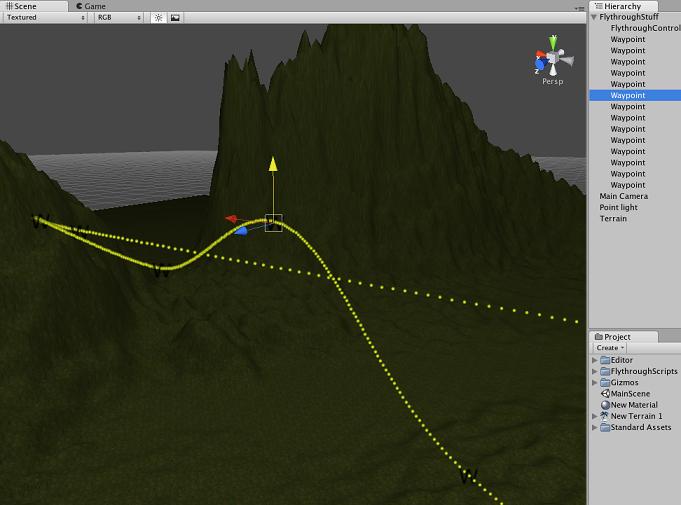
I’ve been playing around with creating a flythrough for the title screen of my game and thought I would share it. I’m sure there are other examples out there but I couldn’t find exactly what I wanted so I did it myself. Maybe this will be helpful to someone.
The flythrough consists of a empty game objects, one of which has the FlythroughController script attached and all the others (waypoints) have the FlythroughWaypoint script attached.
Using Bezier curve things the result is a nice smooth path through the waypoints. Using Gizmos the waypoints and resultant path are visible in the Scene view and can be modified visually.
The math is done in MyBezier.cs. I originally didn’t realise what I needed and implemented a N-point Bezier system, but it only uses four points at a time.
The FlythroughController is the object that moves, so for the example project here I just added the SmoothFollow script to the camera and make the flythrough controller the target.
For extra bling, try running the Game with Gizmos on. Looks like a rollercoaster
@Raiden – it appears to be showing the unity package (binary) as a text file. If you save it, and then import the package into Unity, it works just fine.
One thing that needs fixing is that if you add another waypoint it is added to the end of the list of waypoints (in the hierarchy). That order is the order that the script pulls them out using GetComponentsInChildren().
I’ve tried to drag and drop the waypoints into different positions in the Hierarchy but it seems to do nothing. Is there a way to reorder items in the hierarchy?
Thanks for sharing! I have not tried it yet, but it might be exactly what I was going to need next week ;).
About your hierarchy: I think the documentation says not to rely on that order, because it might not be always correctly retrieved using any of the enumeration options. Or possibly I am confused with the actual Start() function being called.
Anyway, what about using an public array variable which you have to fill with the objects you want to use? And array order is the fly order then. Just a random thought…
It would still have the problem of wanting to insert a waypoint in the middle of the others, because you would have to manually shift all the others down wouldn’t you? But I think that is a problem common to all publicly (inspector) editable arrays. It would be nice if you could click on an element of the array and choose insert or something.
Hi thanks for a great script. All is working fine, except for when I enable the controller script after startup, the controller
starts at random positions along the curve.If I enable everything at startup,everything is fine. Any ideas on what is causing this?
Don’t use a set value like 1. You don’t know how often this script is being called so 1, will be added at different times - thus the jitter.
Instead of:
path_time = path_time + 1.0f;
try:
path_time += Time.deltaTime;
if this is not enough (Scroll speed is too slow) then add a multiplier (value becomes larger but still dependent on time elapsed since last time script was called.
And it almost works as desired, the jerkiness is much less, but it still exists, and when I scroll the mouse wheel the camera jerks back slightly, before adjusting its speed around the waypoints.
What I am trying to do is have a camera or game object follow a preset waypoint path smoothly, with the ability to adjust the speed of the camera or object.
If anyone can help me get this working, I would be so grateful!
What I used (and it worked quite nice if I remember - don’t need it anymore however) is some code I found where a group of people were trying to emulate the controls from WoW.
Remember to post a solution if you find one. I will take a look at my code if I can find it and post it here as I think my scroll code worked fine (but it was based on the WoW code so read that too).