For the love of god please let us change the font in the editor!

Dear Unity Devs

About 3 months ago I developed poor eyesight due to ischemic stroke, and it is a real struggle dealing with Unity’s Editor because of the small font and no ability to change the font. All the letters just blur together, almost like I’m dyslexic. I have very little issue reading code in an IDE (blurry but readable).

What’s just as important as the size is the ability to change the font so that we can use monospaced programmer fonts that work much better small like Monaco, Roboto Mono or Dejavu Sans Mono. Arial is still hard to read unless it is really big.

This is the highest voted feature under review and has been requested for 7 years!!!

https://feedback.unity3d.com/forums/unity/suggestions?utf8=✓&status=1&category=&view=most_voted

We really really need this, 12pt arial (it looks even smaller than that) is almost impossible read all the letters just blur together, we need the ability to use programmer fonts like monaco as well.

I may have to pull all my assets off unity simply because I am going to struggle to support it when I can barely read anything.

Please, I am begging you, I love everything about this engine, just please can you just fix this one issue!


If you are adding this feature, adjusting kerning really helps too, but I’m not going to complain if its not there, just seems trivial if you’re adding the other stuff.

Unity 5 or LTS as well if possible, 5 is the most stable and is preferred for production, but I’ll be ok with using LTS if things improve, but any other versions are far too unstable for production. But hey, beggars can’t be choosers either, so ill take what I can get.

Thank you devs!!!

6 Likes

They are revamping to UIElements/stylesheet based GUI, I think it is the reason why this feature is not progressing for the current to be deprecated UI?

Anyways, maybe you could try some dirty hack such as changing the editor style directly? Changing the font size works but unfortunately the line height used in various drawers is baked as a const 16, we could not change it as a const was baked throughout the compiled Unity source code, the enlarged font will clip. The default seems to be 11, I found that going to 13 is still readable if that helps with your eye condition for the time being. (It clips characters with hanging part like ‘g’)

1 Like

Thanks 5argon for the update, also I will try this!

lol, I just tried changing the font and it works too!

1 Like

How did you do that? Could we have the script and use it?

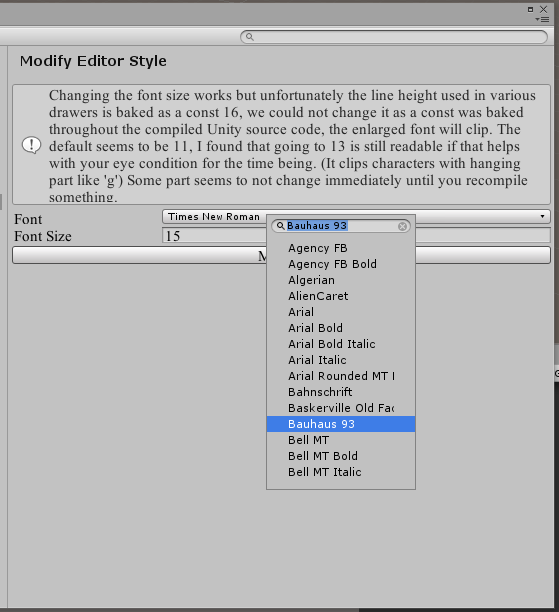
Ok I made a repo for the script. Check it out. GitHub - 5argon/ModifyEditorStyle: Change fonts throughout Unity editor

In the source code you can see some yield returns, you could comment out some of them if you want only something to change.


10 Likes

Thank you! :slight_smile:

wow thanks 5argon! well done!

It doesn’t work for me. I dropped the “ModifyEditorStyle-master” folder in the Assets directory and dragged the “ModifyEditorStyle” script in Assets/Editor and restarted the project but there is nothing in the Preferences window… I’m using the 2018.2.14f1 personal edition.

I have updated a version which works with 2017.1.5, please try again once more?

Still nothing.

I dropped the ModifyEditorStyle-master folder in the Assets directory. I noticed that you had created an “Editor” folder with the script inside. I tried after leaving the script in that Editor folder: nothing and after moving the script to the Assets/Editor folder: still nothing.

Well, if it works for others, no need to bother about me. :slight_smile:

Thank you for the script anyway! Something to learn from is always great! :wink:

Oh… that’s certainly strange. I have a version behind you just one version (.2.13) and it shows in the Preference menu.

It’s working now, after I deleted all the .meta files that are in the archive. :wink:

Thank you very much; that’s a gift! :slight_smile:

3830008--323113--Capture.JPG

1 Like

Unfortunately, the changes don’t seem to hold. As I am using the editor, going back and forth between Visual Studio and the editor, using Alt+Tab, the font reset to its original size and uses the first of the list.

Same problem after changing the font and the size, clicking on “Modify”, quitting the editor and starting it again, the size resets to 11 and the font is the first of the list. :frowning:

I tried using EditorPrefs to store the settings now. Please try again once more.

1 Like

Hmm, changes seem to hold now. I’ll tell you more in the future. Thanks for all your efforts! :smile:

@5argon Pretty neat, are you accepting pull requests? I included my LabelWindow reflection to use instead of the dropdown. This makes searching for the fonts way easier.

2 Likes

Please do send the PR! Thank you!

1 Like

Awesome, PR sent.

I used to use this, but it’s not updated so much anymore. Allegedly it works for 2018.2.