Hey gang. I have what feels like a unique situation. my game runs faster when I play it in the editor than when I make a stand alone build. I am using Unity 2018.3.13f1
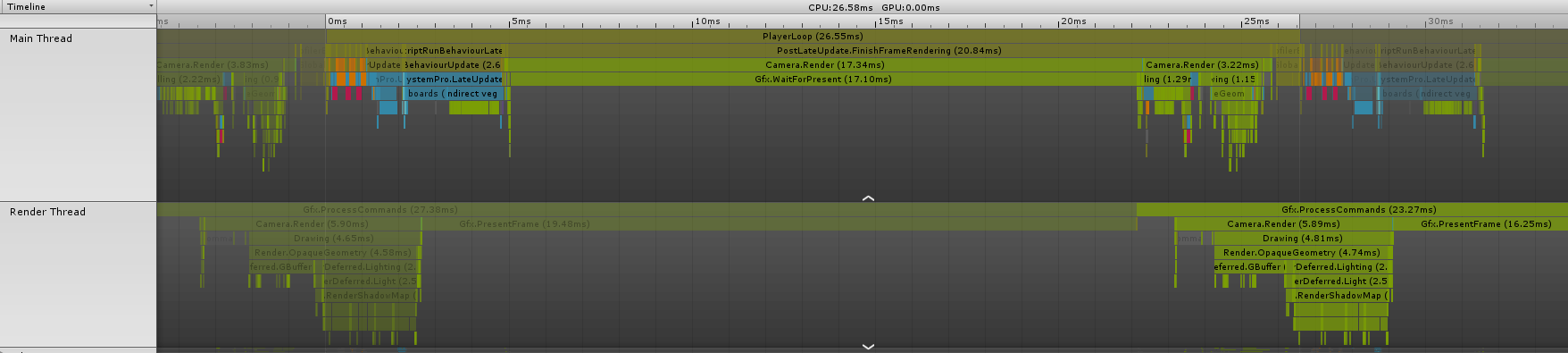
This is the profiler for when it’s in the editor
This is what the profiler looks like for when I do a stand alone build
The big difference seems to be the Gfx.WaitForPresent taking about 17ms
Is there any reason why this would be happening in a stand alone build rather than in the editor? in my previous experience the game usually runs better in a stand alone build as the editor has all other kinds of overheads.
When looking at the hierarchy i can see that in the editor it has Camera.Render directly under PlayerLoop, but in the build under PlayerLoop is PostLateUpdate.FinishFrameRendering and then under that is Camera.Render
when playing in the editor.
When playing in the stand alone build.
Do you have any ideas for what could be going on?
My first guess would be that in the editor you’re rendering it at a lower resolution than in the build. Have you confirmed that these are the performance results when running both the in-editor and build versions at the same screen resolution?
That was a good idea. I was not running them at the same resolution for my tests, I’ve now fixed that and I am testing with the same resolution and my results are about the same as they were before. Still a massive difference in performance between in editor and in build.
Do you have two GPUs? My next guess is the build is targeting your built-in GPU instead of your dedicated GPU? Assuming you have two GPUs?
I only have 1 gpu, a 1070. and by the way my computer’s fans fire up I reckon that’s the one that is being used.
Huh, I thought there were nearly no CPUs in circulation anymore that don’t also have an integrated GPU…
Are both Editor and Player running at the same tier according to the Quality Settings? Because the Player is definitely GPU bound, while the Editor is not. Fillrate-boundness is just a likely suspect and it could be some post FX, higher tier shader variants, different Graphics API (OpenGL vs DirectX?) or something along those lines that’s affecting this.
Also, in your Editor Profile you had the GPU profiler active, which added a considerable amount of overhead to the GPU timings so it’d likely be even more CPU bound in the Editor.
Might be you’ll have to use NVIDIA NSight or Render Doc to analyze this.
my cpu probably has a built in gpu, but i don’t think it would be performing better if it was running on that compared to my 1070.
yeah I have set the quality to the same in the editor and the build.
How can I check if it’s Fillrate related?
Would fill rate, post fx, shader varients, graphics apis etc mean that the editor would run significantly faster than the build?
I’ll check out Nividia NSight and Render Doc to see what they are about and if they can help me out.
I’ve just got no idea why there is the waiting for the gpu in the build but not the editor.
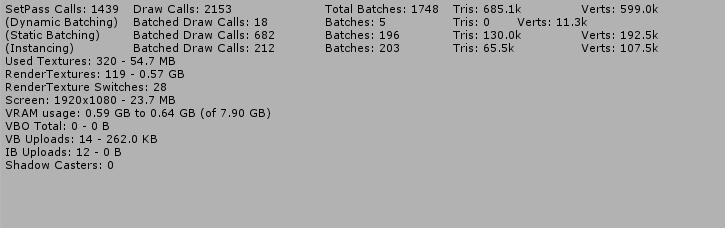
ok, now this is interesting, when looking at the Rendering tab on the profiler…
This is what I get from my stand alone build
This is what I get for my editor
Just ignore me.
I just realised that after spending a few days pulling my hair out over this that in the editor i had it set to High quality but in the stand alone build i was checking Very High quality… I’m an idiot. carry on with you day, nothing to see here. #facepalm
Did just the quality setting make that big of a difference? I’m used to quality making some difference to performance, but nowhere near the level you seem to be seeing. A few FPS difference maybe. Are you now finding the built game runs faster than in the editor, as long as they’re both using the same quality settings?
yeah the built game is running faster than in editor.
I have a lot of things connected to the quality setting, eg my vegetation, clouds in the sky, textures, shadows etc. so when I change quality settings i get solid performance changes
Yeah it’s more that sometimes an app gets started with and uses the built-in GPU instead of the dedicated one and then you’d see a lower performing app. Task Manager does show which GPU is used for each app so it’s easy to check if that’s the case but it looks like you found the current issue in the Quality Settings. The things you mentioned do make sense to be more taxing on the GPU too so that checks out. Glad that this thread helped