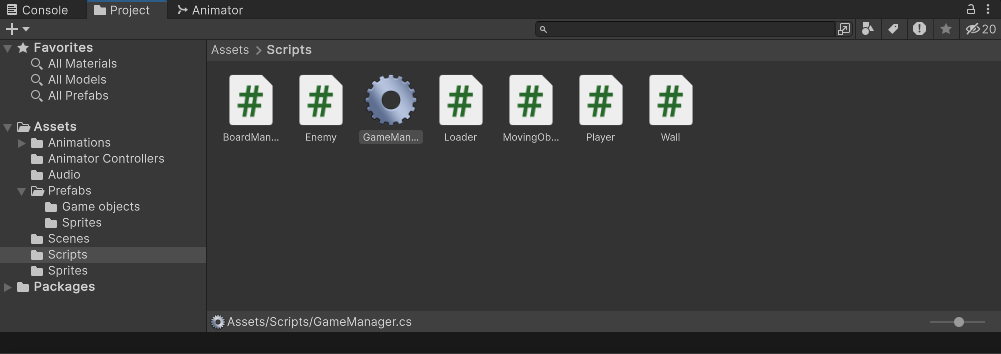
Hello, I just realised that the gear icon of GameManager.cs is not visible, has this feature been removed in the new version or is it a bug?
Editor Version: 2022.3.181f
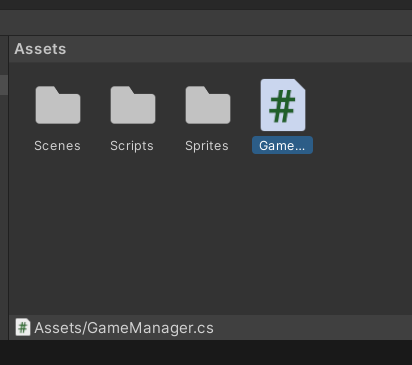
Hello, I just realised that the gear icon of GameManager.cs is not visible, has this feature been removed in the new version or is it a bug?
Editor Version: 2022.3.181f
I think Version: 2022.3.181f bug
The icon doesn’t actually mean anything though.
It doesn’t and frankly I don’t think it should change its icon like this in the first place. This is something that should be user assigned, not filename based.
That said, it does seem strange it’s not changing for the OP considering how the other versions of Unity I have all do this,
Were there any errors in the console when you created the script? Because if there is an error preventing code from being compiled it will likewise prevent the gear icon from being assigned. I’ve also observed it not always assigning the gear icon once the error has been resolved. Moving the script to a new folder can fix this.
Either way if having an icon for the script is important you can just assign one yourself.
It was intentionally removed, I saw it somewhere in the patch notes a few weeks ago.
See: Unity Issue Tracker - Script file has a gear icon when having the “GameManager” class name
I think it’s a bug caused by the version, I add it manually myself, I prepared the icon, if anyone wants icon here.

That’s the one I got. Nothing to do with the usual gear icon, it’s a circular saw!
Since you added yours manually, where can I put that one so that I can use it instead of the default one?

Yes you can use it mine is the default icon, I looked on the internet and there was no internet, I prepared it, I took a screenshot from the old version and edited it. 
Yeah, this was never intentional behaviour - it’s a long-standing bug that we finally fixed. As @Ryiah says it’s possible to set the icon yourself manually if you want.
What?
What?
This thing the engine has done since at least Unity 4 was a bug?
Yes.
And it persisted for over a decade because…?
It’s a surprising behaviour with a file icon - not exactly near the top of our priority list. We actually previously decided that it wasn’t something we’d ever get around to fixing, but it got reported again late last year and someone happened to pick it up.
Sure, it’s not high priority, but no priority feels pretty absurd. If the context menu said “Create new C# Scropt” I imagine that would get pretty fast. It’s not exactly like this behaviour was unknown or anything, and the fact this thread exists at all shows that it was even expected behaviour to the point where three people in this thread all operated under the assumption that it not happening was the bug.
Ah, that one looks better. 

You’re right, yours looks better than the original.
I really hope that the fix was to change the keyword / icon pairs to be Easter Eggs, rather than remove them entirely.
If that isn’t how it was fixed, please consider this a feature request.
Okay, I added a new icon for my game manager script but what if I want the original # instead? What if I don’t want to add a new icon each time I create a new project?