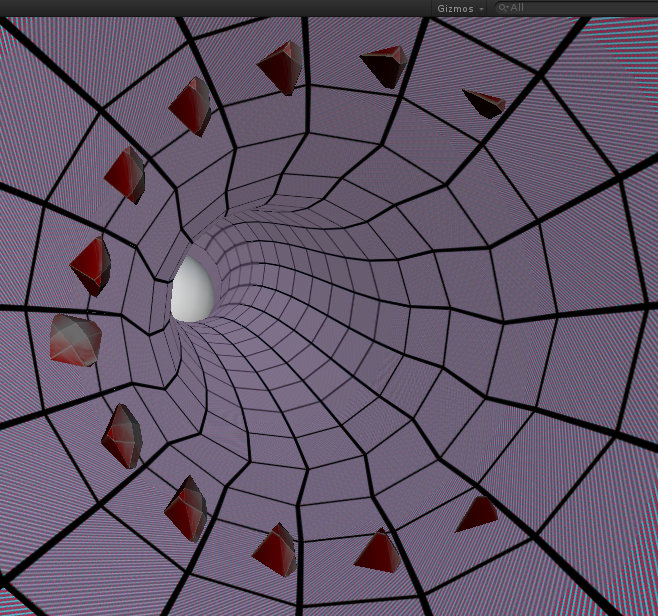
i have a tube that contains several separated rectangle shaped mesh objects. My goal is to spawn an object in the center of each rectangle and face perpendicular to the rectangle surface
On each separated rectangle i have this code:
Mesh mesh = GetComponent<MeshFilter>().mesh;
        int[] triangles = mesh.triangles;

        Vector3 n0=Vector2.zero,n1=Vector2.zero,n2=Vector2.zero;
        for (int i = 0; i < mesh.triangles.Length; i += 3)
        {
            n0 = mesh.vertices[mesh.triangles[i + 0]];
            n1 = mesh.vertices[mesh.triangles[i + 1]];
            n2 = mesh.vertices[mesh.triangles[i + 2]];
        }

        Vector3 a = Vector3.Cross (n1 - n2, n2 - n0).normalized;

        Instantiate(prefab, transform.renderer.bounds.center,Quaternion.LookRotation(a));
You can omit the Euler to invert the rotation and you can try changing the transform.up to transform.forward or right (depending on the tube orientation).
yes i tried the code but the didnt solve it unfortunately . Also the transform.up points to the same direction for all objects (not perpendicular) , i think it cannot be seeing clearly from pics above … take a look at this new pic with the first code you suggested
just a quick update… i found that (in my original code) if dont use “transform.renderer.bounds.center” location in the instantiate function but use “mesh.bounds.center” the rotation is correct but position is way off
If your asset is facing the z axis when imported, doing “obj.transform.foward = direction to face” should suffice.
To illustrate the exemple i made you a sample project with a scrolling inifinte tube that you can download here: https://www.sugarsync.com/pf/D2307301_98582733_600566
Sorry for the late reply , i had some free time today and tested isGreen code and it solved my issue
everything works as it should be , thank you for helping me out.
I will also test the Yseron source with procedural mesh as it looks interesting.