GetComponent can't recognize a component in another GameObject even though referenced correctly.

I have a car which is made with Unity Standard Assets, and a cube inside of it as a trigger. Once my player steps in the cube and presses E, a script disables the player movement and camera control, and enabled a camera inside the car, as well as the car controls… in theory that is. Everything works fine, up until the enabling the controls. the code has 2 variables, one for the player, one for the vehicle camera, and one for the vehicle itself.

the car gameobject has 3 components: “Car Controller”, “Car User Control”, and “Car Audio”. By default, these are disabled so that the player doesn’t control the car when not in the car, and the script just enables these components when the player presses E and “enters the car”. Someone said that GetComponent cannot recognize disabled components, but many others, including the youtube tutorial, say it does.

The vehicle camera is a child of the car, and so is the trigger block. The problem is that when the script gets to “GetComponent();”, I get a NullReferenceException. Many forum threads, including another one I made troubleshooting this error have said that the variable isn’t assigned any game object. I made sure that it is, and that the gameobject it’s assigned (the car) has all 3 components. I’m new to unity and coding, and a lot of threads say that getcomponent can’t be used for a gameobject that the script isn’t assigned to. The funny thing is that I used a youtube tutorial for this, and I followed the tutorial step for step, watching it over 20 times the make sure I did nothing wrong. Yet I still get this problem. I’ve tried modifying the code but to no avail.

The Code:

using System.Collections;
using System.Collections.Generic;
using UnityEngine;
using UnityStandardAssets.Vehicles.Car;

public class VehicleEntry : MonoBehaviour
{
    public GameObject vehicleCam;
    public GameObject thePlayer;
    public GameObject liveVehicle;
    public bool canEnter = false;

    void Update()
    {
        if (canEnter == true)
        {
            if (Input.GetKeyDown(KeyCode.E))
            {
                this.gameObject.GetComponent<BoxCollider>().enabled = false;
                vehicleCam.SetActive(true);
                thePlayer.SetActive(false);
                liveVehicle.GetComponent<CarController>().enabled = true;
                liveVehicle.GetComponent<CarUserControl>().enabled = true;
                liveVehicle.GetComponent<CarAudio>().enabled = true;
            }
        }
    }

    void OnTriggerEnter(Collider other)
    {
        if (other.tag == "Player")
        {
            canEnter = true;
        }
    }

    void OnTriggerExit(Collider other)
    {
        canEnter = false;
    }


}

7288174--881443--upload_2021-7-1_0-36-52.png
These are all the variables under inspector, and they are assigned correctly. Live vehicle is assigned to a GameObject named car, which is the parent of the trigger block that this script belongs to.
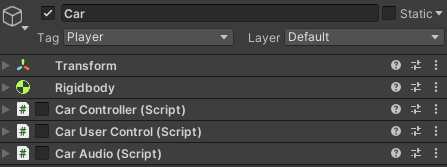
7288174--881449--upload_2021-7-1_0-37-55.png
the GameObject “Car”, which I just mentioned as the parent has all 3 components.

I believe that this is probably a rookie mistake, but for the life of me I cannot comprehend or find what I did wrong. What’s even worse is that I followed the tutorial correctly! I’m still trying to learn C# and unity, so I really appreciate detailed explanations and help. Thank you in advance to anybody who can assist me with my problem, and I apologize for the poor souls who have to read my giant text wall.
As I said in the other thread, try some code like this, see what you find:

// put this in Start() on your script above.
        {
            var AllMBs = liveVehicle.GetComponents<MonoBehaviour>();
            foreach( var mb in AllMBs)
            {
                Debug.Log( "Found a " + mb.GetType());
            }
        }

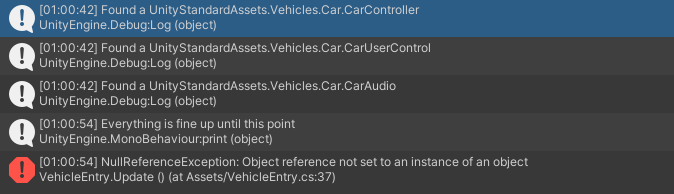
7288195--881458--upload_2021-7-1_1-1-18.png
this is the console log

Do you have your OWN script called CarController? (or CarUserControl or CarAudio) ?

If so, your GetComponent() calls may be trying to find one of those rather than a Unity component called UnityStandardAssets.Vehicles.Car.CarController, which is what is actually on the car.

No, those 3 scripts are just found under the standard asset. The only script made by me is the one I sent.

And if you right-click on CarController inside of your GetComponent() code and say “Go to declaration” does it take you into the standard assets assembly(ies) ?

Also, what happens if you put in at the very top of the Start() method also a:

Debug.Log( "Hello from " + name);

Do you only see one of those?

I’m not sure about that. I will get back to you in the morning since its late and I can barely open my eyes. Thanks for helping me so far and I’ll try that in the morning!

1 Like

You’re welcome… it is gonna be something silly like this I’m sure.

I just pulled up Standard Assets and wrote this script:

using UnityEngine;
using UnityStandardAssets.Vehicles.Car;

public class ReportMBs : MonoBehaviour
{
    void Start()
    {
        Debug.Log(GetType() + ".Start(): Hello from " + name);

        var AllMBs = GetComponents<MonoBehaviour>();
        foreach (var mb in AllMBs)
        {
            Debug.Log("Found a " + mb.GetType());
        }

        var cco = GetComponent<CarController>();
        Debug.Log("carcon = " + cco);

        var cuc = GetComponent<CarUserControl>();
        Debug.Log("caruser = " + cuc);

        var cau = GetComponent<CarAudio>();
        Debug.Log("caraud = " + cau);
    }
}

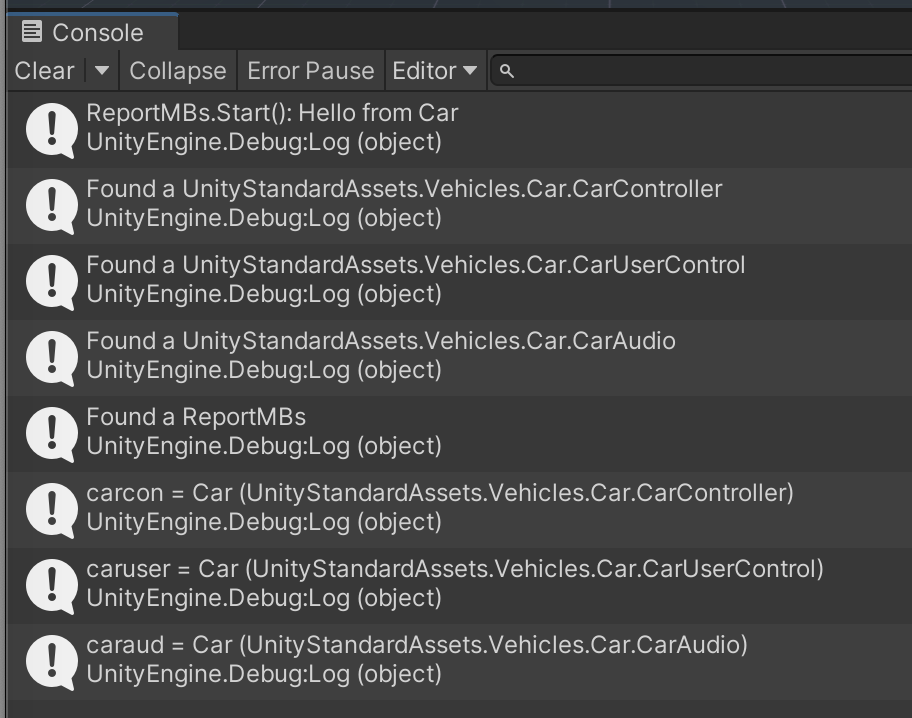
Stuck it on the Car prefab in the Car.unity scene and ran it and everything worked as expected:

7288270--881470--Screen Shot 2021-06-30 at 10.31.14 PM.png

When I make my own local not-namespaced CarController.cs file, the error starts to look a LOT like yours:

7288270--881473--Screen Shot 2021-06-30 at 10.34.48 PM.png

Note how carcon is quietly not found because I’m looking for my own CarController, not the one that’s actually on the prefab.

Perhaps try fully-qualifying your GetComponent() calls?

7289182--881746--upload_2021-7-1_8-27-22.png
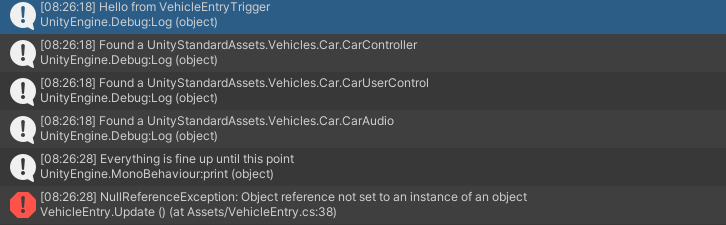
Good morning. I ran it with the bit you told me to add, and this is what the console says.

What does this mean?

I wrote the code in visual studio and when I right click it, it doesn’t do anything. It’s just white text

He means including the namespace in order to differentiate the Components, but that would require actually making a namespace for your classes to be in.

I would suggest just changing the name of your CarController class to a Component that doesn’t already exist.

I’m not sure if this has anything to do with it, but the script is attached to a child of the car, not the car itself. So the script is attached to like a collision box that detects if a player is inside it and then the script calls the components of the collision box, which is the car.

I tried that, but it just spawns all sorts of errors so I changed it back

That’s a huge difference, your VehicleEntry script should be given a reference to the object the scripts are on, not just the car.

Alternatively, you could use GetComponentInChildren() instead, but is more expensive.

1 Like

By scripts I’m assuming you mean the components? and all those are under the car and referenced properly.

This is 100% your problem. GetComponent() specifically finds components RIGHT HERE ON THIS GAME OBJECT. It says so in the docs, it has always been this way. You’re looking somewhere the ReportMB script is not even attached!!!

I am putting you on a three-month timeout from using GetComponent(): go make public references in your child script and DRAG the actual scripts into them, like a real Unity user does. (Just kidding, but this is 100% the problem: you’re looking for something that isn’t there.)

so I drag the 3 scripts in car into the public references I make in the child script?

Yep yep, just like all stuff in Unity.

Referencing variables, fields, methods (anything non-static) in other script instances:

https://discussions.unity.com/t/833085/2

https://discussions.unity.com/t/839310