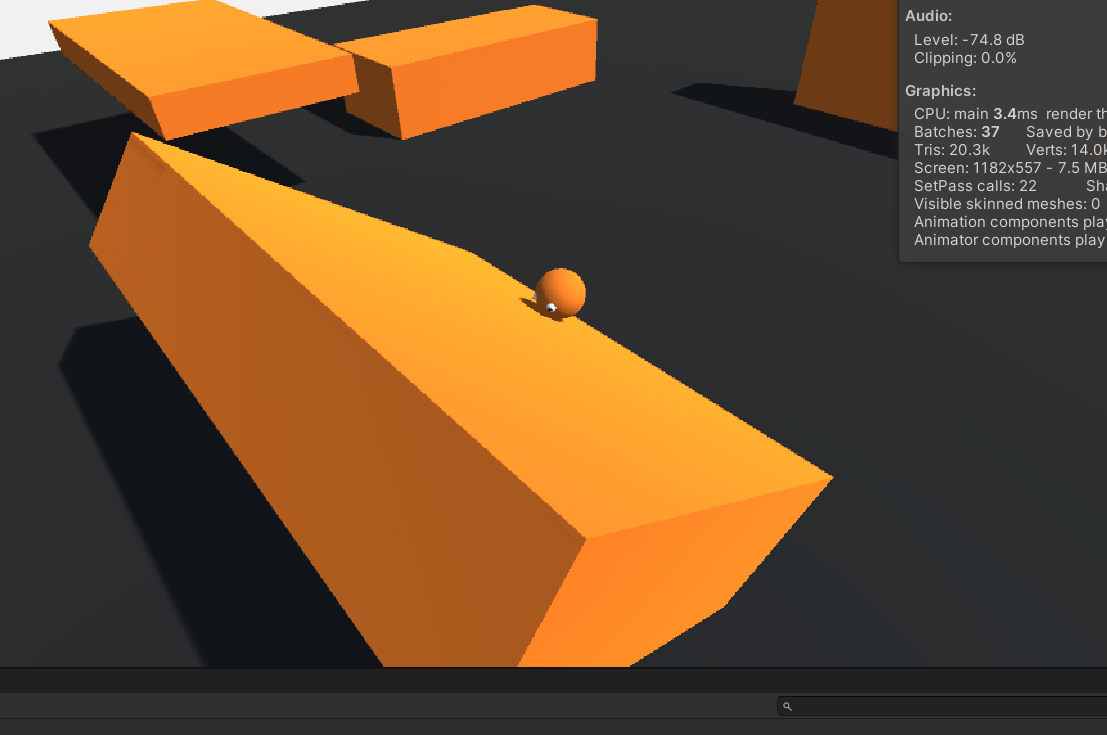
I’m currently working on a little prototype and I’m having trouble figuring out the best way to rotate the player when they’re on a slope. I’d like to rotate a child playerModel object instead of the parent player object because I froze the parent’s x, y, and z rotation. Here’s what my hierarchy looks like:
Here’s my code ( the important part is in Update() ):
// refs
    Rigidbody rb;
    Transform orientation, playerModel;

    [Header("Movement")]
    public float moveSpeed, speedMultiplier;
    float vertInput, horInput;
    Vector3 moveDirection;

    [Header("Drag")]
    public float groundDrag, airDrag;
    float playerHeight;

    [Header("Jumping")]
    public float jumpForce, jumpCoolDown, fallMultiplier;
    public LayerMask whatIsGround;
    bool grounded, readyToJump;

    // Slopes
    RaycastHit hit;
    Vector3 slopeDirection;

    void Awake() {
        rb = GetComponent<Rigidbody>();
        orientation = transform.GetChild(1);
        playerModel = transform.GetChild(0);
        playerHeight = playerModel.localScale.y; // Height of model
    }

    // Update is called once per frame
    void Update()
    {
        // Do input logic in Update.
        GetInput();
        MovePlayer();
        ControlDrag();

        if (OnSlope()) {
            // rotate playerModel to match the slope's angle.
        }
    }
and here’s the slope detection function:
public bool OnSlope() {
        // Create a raycast of length 1 at the player's base.
        // If the normal isn't equal to Vector3.up, it means that the player is on a slope.
        if (Physics.Raycast(transform.position + new Vector3(0f, playerHeight * 0.5f, 0f), Vector3.down, out hit, 1f)) {
            if (hit.normal != Vector3.up) {
                return true;
            }
        }
        return false;
    }
The playerModel is the sphere, and that’s what I need to rotate to match the slope. I feel that there’s a simple solution to this, but I need some ideas.
You already have the main ingredient hit.normal in OnSlope(), i.e. the “up” vector of the ground. The next ingredient is Quaternion.FromToRotation with which you can create a quaternion that describes a rotation from the world up vector (0, 1, 0) to that ground up vector.
Thanks for the advice. I tried doing just that but the player ended up snapping in one direction all of the time. I’d like to keep the flexibility of the player model looking around while still pointing slightly up the slope. Here’s a video of what I mean:
Also, here’s my code:
bool OnSlope() {
        if (Physics.Raycast(transform.position, Vector3.down, out hit, playerHeight * 0.5f + 0.2f)) {
            if (hit.normal != Vector3.up) {
                return true;
            }
        }
        return false;
    }
I also tried setting the player model’s forward direction to the normalized Vector3 resulting from using Vector3.ProjectOnPlane() with the player’s move direction and the slope’s normal.
 void Update()
    {
        // Do input logic in Update.
        GetInput();
        MovePlayer();
        ControlDrag();

        slopeForward = Vector3.ProjectOnPlane(moveDirection, hit.normal).normalized;
    }
However, this doesn’t work either. The player ends up looking in the right direction, but only when they are actively moving. Even then, it’s very buggy and doesn’t work half of the time.
UPDATE: instead of projecting the player’s move direction on the plane with hit.normal, I projected playerModel.forward instead. Now I’m getting the visual effect I wanted, but I’m still going to smooth it out to see if it can look any better.
I figured out how to solve this issue perfectly. For anyone wondering how to do the same with cinemachine and third-person, here’s my code
public class CameraLogic : MonoBehaviour
{
    PlayerMovement pm;
    Transform orientation, player, playerModel;
    Rigidbody rb;
    public float smoothTime;
    float turnSmoothVelocity;

    void Awake()
    {
        Cursor.lockState = CursorLockMode.Locked;
        Cursor.visible = false;

        pm = FindObjectOfType<PlayerMovement>();
        player = GameObject.Find("Player").transform;
        playerModel = GameObject.Find("Player").transform.GetChild(0);
        orientation = GameObject.Find("Player").transform.GetChild(1);
    }

    // Update is called once per frame
    void Update()
    {
        // Get relative forward direction by finding the distance between the camera and player.
        Vector3 viewDir = player.position - new Vector3(transform.position.x, player.position.y, transform.position.z);
        orientation.forward = viewDir.normalized;

        // Get horizontal and vertical input.
        float horizontalInput = Input.GetAxis("Horizontal");
        float verticalInput = Input.GetAxis("Vertical");

        // Get the combined direction of the horizontal and vertical inputs.
        Vector3 inputDir = orientation.forward * verticalInput + orientation.right * horizontalInput;
        Vector3 slopeForward = Vector3.ProjectOnPlane(playerModel.forward, pm.hit.normal).normalized;

        // Decide how to rotate the player depending on their position.
        if (inputDir.magnitude >= 0.1f && !pm.OnSlope()) {
            // If the player is not on a slope, rotate the player model
            // to the direction of the input.
            playerModel.forward = Vector3.Slerp(playerModel.forward, inputDir.normalized, smoothTime);
        } else if (inputDir.magnitude >= 0.1f && pm.OnSlope() && slopeForward != Vector3.zero) {
            // If the player is on a slope, rotate the player model according to the sum
            // of the direction of the input and slopeForward.
            playerModel.forward = Vector3.Slerp(playerModel.forward, inputDir.normalized + slopeForward, smoothTime);
        }
    }
}
The logic here is that we’re going to rotate the player according to the direction of the input when they’re not on a slope. When they are on a slope, we’ll rotate them according to the sum of the direction of input and the player model’s forward direction projected onto the slope using the slope’s normal. This will keep the original rotation based on the horizontal and vertical input information, but it’ll also shift that rotation slightly upwards or downwards to match the slope. Hope this helps!