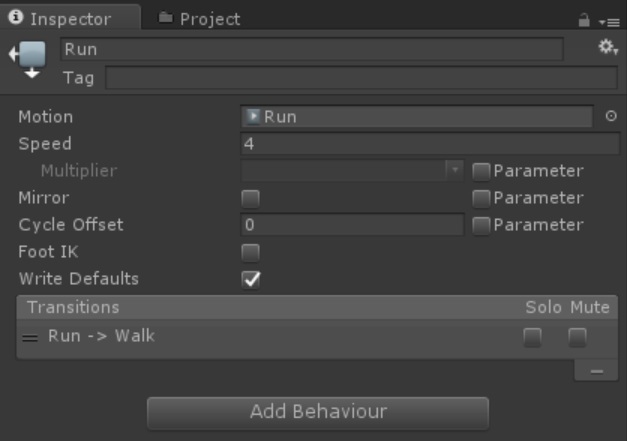
I have been loosing my mind for a while now trying to learn all this. I finally switched all of my Animation from Legacy to Humanoid so that I could use the Animator Controller and yet I still am running into the same problem (And then some) I originally was trying to run the Animations through the Legacy and could not get the speed of the animations right in the scripting, nor able to call on Run animation whil I was walking. and so switched everything to Humanoid. Now I can not get it to change the Int so that it calls up the different animations AND it wobbles my Camera left and right with the Idle process… PLEASE I am totally lost on what to do. I am running 5.4
public class UnitPlayer : Unit
{
    private Animator animator;

    // Use this for initialization
    public override void Start()
    {
        animator = GetComponent<Animator>();
        base.Start();
    }

    // Update is called once per frame
    public override void Update ()
    {
        // rotation

        transform.Rotate (0f, Input.GetAxis ("Mouse X") * turnSpeed * Time.deltaTime, 0f );

        // movement

        move = new Vector3(Input.GetAxis("Horizontal"), 0f, Input.GetAxis("Vertical"));

        move.Normalize();

        move = transform.TransformDirection(move);
        animator.SetInteger("Speed", 1);

        if (Input.GetKey (KeyCode.Space) && control.isGrounded)
        {
            jump = true;
        }

        running = Input.GetKey(KeyCode.LeftShift) || Input.GetKey(KeyCode.RightShift);
        animator.SetInteger("Speed", 2);
        // animation


        base.Update();
    }
}
using UnityEngine;
using System.Collections;

[RequireComponent (typeof (CharacterController))]

public class Unit : MonoBehaviour
{

    protected CharacterController control;

    protected Vector3 move = Vector3.zero;

    public float walkSpeed = 4f;
    public float runSpeed = 8f;
    public float turnSpeed = 15f;
    public float jumpSpeed = 5f;

    protected bool jump;
    protected bool running;

    protected Vector3 gravity = Vector3.zero;

    // Use this for initialization
    public virtual void Start()
    {

        control = GetComponent < CharacterController >();

        if (!control)
        {
            Debug.LogError("Unit.Start[) " + name + " has no CharacterController!");
            enabled = false;
        }
    }

    // Update is called once per frame
    public virtual void Update()
    {
        // control.SimpleMove(move * moveSpeed);

        if (running)
            move *= runSpeed;
        else
            move *= walkSpeed;

        if (!control.isGrounded)
        {
            gravity += Physics.gravity * Time.deltaTime;
        }
        else
        {
            gravity = Vector3.zero;

            if (jump)
            {
                gravity.y = jumpSpeed;
                jump = false;
            }
        }

        move += gravity;

        control.Move(move * Time.deltaTime);
    }
}
and this is my failed attempt at making the Animations work with Legacy and everything in Javascript
#pragma strict

function Start () {


}

function Update () {

    if (Mathf.Abs(Input.GetAxis("Vertical")) > 0.1)
    {
        //animator.SetInteger("Speed", 1);

    }
    else
        // (Mathf.Abs(Input.GetAxis("Vertical")) < 0.1)
    {
       // animator.SetInteger("Speed", 0);
    }

    if (Mathf.Abs(Input.GetAxis("Vertical")) > 8)
    {
       // animator.SetInteger("Speed", 2);
    }
}
   // if (Input.GetKey ("w") || Input.GetKey ("s"))
    //{
      //  GetComponent.<Animation>().Play("Walk");

    //}
    //{
      //  if (Input.GetKey (KeyCode.LeftShift) || Input.GetKey (KeyCode.RightShift))
        //{
          //  GetComponent.<Animation>()["Run"].speed = 10.0f;
           // GetComponent.<Animation>().CrossFade("Run");
       // }
       // else
        //{
         //   GetComponent.<Animation>().CrossFade("Idle");
        //}
  //  }
Someone PLEASE help!