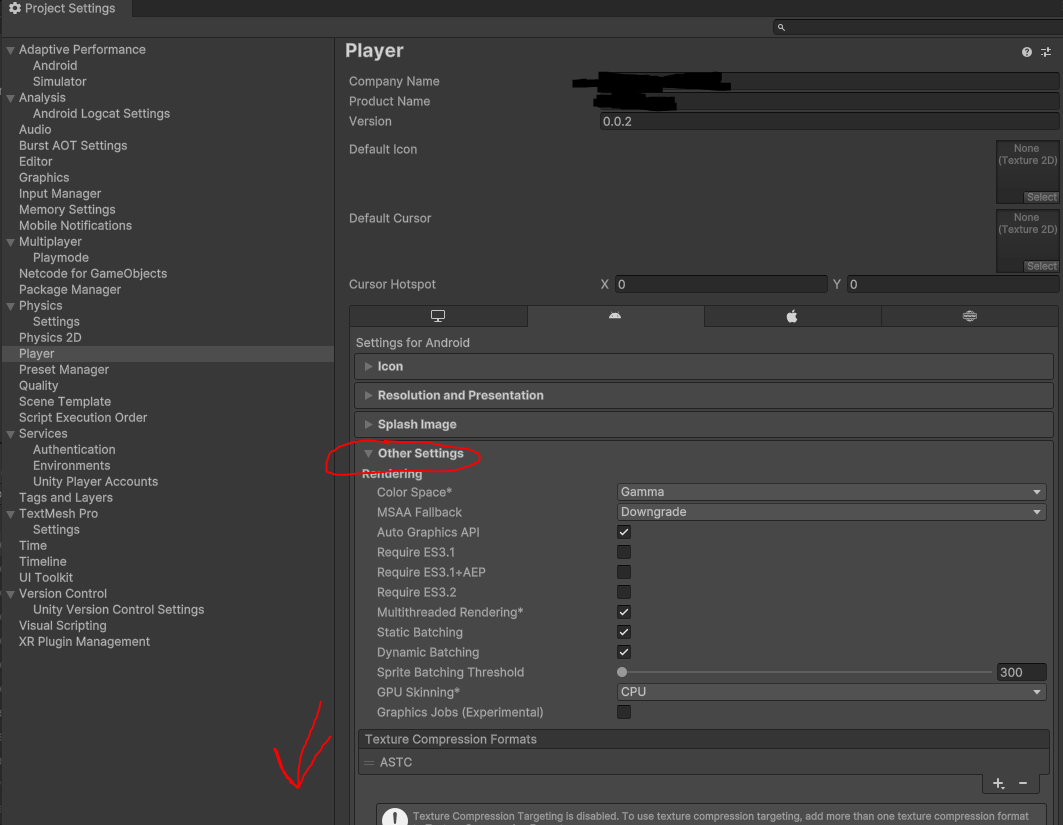
I’m trying to create a build for Android, specicially the Google Play store.
I’ve already deployed v0.0.1, and now I’d like to deploy v0.0.2. So I’ve changed the version to that in the Player Settings.
But when I build the aab and upload it to the Google Play console, I get an error:
“Version code 1 has already been used. Try another version code.”

How do I change the version away from “Version code 1”?
This number is labeled Bundle Version Code: in Unity3D’s Player Settings.
EDIT: Bundle Version Code is located under Other Settings in the Player Settings.
This value corresponds to what Google calls versionCode
It has absolutely nothing to do with your application’s “Version.”
Bundle Version Code is an integer.
You may only upload one binary for each possible number.
Any release channel in Android must only ever go UP in number.
See Google Play docs for more.
Thank you
For reference, since you didn’t mention where this value can be changed:
Project Settings > Player > Android > Other settings > Identification > Bundle Version Code