How do I make a "Ready" button for a multiplayer game?

I want to make a multiplayer card game for a school project. The game has 6 turns and both players have to press “Ready” in order for the game to advance to the next turn (like Marvel Snap).

Both players have a NetworkVariable attached to their prefab which becomes true after the button is pressed and the button becomes uninteractable until the start of the next turn.
I had a lot of problems when trying to implement this so I made a simple test scene with just a button where all I wanted was to have the button increment a NetworkVariable if the button was pressed by the host and decrement if it was pressed by the client.
The problem is that it doesn’t update on either side and the NetworkObject component that’s on the GameObject with the script for testing isn’t spawned on the Host’s side by default. I have to spawn it in the Inspector or via code and from what I understood from the documentation it should have spawned by default (it does for the other GameObjects and it is in the Network Manager prefab list like the others). This GameObject and the button are spawned in the scene, before (?) the players join.
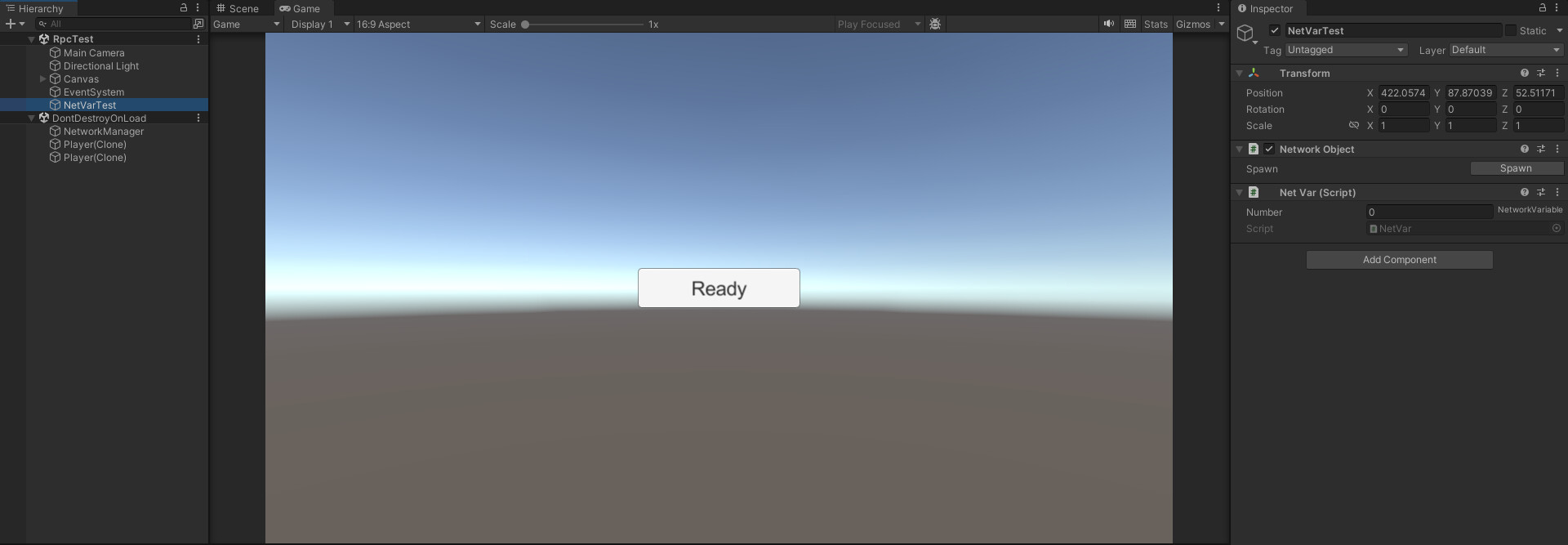
This is what it looks after I spawn the NetworkObject component on the Host:

9580399--1356439--upload_2024-1-14_7-17-0.png

This is what it looks on the Client:
(I get 4 errors with the default values)
9580399--1356442--upload_2024-1-14_7-17-55.png

Here is the code I initially tested with:
The button’s onClick() is assigned the pressedBy() function.

using Unity.Netcode;
using UnityEngine;

public class ReadyButton : NetworkBehaviour
{

    [SerializeField]
    public NetworkVariable<int>test; //test integer
   

    [ServerRpc(RequireOwnership =false)]
    public void RpcExampleServerRpc(int type)
    {
        if (type==1)
        {
            Debug.Log("ServerRpc called by the host!!");
            test.Value++;
        }
        else
        {
            Debug.Log("ServerRpc called by the client!");
            test.Value--;
        }
    }
    public void presedBy()
    {
        //initially tried with a ServerRpc but it only worked when called by the Host (and only incremented on the Host's side)
        //couldn't make the Client's side work since it has to be on the Server
        if(NetworkManager.IsServer)
        {
            test.Value++;
            //RpcExampleServerRpc(1);
           
        }
        else
        {  
            //this was a little different initially, if RpcExampleServerRpc(2) ran like it is now it would give a missing Dictionary error
            test.Value--;
            //RpcExampleServerRpc(2);
        }
       
    }
    void Start()
    {
       
        if(NetworkManager.IsServer)
        {
            //Spawning the Host's NetworkObject Component
            this.GetComponent<NetworkObject>().Spawn();
            test.Value=0;
        }
       
    }

}

It didn’t work so I tried this code (which also doesn’t work):
The button’s onClick() is assigned the onPress() function.

using System.Collections;
using System.Collections.Generic;
using Unity.Netcode;
using UnityEngine;

public class NetVar : NetworkBehaviour
{
    [SerializeField]
    public NetworkVariable<int> number;


    public void onPress()
    {
       
        number.Value++;
       
    }
}

At this point I’m lost. I don’t know what else to test or change to make the button work. I didn’t have these problems when I made a ServerRpc button in the menu (which is the first scene) to test its functionality.

Is ReadyButton already in the scene, as it looks like it needs to be. Make liberal use of debug logging to see what’s going on.

As your player is spawning fine here’s a quick example using that to trigger a change in the network bool variable.

This class creates the connection and finds the correct local player.

 public class ReadySceneController : MonoBehaviour
    {
        Player player;

        void Start()
        {
            Application.targetFrameRate = 15;

            NetworkManager.Singleton.OnClientConnectedCallback += OnClientConnected;

            if (!ParrelSync.ClonesManager.IsClone())
            {
                NetworkManager.Singleton.StartHost();
            }
            else
            {
                NetworkManager.Singleton.StartClient();
            }
        }

        private void OnClientConnected(ulong clientId)
        {
            Debug.Log("ReadySceneController OnClientConnected: " + clientId);

            if (NetworkManager.Singleton.IsHost)
            {
                if(clientId == NetworkManager.ServerClientId)
                {
                    player = NetworkManager.Singleton.LocalClient.PlayerObject.GetComponent<Player>();
                }
            }
            else
            {
                player = NetworkManager.Singleton.LocalClient.PlayerObject.GetComponent<Player>();
            }
        }

        public void OnClickReady()
        {
            Debug.Log("ReadySceneController OnClickReady");

            player.IsReady = true;
        }
    }

And the player class where the owner has permission to change the bool value and trigger the OnValueChanged call.

    public class Player : NetworkBehaviour
    {
        [SerializeField] NetworkVariable<bool> isReady = new NetworkVariable<bool>(false, NetworkVariableReadPermission.Everyone, NetworkVariableWritePermission.Owner);

        private void Awake()
        {
            isReady.OnValueChanged += OnReadyChanged;
        }

        private void OnReadyChanged(bool previousValue, bool newValue)
        {
            Debug.Log($"Player {NetworkObjectId} isReady: {newValue}");
        }

        public bool IsReady { get => isReady.Value; set => isReady.Value = value; }
    }

Arguably using an rpc over client permission is the better option and it shouldn’t take much to work that way instead.

It works! Thank you very much.

Follow-up question: How do I make it so both players’ isReady value becomes false after the turn counter increases?

private IEnumerator PlayGame()
    {
        while (currentTurn.Value < Turns.Value)
        {
            yield return new WaitUntil(() => player1.isReady.Value==true && player2.isReady.Value==true); //works

            if(currentTurn.Value>Turns.Value)
            {
                break;
            }
           
            currentTurn.Value++;

            player1.isReady.Value=false; //works
            player2.isReady.Value=false; //doesn't work
          
           
            yield return new WaitForSeconds(1.0f);

        }

        Debug.Log("Game Over");
    }

When I run this code it says: “InvalidOperationException: Client is not allowed to write to this NetworkVariable”.
I understand why it happens: The Player’s NetworkVariableWritePermission is set to Owner and it can’t be set to Everyone.
I want to know how to fix this or a workaround. I tried ClientRpcs and I got a missing dictionary error.

Easiest option would be to remove the client permission and instead send an rpc when the client is ready and have the host change the isReady value itself. If you want to keep the client permission you could use a change in the currentTurn value to trigger resetting the ready value but I’d likely go with the first option.