How to add localization to a prefab with smart strings

Hi there, I’m trying to use smart strings in localization but I’m not able to figure out how to setup it correctly via script on a prefab.

I will present the situation below:

The DataRT class will manage informations given by 4 classes and will create, for each of them, a prefab (InfoDataListItem), which is a UI Information Panel with 4 texts showing informations.
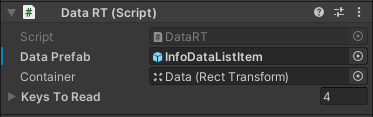
8371944--1103454--upload_2022-8-18_12-45-9.png
DataRT Script with InfoDataListItem prefab reference

8371944--1103460--upload_2022-8-18_12-51-37.png
Prefab InfoDataListItem

InfoDataListItem has the following structure (left) and setup (right):

8371944--1103472--upload_2022-8-18_12-56-19.png

Every text (Title UI, Subtitle UI, etc…) references to its relative TextMeshPro text.

Only SubTitle texts are SmartStrings and the text structure is like this:

“last 5 min”, “last 25 min”

or

“last 5 sec”, “last 25 sec”

To generate strings like the examples above I created entries like:

So, there are two words (quantityTime and unitTime) to update every 5 sec, where quantityTime=5,10,15,… and unitTime=min,sec.

The text will be updated every 5 seconds by changing its values (quantityTime and unitTime) AND when the language is changed.

Now, the goals is to generate these prefabs at runtime, adding a LocalizeStringEvent component and setting up it.

With the following code:

// Get subtitle text
TextMeshProUGUI textToUpdate = uiElement.GetComponent<DataRTElement>().SubtitleUi;

// Setup LocalizeStringEvent
LocalizedString localizeString = new LocalizedString(data.DataRTValueLocalizer.TableName, data.DataRTValueLocalizer.SubtitleLocalized);

// Add local variables to update
localizeString.Add("quantityTime", new IntVariable { Value = 0 });
localizeString.Add("unitTime", new StringVariable { Value = "min" });

uiElement.GetComponent<LocalizeStringEvent>().StringReference = localizeString;

… I’m able to reach the result above:

Looking at the result:

  • the StringReference refers to the right table and entry :heavy_check_mark:.
  • the LocalVariables are assigned correctly, but they should come from another class which has the variables with updated values :x:.
  • I’m not able to setup UpdateString. There should be a reference to the text of Subtitle as the target text to be updated :x:.

Can anyone help me set everything up correctly? Thank you!

What class should the info come from? You should be able to provide the class with the variable so it can change the values.
E.G

var quantityTime= new IntVariable { Value = 0 };
localizeString.Add("quantityTime", quantityTime);
return quantityTime; // pass the variable to a controller so it can set it every 5 secs. When the value changes the localized string will auto update.

We set this up automatically with an Editor script when you click “Localize”. If you are adding the LocalizeStringEvent component yourself then you need to hook up the connection.

Something like:

uiElement.GetComponent<LocalizeStringEvent>().OnUpdateString.AddListener(s => textToUpdate.text = s);

It won’t appear in the editor because it was added via script. If you want it to appear in the editor then it needs to be added as a persistent event, which can only be done in Editor. Take a look at the package code to see how we do it

First, thank you so much for your help!

To simplify, three classes are involved in the text update process. Call them A, B and C.

  • C = generates new data values and notifies B.
  • B = receives data updated and invokes events to which A is subscribed, in such a way as to allow A to update the texts of the UI.
  • A = setups LocalizeStringEvent component and updates UI texts. The update happens through events.

The following code inside A is used to add and setup LocalizeStringEvent:

// Get subtitle text
TextMeshProUGUI textToUpdate = uiElement.GetComponent<DataRTElement>().SubtitleUi;

// Setup LocalizeStringEvent
LocalizedString localizeString = new LocalizedString(data.DataRTValueLocalizer.TableName, data.DataRTValueLocalizer.SubtitleLocalized);

// Add local variables to update
localizeString.Add("quantityTime", new StringVariable { Value = data.DataRTValueLocalizer.QuantityUnitTime.QuantityTime });
localizeString.Add("unitTime", new StringVariable { Value = data.DataRTValueLocalizer.QuantityUnitTime.UnitTime });

uiElement.GetComponent<LocalizeStringEvent>().StringReference = localizeString;
uiElement.GetComponent<LocalizeStringEvent>().OnUpdateString.AddListener(x => textToUpdate.text = x);

And the following code inside A is used to update texts with the new values:

if (CheckIfIsSmartIsTrue(data))
{
  if (uiElement.GetComponent<LocalizeStringEvent>() != null)
  {
    // Update smart parameters
    uiElement.GetComponent<LocalizeStringEvent>().StringReference.Arguments[0] = data.DataRTValueLocalizer.QuantityUnitTime.QuantityTime;
    uiElement.GetComponent<LocalizeStringEvent>().StringReference.Arguments[1] = data.DataRTValueLocalizer.QuantityUnitTime.UnitTime;

    return LocalizationSettings.StringDatabase.GetLocalizedString(
      tableReference: data.DataRTValueLocalizer.TableName,
      tableEntryReference: data.DataRTValueLocalizer.SubtitleLocalized);
  }
  else
  {
    return "0";
  }
}

The problem is that at lines 6. and 7. the Arguments are null, but they should not be. I first add and setup the LocalizeStringEvent and then I update the values. Are you able to tell me why these arguments are null? Am I doing a wrong usage or setup?

Oh, I didn’t know about the editor visibility issue. Maybe I’ll try to solve it too but first I would like to make it work .

Thank you so much!

The Arguments property is for script-provided arguments that are accessed via index, like String.Format works.
In your previous post you were using the PersistentVariables which are not stored in the Arguments.
To access them you treat the LocalizedString as an IDictionary<string, IVariable>.
e.g

var time = uiElement.GetComponent<LocalizeStringEvent>().StringReference["quantityTime"] as IntVariable;

I followed your advise but I’m still stuck in the same error as before:

OperationException : Error parsing format string: Could not evaluate the selector “quantityTime” at 8
Ultimi {quantityTime} {unitTime} en
--------^

The error comes from the line 5.

// Update smart parameters
uiElement.GetComponent<LocalizeStringEvent>().StringReference["quantityTime"] = data.DataRTValueLocalizer.QuantityUnitTime.QuantityTime;
uiElement.GetComponent<LocalizeStringEvent>().StringReference["unitTime"] = data.DataRTValueLocalizer.QuantityUnitTime.UnitTime;

return LocalizationSettings.StringDatabase.GetLocalizedString(
  tableReference: data.DataRTValueLocalizer.TableName,
  tableEntryReference: data.DataRTValueLocalizer.SubtitleLocalized);

QuantityTime and UnitTime are two StringVariable containing updated data.

That’s because you are using local persistent variables which are part of the localized string. Calling LocalizationSettings.GetLocalizedString will have no access to the variables. You need to call

uiElement.GetComponent<LocalizeStringEvent>().StringReference.GetLocalizedString()

Call SetReference on the localized string first if you need to change the table and entry.

Ah, now I understand! It’s working! Thank you so much

1 Like

I would love if someone makes a video-tutorial about SmartTags and Local variables. :sweat_smile: