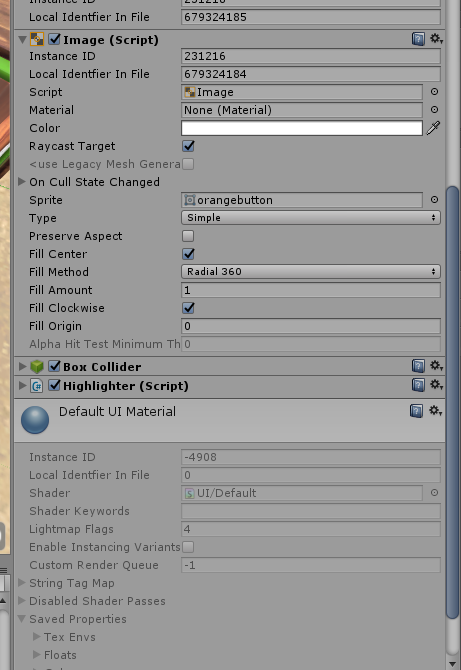
But I’m not facing the same problem with an Image. The image I’m using is a Sprite, and it does not contain any material. As shown below, it’s using “Default UI Material”, but all the settings for this are grayed out, and I’m not able to access this via a script.
Does anyone know what the solution is for this? Thanks.
I was able to fix this by changing the renderQueue of the transparent object via script.
I could not change the renderQueue of the material by setting the Custom Render Queue in the Editor. It always would revert back to 3000 (The default queue for transparent objects).
If Unity doesn’t want us to be able to manually change the renderQueue for transparent objects, then I wonder why it’s even editable in the editor? It seems to me that it should be grayed out.
I’d still like to know how to change the queue for UI elements though, so if you have any idea about this, let me know! Thanks.
You can create your own material in Unity Editor based on the Sprites / Defauls shader, for example, SpriteCustom. Then assign this material in Editor Render Queue = 5000 (Transparent + 2000) and assign this material to all Image components.