How to get Euler rotation angles exactly as displayed in the Transform inspector? [SOLVED]

This is an age old problem and I know there are tons of posts on using quaternions for rotation, and I understand gimbal lock, however I am still missing something…

What I want to do is read the current Euler angles for a transform, however the values I am getting do not match what I see in the inspector. Whatever Unity is doing in the Transform inspector to display the (Euler) rotation values, I want to match that. I understand that under the hood rotations are Quaternions, but how is this value then converted to the Euler display? Reading the eulerAngles value isn’t cutting it.

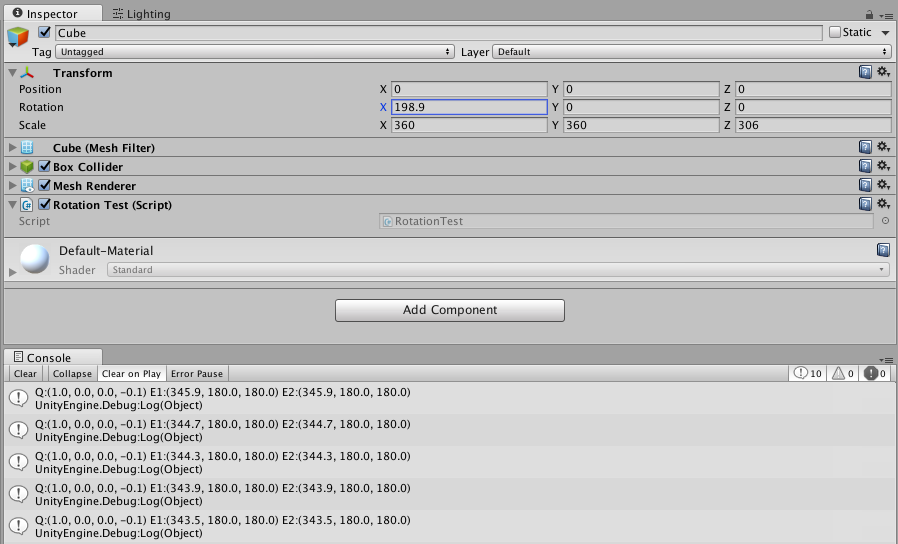
For example, when I manually input a rotation in the inspector of [180,0,0], I expect that when I read transform.localEulerAngles (or transform.localRotation.eulerAngles) that I will also get [180,0,0], however instead what I am getting is [0,180,180]. Furthermore, the rotations wrap around from 0-360, so if the inspector shows a value such as [0,720,0], the value I get from transform.localEulerAngles is [0,0,0]. Unity is obviously calculating these values in a different way.

So the big question is: how do I get the exact same Euler rotation values shown in the inspector?

Here is a very simple script that demonstrates the problem, and also a screenshot attached showing the object and console output.

using UnityEngine;
using System.Collections;

[ExecuteInEditMode()]
public class RotationTest : MonoBehaviour {

    void Update () {
        Debug.Log("Q:"+transform.localRotation+" E1:"+transform.localRotation.eulerAngles+" E2:"+transform.localEulerAngles);
    }
}

I’m hoping this is a simple fix. Appreciate you taking the time to read and for any help.

Thanks,
Stephen
2 Likes

The euler angles displayed in the inspector concern the local rotation. That’s how you can access them:

transform.localRotation.eulerAngles
1 Like

I think Stephen was asking about accessing fields in editor.
eulerAngles will return (0,300,0) no matter what, while editor will keep the exact value it accepted, like (0,300,0), (0,-60,0), (0,-420,0) and so on.
This kind of behavior.

If I remember correctly. EulerAngles allows you by code to do something like spin around 720 and it will spin twice, however if you check the value you get from eulerAngles after, it will return 0. One of my work projects involved a prize wheel and you had to be careful because code wise you always got a number from 0-360, but I think in the inspector it just kept going up and up, more like it’s adding degrees.

As far as getting the exact value they display, don’t know. Never had a use case for it honestly. But would be interesting if someone knew a way.

transform.localRotation.eulerAngles is not returning the same value as displayed in the inspector, so it doesn’t solve my problem. Somehow the inspector is showing extended Euler angles that go well beyond 0-360, and maintain those values consistently – if it didn’t then entering [180,0,0] would immediately change to [0,180,180], but that’s not what happens. There is additional math (or data) that is not being represented by transform.localRotation.eulerAngles.

Also to clarify, I care more about the calculation/data than the inspector. The inspector window after all is just the GUI. I want to know how/where it gets the values it displays. If the rotation is purely stored internally as Quaternion, then how do I extract the extended Euler angle values to exactly match what I see in the inspector? Or if there is additional data being stored, how do I access that?

2 Likes

Well, when you edit your object in editor (I mean rotate) it will save additional data. All field of your objects are serialized and stored in the scene file. If you force Unity to keep em human readable aka text format, you can see something like this:

my cube’s transform

Transform:
m_ObjectHideFlags: 0
m_PrefabParentObject: {fileID: 0}
m_PrefabInternal: {fileID: 0}
m_GameObject: {fileID: 1165063687}
m_LocalRotation: {x: -0, y: 0.9425249, z: -0, w: -0.3341359}
m_LocalPosition: {x: 0, y: 0, z: 0}
m_LocalScale: {x: 1, y: 1, z: 1}
m_LocalEulerAnglesHint: {x: 0, y: -500.96, z: 0}
m_Children: [ ]
m_Father: {fileID: 0}
m_RootOrder: 0

But eulerAngles will return you the same value within 0 to 360 range.
However if you will rotate object in script, unity will keep values in editor within -180 to 180 range.

How to calculate it? Simple. Add or remove 360 until it’s within desirable range. (not exactly simple, but you can figure it out of course, you’ve got the idea I hope :slight_smile: )

1 Like

It’s interesting there’s the field m_LocalEulerAnglesHint, although that data isn’t accessible through scripting as far as I can find. Without that info it’s impossible to know how much to add/subtract 180 to find the desired range. Looks like this is a serious limitation in working with rotations. Appreciate your help, though still looking for a solution that will work consistently and isn’t overly cumbersome. Hopeful that there is still something I have missed.

2 Likes

Not really a limitation, just a very annoying feature when you design your scene in editor.

Simplest solution would be to add your own rotation controls in inspector.

if it is really that needed you can get m_LocalEulerAnglesHint via reflection

Thanks everyone for helping me figure this out. I’ve used reflection to find all properties of UnityEngine.Transform, but m_LocalEulerAnglesHint does not exist. Unless it is not a property of Transform? Here is a complete list of PropertyInfo (there is nothing for FieldInfo):

position (UnityEngine.Vector3)
localPosition (UnityEngine.Vector3)
eulerAngles (UnityEngine.Vector3)
localEulerAngles (UnityEngine.Vector3)
right (UnityEngine.Vector3)
up (UnityEngine.Vector3)
forward (UnityEngine.Vector3)
localScale (UnityEngine.Vector3)
childCount (System.Int32)
lossyScale (UnityEngine.Vector3)
hasChanged (System.Boolean)
hierarchyCapacity (System.Int32)
hierarchyCount (System.Int32)
gameObject (UnityEngine.GameObject)
tag (System.String)
rigidbody (UnityEngine.Component)
rigidbody2D (UnityEngine.Component)
camera (UnityEngine.Component)
light (UnityEngine.Component)
animation (UnityEngine.Component)
constantForce (UnityEngine.Component)
renderer (UnityEngine.Component)
audio (UnityEngine.Component)
guiText (UnityEngine.Component)
networkView (UnityEngine.Component)
guiElement (UnityEngine.Component)
guiTexture (UnityEngine.Component)
collider (UnityEngine.Component)
collider2D (UnityEngine.Component)
hingeJoint (UnityEngine.Component)
particleEmitter (UnityEngine.Component)
particleSystem (UnityEngine.Component)
name (System.String)
hideFlags (UnityEngine.HideFlags)

It seems obvious I need to rethink my approach to this problem, since there appears to be no way to unambiguously convert Quaternion to Euler angles.

My (incorrect) assumption was that I would be able to read and write the X, Y, and Z angles separately in different passes (across different scripts), but Quaternions represent a final total rotation, and there’s no way to know the original input Euler values from the Quaternion alone. Ultimately I am using this for animation, so I may have cases where one component controls the X rotation and another controls the Y rotation. But with the current state of things, either one overwrites the other, or I get flipping values since reading the Euler angles resolve to an equivalent but wrong rotation for interpolation. This approach actually works fine for Y and Z rotations, but X causes flipping. Quaternion interpolation isn’t the solution either because it always comes back to knowing the original input values entered by the user in Euler angles.

My next approach is to try creating a component that acts as a middleman that handles getting/setting rotation via Euler angles and storing the original values to retain context. This will only work with scripts I write to use it, but it’s the only workaround I can think of to retain the original Euler values.

it might be only be part of the editor script for it, and thus be in the SerializedObject of transform

I don’t really see why both approaches should not work. While last one is much much cleaner, first one must be perfectly fine in small game.
In your first approach try to not calculate angles yourself. Just command your object to turn around specific axis by specific amount of degrees.
In last approach you can collect data for your calculation from hundreds of sources and still be able to debug.

As an alternative to accessing Unity internals, you could write your own script to manage objects that require angles of that range:

using UnityEngine;

[ExecuteInEditMode]
public class MyRotation : MonoBehaviour
{
    public Vector3 rotation;
  
    void Update ()
    {
        transform.localRotation = Quaternion.Euler(rotation);
    }
}

Edit:
@Steven-Walker_1
Just reading that you’ve already consider this approach in your previous post.:stuck_out_tongue:

So to follow up, I finished implementing the solution as described by @ericbegue and it is working great! In the end it was pretty easy to set up. The only caveat is if any other scripts on the same object set localRotation, then those values will be overwritten. To help ensure my script sets the value in the end, I am setting it in LateUpdate.

To make other scripts work with the new rotation component, they just need to look for, or create the component. The code looks something like this:

if(myRotation == null) {
    myRotation = gameObject.GetComponent<Rotation>();
    if(myRotation == null) {
        myRotation = gameObject.AddComponent<Rotation>();
    }
}
if(myRotation != null) {
    myRotation.Euler.x = xValue; // or whatever
}

Since the Euler values persist, it allows single axis manipulation without affecting the other axis, and the values are not constrained 0 to 360.

Hello @Steven-Walker_1 , I would like to know how is being used your script with @ericbegue 's one. I’ve written your post into a new script, and this script refers to MyRotation (ericbegue’s), but yours refers to an Euler property that his script doesn’t have.

Could you suggest me how to use your solution?
Thanks in advance.

Ive been having the same problem, and im trying to get your code in your latest post to work, could you show the rest of the file so i can see how you are using these variables?

Thanxs, its been very troubling to solve this, hopefully this will work

I think you should use C# reflection to get the transform inspector rotation value.
it’s just a Vector3Field for temp vector3 value.
so you should get your selected GameObject and get the TransformInspector instance and to get the Temp field (Vector3) in the TransformInspector.

1 Like

Found on Reddit and tested :

SerializedObject serializedObject = new UnityEditor.SerializedObject(transform);
SerializedProperty serializedEulerHint = serializedObject.FindProperty(“m_LocalEulerAnglesHint”);
Debug.Log(serializedEulerHint.vector3Value);

2 Likes

By the way if you want to find out how m_LocalEulerAngles is calculated see Quaternion to three hinge joints - Unity Engine - Unity Discussions

I tried something for myself and I can confirm it works

    float GetObjectRotation()
    {
        if(transform.eulerAngles.z > 180)
        {
            return transform.eulerAngles.z - 360;
        }
        else
        {
            return transform.eulerAngles.z;
        }
    }

If the angle is greater than 180 than it subtracts 360 from it to display a negative value

7 Likes