Please, I’m a bit confused rn.
I have a blend tree with idle, walk, run and Sprint animations.
I’ve written a good script for player movement, but just for idle-run transmission. I’d want to make the Sprint animation work when I press leftShift with directions. Following a tutorial, I added a new input for Sprint, created a new bool for animation and now, how can I set that bool to be for that particular sprint animation in that blend tree?
Should I remove and make it a single animation or is there a way I can still set it in that blend tree before writing a script for it?
I’ve been looking for this answer and figured out a way for me. I set up a blend tree in between a walk blend tree and a run one. Set a parameter with speed to switch between the two. In the animation script I set shift to set this speed value to 1 or 0. That lets it switch between the two blend trees with a faked boolean. Not sure why they made a boolean parameter but you can’t hard set it as a motion parameter. It’s probably not the correct way but it worked for me.
void Update()
{
animator.SetFloat(“Horizontal”, Input.GetAxis(“Horizontal”));
animator.SetFloat(“Vertical”, Input.GetAxis(“Vertical”));
if (Input.GetKeyDown(KeyCode.LeftShift))
{
animator.SetFloat(“Speed”, 1f);
}
if (Input.GetKeyUp(KeyCode.LeftShift))
{
animator.SetFloat(“Speed”, 0f);
}
}
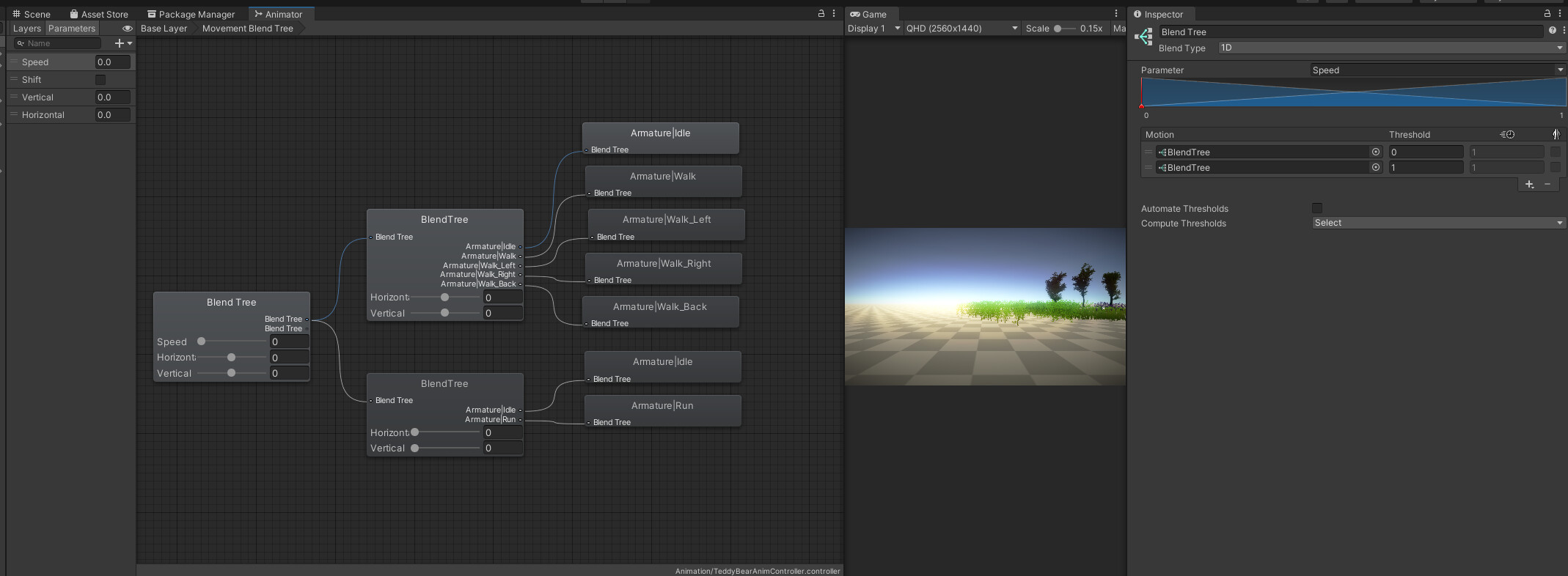
EDIT
The above won’t have a transition between the two run and walk states. I fixed this below by slowly transitioning the speed variable. Just leaving this here incase anyone wanted this fixed too.
public float currentSpeed = 0f;
public int transitionSpeed = 8;
private Animator animator;
// Start is called before the first frame update
void Start()
{
animator = GetComponent();
}
// Update is called once per frame
void Update()
{
animator.SetFloat(“Horizontal”, Input.GetAxis(“Horizontal”));
animator.SetFloat(“Vertical”, Input.GetAxis(“Vertical”));
animator.SetFloat(“Speed”, currentSpeed);
if (Input.GetKey(KeyCode.LeftShift) && currentSpeed <= 1f)
{
currentSpeed += 0.1f * Time.deltaTime * transitionSpeed;
}
else
{
if (currentSpeed >= 0f)
{
currentSpeed -= 0.1f * Time.deltaTime * transitionSpeed;
}
}
}
1 Like
Thank you, this is a nice little trick!
Blend Trees are used for allowing multiple animations to be blended smoothly by incorporating parts of them all to varying degrees. The amount that each of the motions contributes to the final effect is controlled using a blending parameter, which is just one of the numeric animation parameters.
To start working with a new Blend Tree, Right-click on empty space on the Animator Controller Window. Select Create State > From New Blend Tree from the context menu that appears. Double-click on the Blend Tree to enter the Blend Tree Graph.
njmcdirect
I was looking for the same thing. Thank you for helping me.
https://blankworldmaps.net/