I work with animations using the Blend Tree.
I want to add running animations using LShift. How can i do this?
My animation script:
using System.Collections;
using System.Collections.Generic;
using UnityEngine;

public class AnimatorScript : MonoBehaviour
{
    Animator animator;

    // Start is called before the first frame update
    void Start()
    {
        animator = GetComponent<Animator>();
    }

    // Update is called once per frame
    void Update()
    {
        float v = Input.GetAxis("Vertical");
        float h = Input.GetAxis("Horizontal");
        animator.SetFloat("vertical",v);
        animator.SetFloat("horizontal", h);
    }
}
First off, why don’t you name your animations You can do that in animation properties in Inspector, just name the clips. That will make your life easier… And also let others to understand how you have configured your blend tree etc. Proper naming conventions are important in any kind of organized project.
When you set a value that blends the idle-sneaking-walking-running or whatever you have, take that Shift key into consideration there? i.e. if you set your value based on vertical input, don’t get it go past certain value without the Shift key pressed.
I have implemented this myself something very simply like this:
if (isRunning == false) {
  forwardMovement *= 0.7f;
}
// Else, forwardMovement will be 1.
And in this imaginary scenario my animation would be configured so that running blend starts only after forward movement is over 0.7.
Well you set something wrong. Please think what I said and try to implement it to your specific case. I just gave an example. That’s one approach that works fine in my opinion.
using System.Collections;
using System.Collections.Generic;
using UnityEngine;

public class AnimatorScript : MonoBehaviour
{
    Animator animator;

    // Start is called before the first frame update
    void Start()
    {
        animator = GetComponent<Animator>();
    }

    // Update is called once per frame
    void Update()
    {
        float v = Input.GetAxis("Vertical");
        if(Input.GetKey(KeyCode.LeftShift))
        {
            v *=1f;
        }
        else
        {
            v *= 0.5f;
        }
        animator.SetFloat("vertical", v);

        float h = Input.GetAxis("Horizontal");
        animator.SetFloat("horizontal", h);
    }
}
But now the animation changes to running sharply, without a smooth transition
And yes, here is my renamed blend tree))
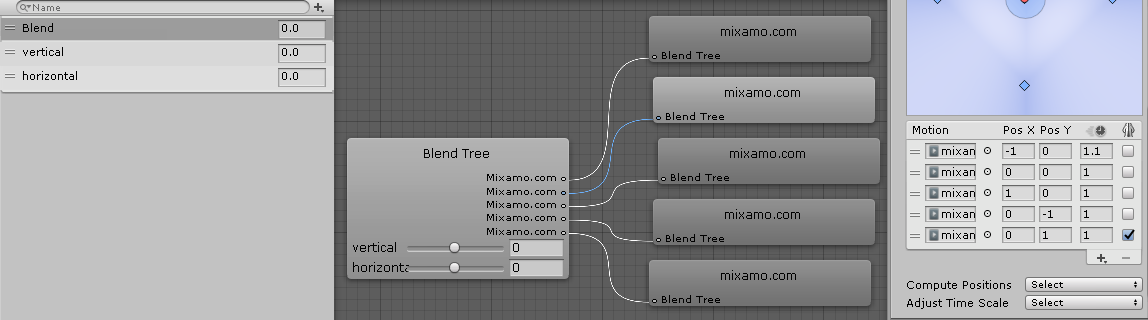
 You can do that in animation properties in Inspector, just name the clips. That will make your life easier… And also let others to understand how you have configured your blend tree etc. Proper naming conventions are important in any kind of organized project.