Don’t need it to be perfect, just need it to be comparable to the rest of the industry.
OK, so what you’re asking for is better blurring of shadow edges, as opposed to just dithering. I think we can all agree with that. As for improving the shadows, I’d recommend turning softness down. I have mine set at 4, and the softness fade set at 1, otherwise I think it gets too noisy. And in Quality Settings, make sure your shadow projection is set to “Close fit”.
1 Like
Okay that’s better… still doesn’t quite mesh with the baked textures but maybe if I rebake with these settings on the light, it’ll blend better.
I’d still love to just slap a layer of blur over what I have. Part of it is the umbra effect. These are skyscrapers. I’d expect the shadow to have about six inches of blurry transition by the time it reaches street level.
Are you also using Beast?
Yes. I don’t have a problem with the dithering per sey, I just think it’s insufficient for making your game look good and modern. Blurring it after the dithering produces better results. That’s what the linked blog explains how to do. That’s (I suspect) why Epic shadows look so good. And that’s what (again, I suspect,) all the complainers have been complaining about all this time.
Unity’s shadows look bad. Unity Team, please make them look good. So I can use Unity to make a modern game. (Using terms defined in the OP.)
Yeah it’s in the background, not really visible in this shot. Realtime lighting only extends out 10 meters, which in the first screenshot is sunlit.
I think the mistake you are doing is leaving the ambient 100 black. Thus when using realtime shadows you aren’t faking GI in any way.
Also make sure to use linear space.
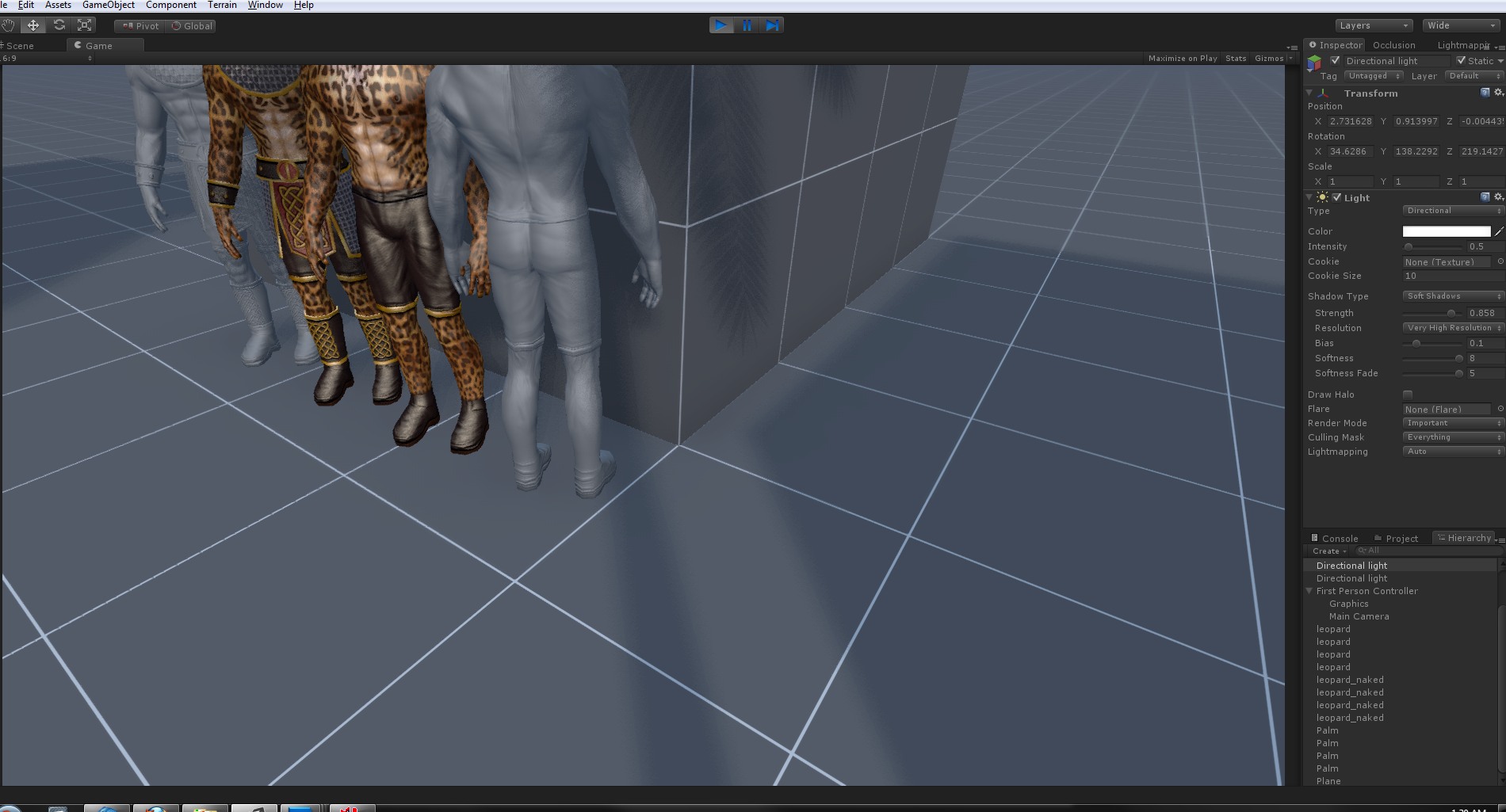


I’m baking some lightmaps too.
I usually leave my scene ambience at full black <(blame my CG background)… I like the last two pics… the shadows are soft but the shape is recognisable… maybe I should do this now on my levels…
EDIT: This doesn’t work on point lights however
Leaving the ambient black only makes sense when using GI in a non-realtime solution.People faked GI using the ambient for years. Just because we can now use GI and the sky to actually do the real thing, doesn’t mean we abandon the practice altogether.
Well, shoot me… LOL. I like the results you have too… what is your ambient set to?
You change it depending on the mood. I give an orange tint for mid-day, light blue for earlier in the morning and afternoon. Dark blue desaturated for night and of course you can experiment with this. You can also fiddle with shadow density (intensity), he screens use 0.858 .
Anyway I was playing CS:GO for the past couple of hours. They have nice lighting, it’s in Source, I figure I can replicate the look easily.
True… I will probably go back to using 4% black…
I usually set the ambient lighting to the colour of the sky, though I use HDR lighting with GI… point lights have some strange bias issues…
Make sure you are using linear space. It just reset after I made the lightmaps.
Deferred and Linear right here…but it is strange that my shadows are not accurately placed…  my character models look WAY better in Deferred and Linear Color space… :)… are you using IBL?
Can you show me a screenshot?
If you aren’t using linear color space you aren’t actually seeing what Unity is doing internally. HDR should also be used so the calcs are of higher precision and again input-output match. Color correction (contrast, leveles etc) go on top of that. This is the correct workflow in offline cg rendering too.
No IBL in the screen, I guess you could do this using the light probes, right?
For what it’s worth, you do have access to all of Unity’s shadow information, you just have to drop down to the fully-custom shader level to work with it. The ShadowCaster pass is used to render into the shadow buffer (so you could probably mess with the value output there, e.g. for implementing VSM) and then it’s read in the ForwardBase/ForwardAdd passes and integrated into the light attenuation term (i.e. atten = 0 means the light is either far away or blocked by shadowcaster). I suspect you might be able to do PCF or something there.
I’ve used this to great effect for making some custom shadowcaster geometry - by writing a shader with only a ShadowCaster pass in, objects are completely invisible but still cast shadows.
Personally, though, what I want is the ability to have lightmapped/static geometry that casts shadows onto dynamic objects. The dual lightmap “switch to realtime lighting for nearby things” approach is no good if you want to run on modest hardware, especially if you’re trying to do directional lightmaps with full color support…
Well this is where light probes can come in handy. If they are far away enough to not be reached by your real-time light, the approximation should be enough.
Note:
Actually I can get pretty good real-time shadows up to 100 (units-meters), they also work better if you want more softness, since the resolution is spread over a larger area the resulting shadow has less stepping. So making the shadow distance small will be better if you want sharper shadows and increasing the shadow distance can help if you want more blur.
I use IBL when lighting with Beast… Daytime levels are cool to light up, nighttime scenes are a bit harder… here is a screenshot of my settings… and the shadow issue may be my model… If you are interested in learning how to light with IBL, I have some tutorials I made just for that.
