How to make realtime shadows look "good" in Unity?

Okay, every time I google this question I see a bunch of angry complaining on the users’ side and doublespeak and feigned confusion on the PR/developers’ side, so before I open this Pandora’s Box of a conversation again, let me first define some terms:

“Good” means I don’t see blocky, angular, jagged black pixels in the realtime shadows. Ever.
“Setting Shadow Type to Soft Shadows in Unity 3” is not “Good.”
“Fallout 3” is an edge case.
“Unreal Engine 3” is not an edge case, that’s why everyone’s USING it.
“Lying” means posting a 256x192 screenshot where a standard jagged Unity 3 shadow is being cast on an extremely busy brick textured floor. If it wouldn’t look smooth on a plain white surface at 1040p, that’s not really smooth, and you know it.
“Modern” means this problem has been solved. That is, solving this problem is necessary, but not sufficient, for making your game look good to modern gamers.
“Easy” means other developers have already solved it, all over the industry, so don’t say it can’t be done. Don’t say it’s only necessary for First-Person games. This guy did it on an iPhone, for crying out loud. In a third-person game. With large outdoor areas. And it looks objectively better. So why can’t I have it in my Unity Pro PC game?

This is not a question of “is this a real feature,” “does this feature matter,” or “is this feature relevant to the types of games people would want to make with Unity.” The answers are all “Yes,” and that’s why people keep asking for this feature over and over again.

There is only one question that needs to be answered in this thread:
Can we achieve this feature with Unity 3, or do we have to wait for Unity 4?

Thank you for your time.
1 Like

Turn your shadow resolution up. Bake light maps. Set the distance for shadows lower, like around 50 units. Shadows are no longer blocky. They look great.

Good question, there has only been mention on mobile shadows, nothing on improved shadows for other platforms which is a MUST.

That’s similar to the Fallout 3/Lying solution of just using really busy textures for everything so the player doesn’t notice or think about the shadows so much.

I’m not asking how to make Unity 3 shadows look as good as possible. I’m asking if we’ll get this specific feature (realtime shadow blurring) now, or later.

Unity cannot do without this feature forever. It’s just not reasonable to pretend it can.

Yes you can, especially since a quick read of that guys blog strongly suggests he is using exactly the same shadow mapping that Unity offers - cascading shadow maps with blur. The thing is, unless there has been a major breakthrough in the last few years that i’ve missed, shadow mapping is not a ‘solved’ problem. There are many solutions but they all suffer various problems, such as perspective aliasing or dueling frusta. The best you can hope for is to learn how the algorithm works, understand the issues and tweak the settings to get the best out of it. This includes choosing correct distances, number of cascades, size of shadow map etc.

This is why ‘Simons tech blog’ looks good, he understands the algorithm as he had to implement it.

Mind your don’t think his shadows are that good, he’s using rather low resolution shadow maps, with extreme blur, so they lose pretty much any detail.

Edit:
LOL - check out that guys blog references and you’ll find one from Aras

[8] Deferred Cascaded Shadow Maps:*http://aras-p.info/blog/2009/11/04/deferred-cascaded-shadow-maps/

So the guy you are using as an example of producing great and easy shadowmapping actually used a reference to Aras tutorial about how shadow mapping was implemented in Unity.

Surely you’re not asking for the entirety of a fallout 3 style world to be drawn with realtime blurred shadows? Or are you asking for deferred shadow blurring to be actually blurred instead of dithered? All I’ve really seen is that you’ve posted a screenshot that was created with the worst shadow settings possible, and asked if they were going to get better. The answer to that is “they’re better now if you change your settings”.

ALL 3d graphics are “lying”. I’d like deferred rendering shadows to be blurred instead of dithered also. But that’s just better lying.

Yes, he uses Cascaded Shadow Maps, just like Unity 3. Then, after he did that, he blurred the shadows, (I’m guessing in screen-space,) which I don’t see a way to do right out of the box. If you look at the screenshots I posted in the OP in their original context on his blog, you’ll see that they are clearly labeled. The images on the left basically emulate Unity 3’s cascaded shadows in both “Hard” and “Soft” modes. (I’m pretty sure THIS is what he’s referring to in the references. Not the feature I’m talking about, which is also the feature the TEXT of his blog post is talking about, E.G. soft realtime shadows.) The images on the right START where Unity 3 ends, and then adds blur to JUST the shadows.

All I want is for this feature, that last blur effect, to be do-able in Unity.

If it’s doable in Unity 3 right now, I want to know how to do it. So I can go back to all those forum posts from like 2008-onwards and tell people, “Yeah, you can make the shadows look good in Unity. Here’s how you do it.”

If it’s doable in Unity3 with an Image Effect, that’s awesome! Where’s that script? How do I do it? If there’s caveats on how to use it properly, like z-fighting or whatever, that’s fine. Just ship the script with Unity 3 and mention the caveats. Wouldn’t that be better than straight up LOSING all the noob customers who ask about this feature because they think they saw it in Call of Duty, only to be told that it doesn’t exist, it shouldn’t exist, it’s not a feature, it’s not necessary, Unity’s lighting already looks great?

If it’s not doable in Unity3, because the shadows aren’t exposed in the API after being drawn or whatever, that’s fine. But Unity 4 needs to expose them.

This feature, while not perfectly realistic, is a pretty standard feature in games these days. It’s unrealistic in a forgiving way. Players expect it. Therefore developers need it in their toolbox.

That’s all I’m saying.

I have seen how the shadows look even NOW… I sent my lights to soft and they don’t look like soft shadows, and changing the resolution just masks the stepping look on the shadows…we need to fix this…

No, of course not. Even the laziest developer realizes that would slow any game to a crawl.

I’m asking for the option of using both. Dither first, then blur. Like in the blog post I linked to in the OP.

No, I showed you screenshots of someone else’s game engine demonstrating first Unity-style shadows, then their same engine demontrating Unity-style shadows but with a custom blur feature enabled.

I know that. And as the screenshots in the blog show, they’re even better than THAT if you blur them after the lighting pass. Right now. Using someone else’s custom iphone engine, that is, not using Unity Pro for PCs.

Agreed. But I want this specific lie in my… what do you store collections of lies in? …in my Tom Sawyer.

But for the purposes of this thread, I defined lying as scaling down a screenshot and using busy textures to make the jagged edges and stepping less visible, then pointing to the screenshot and saying “See? No jaggies! This is totally fixed in Unity 3.” This actually happened in a thread from 2011, and it made me angry when I saw it today. This was by one of the “I don’t understand what shadow issue you’re referring to” apologists, too, IIRC.

You can actually have soft-shadows on iPad2/3 with good performance (we are doing it on our game, full screen and it runs really fast). But you know, this sort of decision in an engine isn’t the same as it really change from one game to an other. At least you will have directional shadows (hard shadows btw). Better than nothing. XD
Now speaking of build-in desktop shadows, no, they won’t be any better. Perhaps Unity 4.x or 5.0 will bring better shadows techniques/filters, but for now is a nono.

You don’t know how to set them up.

How did you manage this? What would need to be changed/exposed in Unity 3 to make your technique possible? Please contact Unity Team and recommend these features for Unity4.

Show me your best.

Its not about how you set them up, its about bugs and visual errors they produce in deferrend mode. And yes its also about softness, Epic shadows just look way better, dont know why though.

Why don’t you post your scene and I can tell you what you are doing wrong?

IMO, Unity’s realtime soft shadows are unusable. They look almost okay in a still frame, but the dithering creeps and pops all over the place with motion. I’ve read, and tried, all the techniques suggested on the forums and nothing produces satisfactory results. In the end I decided not to use soft shadows. So I am with the OP, Unity’s realtime shadows need some love!

Can I see an example?

How about we do both?

The point is, I already know the simplest way to fix this issue. It’s called switch to Unreal Engine. And that’s a real problem for Unity Team. If they’d listened to the first person who complained about this issue, or started implementing the feature when Unreal Engine did it, they coulda got out in front of this thing. Now it’s too late. It’s reaching critical mass. All the people who’ve been complaining about this feature since day one, and all the people quietly making a single post agreeing with the OP in this thread are part of that critical mass that has been slowly building. It’s becoming a majority.

And now Unity Team is marketing Unity 4 as a AAA engine? Forget about it. This feature is coming.

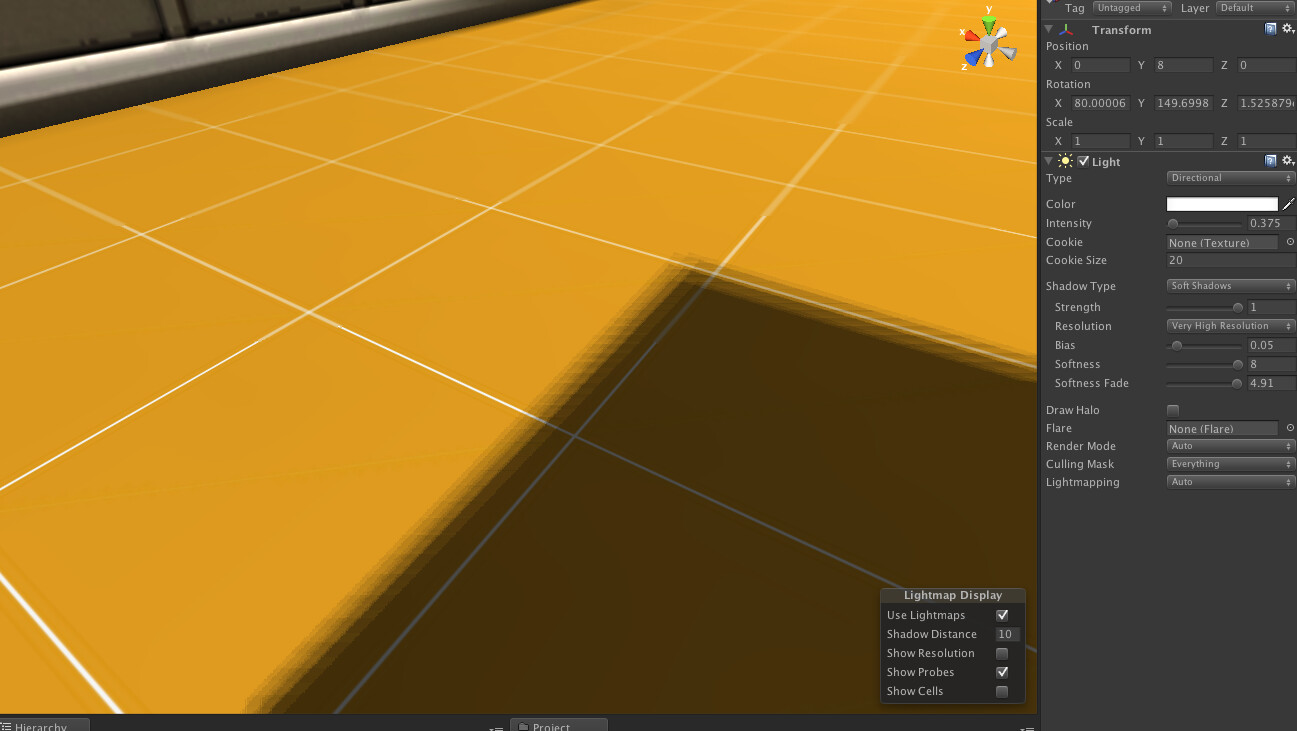
What are you going to do, tell me to turn my settings up? Settings are all the way up already. Draw distance is 10 meters. Very High Resolution, Softness 8. If there’s a way to improve this any further, I’d love to hear it, but somehow I still doubt it’ll get rid of the obvious banding whenever the light source hits it at a 90 degree angle.

And this could easily be fixed if we just had access to the shadow data at runtime. One more Image Effect, called Blur Shadows, and suddenly Unity’s graphics are as easy/good as Epic’s and Unity’s more generous licensing terms make it the belle of the ball in AAA, too, not just Indie iphone games.

I know I sound angry. That’s because I’m passionate about this. I love Unity and I want it to succeed. I BOUGHT Unity and I want it to be USEFUL to me. It’s superior to all the other engines in a lot of ways. So why does it have to keep falling down on the strength of its realtime shadows?

I can’t just throw jagged shadows and busy floor textures at my players and then tell them, “the game looks great, you’re looking at it wrong.”

1018994--37759--$Screen shot 2012-08-25 at 4.56.45 PM.jpg

Welcome to realtime rendering. No-one can do clean surfaces and perfect shadows. Seriously. Not even UE or CE.

Do you have the shadow casades set to close fit? I do get the jagged shadow edges on a flat plane, set to soft with a low softness fade… it is still there, but the results are not too noticeable… and I also use GI and Beast so it doesn’t really bother me…