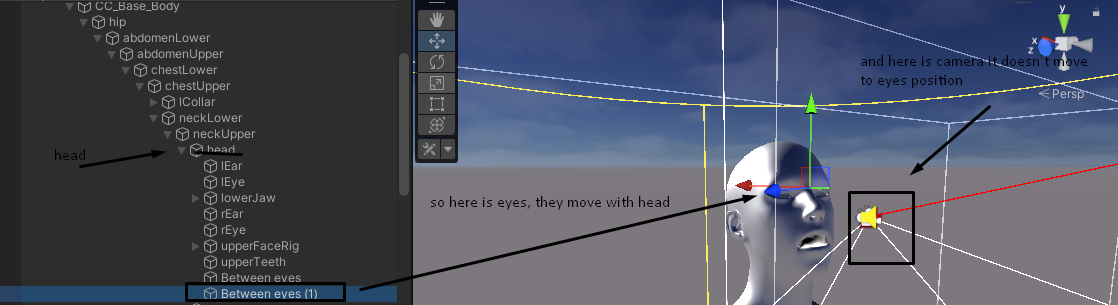
Hi, I,m using 3rd person virtual camera for 1st person view of the character, everything works fine except that when the character stays static and the head continues to move with IK camera always stays at the same position.
I noticed that the camera moves only when I use wsda buttons, but the following target also moves even when the character stays in one place because the head is controlled with IK and always changes position depending on the mouse position.
My goal is to apply this movement also to the camera, so it would also change the movement of the target with IK and place the camera directly to the position of the following target. How can I do this?
I was trying different cameras and also just adjusting shoulder offset depending on head position, but it didn’t work properly… maybe you know how to make the camera always follow the head position (and not only when the character is moved with wsda)?
Have you tried making the follow target an actual child of the moving head?
If it’s a child of the head and the head is moving, then the camera should move along with it. It would take work to prevent it from moving. Can you show some images of your hierarchy, with the relevant objects visible?
yes here is character hierarchy
Hmmm… strange. If the camera is indeed tracking that object, and if the object is moving, then the camera should move.
Can you try, as an experiment, to put a cube there? Does it move with the head?
yes, cube is moving with head

Can you use the cube as a Follow target in the vcam? What happens?
well, if I move the cube camera also moves in direction of it, but not precisely at the position of the cube. If I move head then the camera stays in the same position.
I was thinking that maybe it’s because the camera uses local rotation position instead of world position. because when a character is animated local position is always 0, but the global position changes. and it seems like the camera change position only if the object which it follows change its local position and not the world position
What happens if you replace “3rdPersonFollow” in the vcam with “Hard Lock To Target”? And perhaps “Same As Follow Target” in Aim.
the camera also stays in the same position and doesn’t follow the target

Something is off with your setup, then. When I open the AimingRig sample scene and put the follow target as a child object of the character’s head, and adjust the rig settings for 1stPerson, the camera moves with the head’s animation.
What versions of Unity and CM are you using?
hm, I use unity 2021.3.6f and cinemachine version 2.8.6.

I don’t know off-hand what the problem is. If you share a repro project with me, I can take a look at it.
hey! I seem to find the reason. I made the same setup as you did in the AimingRig scene and it was working. Then I added LookAtIK script to the character and set the sphere as a target. And then if I move the sphere in the scene head is moving, but the camera not following it.
you can also try to replicate it.
Do you know how to fix it?
I was reading the thread https://forum.unity.com/threads/cinemachine-vs-final-ik-script-execution-order-nightmare.680251/ , is there a better way to do it instead of embedding the package to the project?
Yes, since that thread, a new CM feature was added: manual update. You can add this custom script to your main camera with the CM Brain. Set its execution order to be after FinalIK, as described in the other thread.
Let me know how it works.
using UnityEngine;
using Cinemachine;

public class ManualUpdateCM : MonoBehaviour
{
    CinemachineBrain brain;

    void Start()
    {
        brain = GetComponent<CinemachineBrain>();
        brain.m_UpdateMethod = CinemachineBrain.UpdateMethod.ManualUpdate;
    }

    void LateUpdate()
    {
        brain.ManualUpdate();
    }
}