How to render objects without camera to a render texture in HDRP?

Hi,

I have my old code for URP that will render meshes with a selected material using other camera matrices (the second camera is disabled, I use it to get the matrices). And now I need to do the same thing in HDRP, but looks like you can’t use this simple approach here. The result is all wrong, in URP I used a Shader Graph Material to render custom Depth, it just displays the distance to a Camera plane. HDRP version of this Shader Graph was used, of course.

For some reason when I render these meshes only one time, it somehow renders them with weird material that has color set to white. And it does not render the backfaces, even though I set the material to be double-sided. If I move the rendering code into Update, the result is black.

Something is wrong here, but there is no info about how I need to change the command buffer rendering approach when using HDRP.

Here is the URP code:

rt = new RenderTexture(resolutionRT, resolutionRT, 32, RenderTextureFormat.RFloat, 0);
        rt.filterMode = FilterMode.Point;
        rt.wrapMode = TextureWrapMode.Clamp;
        effect.SetTexture("DepthTexture", rt);
        rt.Release();
        CommandBuffer cmd = CommandBufferPool.Get();
        cmd.SetViewMatrix(dummyCam.worldToCameraMatrix);
        cmd.SetProjectionMatrix(dummyCam.projectionMatrix);
        cmd.SetRenderTarget(rt);
        for (int i = 0; i < meshesToRender.Length; i++)
        {
            meshesToRender[i].material.SetPass(0);
            cmd.DrawMesh(meshesToRender[i].gameObject.GetComponent<MeshFilter>().mesh, meshesToRender[i].localToWorldMatrix, material, 0, 0);
        }
        Graphics.ExecuteCommandBuffer(cmd);
        cmd.Clear();
        CommandBufferPool.Release(cmd);

Just tested the CustomPassUtils.RenderFromCamera but for some reason, it requires Camera to be enabled. Is there a way to render from the Camera view without enabling the Camera, only sending the essential matrices?

I’m pretty sure it works with a disabled camera.

Note that the culling results of the main camera will be used, so if your disabled camera is completely in a different place looking in a different direction or whatever, it will render only stuff in its view that is also visible in the main camera.

You can use the disabled camera’s TryGetCullingParameters(out var cullingParams) and call ctx.renderContext.Cull(ref cullingParams).

My memory is slightly vague because I experimented with this a few months ago.
Here is some code where I do some prep work to render from a disabled camera with its own culling results.
I don’t know how correct it is, because I was also experimenting and struggling to get it to work at first.

BTW big gotcha, if you pass CustomPassContext around, do it by ref since it is a struct.

Thank you, I will try this method. And yes, my second cameras are in other places, I used them to get local Depth data for some custom effects. In URP I can spawn these effects with cameras in large numbers, because Cameras were disabled, of course. So, just staying to do the same thing in HDRP.

I was surprised that there are no methods to just render a mesh with given matrices to a render texture, I mean working ones because the standard approach with Command Buffer is not working.

UPDATE: Looks like the Command Buffer regular render approach (Code from the first post) works fine when used inside Custom Pass.

Hello!It seems you have experience with secondary cameras. I’m in a desperate situation and need your guidance. I want to obtain the Normal Buffer from a top-down light perspective. Referring to this post Does HDRP have a shader replacement rendering like URP for assignment to a 2ond camera? - #4 by boyaregames, I wrote the following code, but it doesn’t seem to work. Can you identify the issue?

using UnityEngine;
using UnityEngine.Rendering;
using UnityEngine.Rendering.HighDefinition;
using UnityEngine.Rendering.RendererUtils;

public class MapCustomPass : CustomPass
{
    [SerializeField] private Camera _mapCamera;
    [SerializeField] private RenderTexture _mapRT;
    [SerializeField] private LayerMask _layerMask = ~0;
    // [Space]
    // [SerializeField] private float _updateInterval;
    //
    // private float _timer;
    
    private ShaderTagId[] _shaderTags;
    private RenderStateBlock _depthTestOverride;
    private RendererListDesc _result;
    private ProfilingSampler _renderFromCameraSampler;
    private float _aspectRatio;
    
    protected override void Setup(ScriptableRenderContext renderContext, CommandBuffer cmd)
    {
        _shaderTags = new ShaderTagId[]
        {
            HDShaderPassNames.s_ForwardName,
            HDShaderPassNames.s_ForwardOnlyName,
            HDShaderPassNames.s_SRPDefaultUnlitName
        };
        
        _depthTestOverride = new RenderStateBlock(RenderStateMask.Depth)
        {
            depthState = new DepthState(true, CompareFunction.LessEqual),
            blendState = BlendState.defaultValue
        };
        
        _renderFromCameraSampler = new ProfilingSampler("Render From Camera");
    }

    protected override void Execute(CustomPassContext ctx)
    {
        if (_mapCamera == null)
            return;
        if (ctx.hdCamera.camera.cameraType == CameraType.SceneView)
            return;
        if (_mapRT == null) 
            return;
        
            
        _mapCamera.TryGetCullingParameters(out var cullingParameters);
        cullingParameters.cullingOptions = CullingOptions.ForceEvenIfCameraIsNotActive;
        var cullingResults = ctx.renderContext.Cull(ref cullingParameters);
        ctx.cullingResults = cullingResults;
    
        ctx.cmd.SetViewMatrix(_mapCamera.worldToCameraMatrix);
        var proj = _mapCamera.projectionMatrix;
        ctx.cmd.SetProjectionMatrix(proj);
        CoreUtils.SetRenderTarget(ctx.cmd, _mapRT.colorBuffer, clearFlags);

        _aspectRatio = _mapRT.width / (float)_mapRT.height;

        _result = new RendererListDesc(_shaderTags, cullingResults, ctx.hdCamera.camera)
        // _result = new RendererListDesc(_shaderTags, cullingResults, _mapCamera)
        {
            rendererConfiguration = PerObjectData.None,
            renderQueueRange = RenderQueueRange.all,
            sortingCriteria = SortingCriteria.RenderQueue,
            excludeObjectMotionVectors = false,
            overrideShader = null,
            overrideShaderPassIndex = 0,
            layerMask = _layerMask,
            stateBlock = _depthTestOverride,
        };
        
        
        using (new CustomPassUtils.OverrideCameraRendering(ctx, _mapCamera, _aspectRatio))
        {
            using (new ProfilingScope(ctx.cmd, _renderFromCameraSampler))
                CoreUtils.DrawRendererList(ctx.renderContext, ctx.cmd, ctx.renderContext.CreateRendererList(_result));
        }
    }
}

This is my scene.


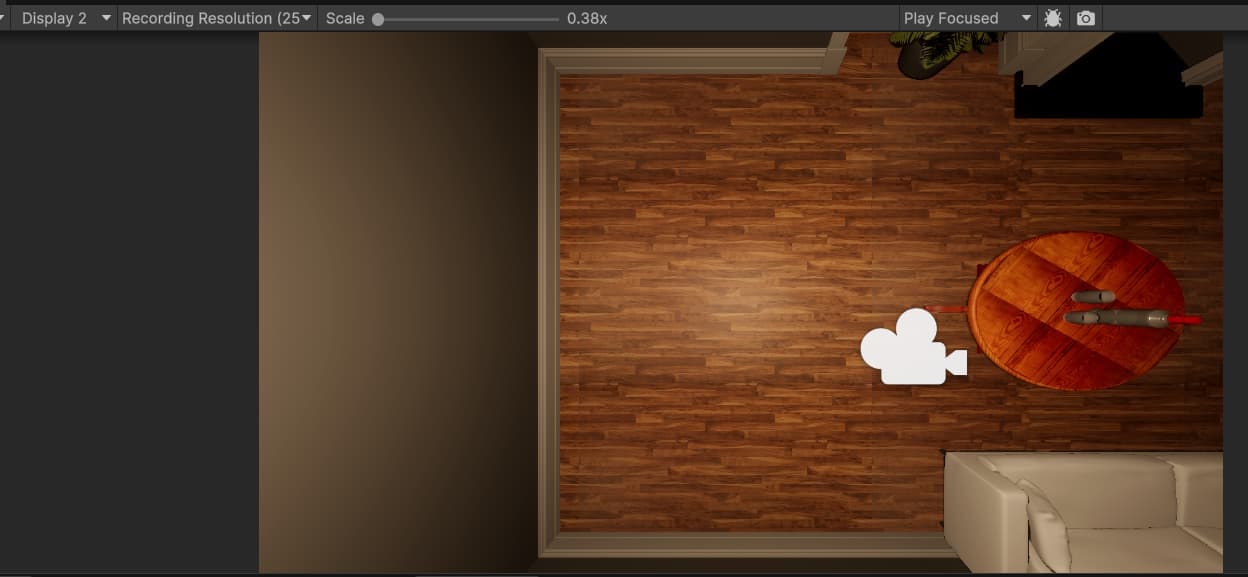
If I enable the camera added to pointLight2 and look downward,it looks like this.

But
However, the Frame Debugger indicates that the light camera is not being utilized. :astonished_face:

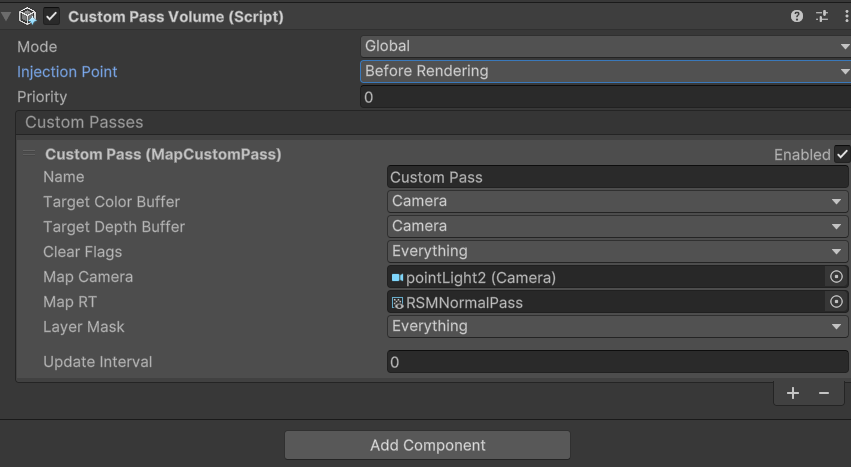
CustomPass Volume Settings:

Problem solved!