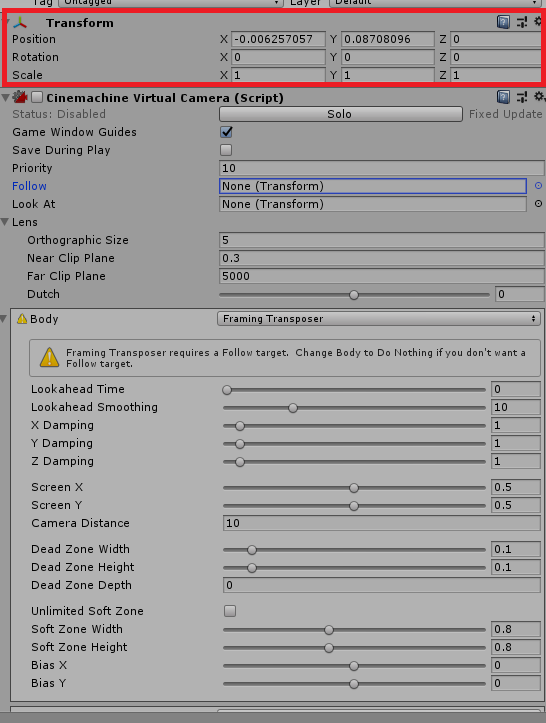
I tried to do something like vCam.GetComponent().position = new Vector3(0,0,0);
but the values keep the same, i also disabled the cinemachine virtual camera script but did not helped me.
Here is the area where i wanted to reset.
I tried to do something like vCam.GetComponent().position = new Vector3(0,0,0);
but the values keep the same, i also disabled the cinemachine virtual camera script but did not helped me.
Here is the area where i wanted to reset.
Since you don’t have a follow target in the vcam, it is possible to set the position. Be aware, however, that as soon as you assign a follow target and thus enable the procedural positioning, the vcam will immediately overwrite whatever position you try to set manually.
normally, the way to do it is just to say vcam.transform.position = bla.
Old question, but ran into the same issue so posting my solution if someone else search for one. I have follow target , aim target, follow-orbital-transposer and aim-composer. I needed to reset that camera so a transition back again would be the same start values. I did like this:
vcam.enabled = false;
vcam.transform.SetPositionAndRotation(startPosition, startRotation);
vcam.enabled = true;
Hi guys,
i have the same issue. I cannot reset the rotation of my thirdperson vcam (body: framing transposer; aim: do nothing; this camera is a child of my player-gameobject). I have a bunch of cameras like menu-cam, aim-cam, and death-cam with different values.
What I simply want to do:
When a player dies, the deathcam (body: orbital transposer; aim: composer) gets activated by increasing the priority. When the player respawns, the regular thirdperson-vcam needs to be re-activated. And it does by setting priorities to values before. But the thirdperson vcam keeps the rotation of the deathcam. The solution above is not working for me.
I tried to set the transform of my vcam-gameobject and the vcam itself. i also tried nulling the lookat and follow before resetting the rotation to avoid procedural positioning.
What am I missing?
Unparent your cameras from the target game object. Main camera and vcams should be separate game objects, not parented to each other or anything that’s moving.
CinemachineFramingTransposer transposer = cam.GetCinemachineComponent();
transposer.ForceCameraPosition(Vector3.zero, Quaternion.identity);
this will reset position and rotation without interpolation
THANK YOU AFTER HOURS OF RESEARCH THIS IS THE SOLUTION
Aloha, I have a setup where a freelook cinemachine camera is orbiting around the player, when I pull the aim bow, it turns off the freelook camera and main camera switches to the 1st person camera… im doing this by deactivating the freelook camera, but when I re-enable the freelook camera itt goes back to the position it was before the deactivation, this is wonky if i wasnt looking in same direction as the 1st person camera… im doing this becouse for some reason I cant get the main camrea to do the switch any other way… im having to use the cusom switcher under the main camera… all in all im using a freelook and a virtual camera, and this is the only way I can get them to switch, I tried altering the cameras priorities vaules but for some reason the main camera will not do the switch unless the freelook is deactivated… SO im trying to go from a free look to a virtual camera, and when the virtual camera releases go back to the freelook camera, which I need set pointing in the same direction as the virtual camera… I hope I described my problem and what im trying to do right…
thanks for any and all reasponses…
For anyone on void you can use cinemachineVirtualCamera.ForceCameraPosition(startPos, Quaternion.identity); to update the camera.
This a complicated description of a simple problem but I think you can use what others suggested to move the freelook camera in the right orientation
cinemachineVirtualCamera.ForceCameraPosition(startPos, Quaternion.identity);
Why?
Because when it has procedural motion enabled the vcam will track the target, then the main camera with the CMBrain will track the vcam. There is no need to parent. If you do parent, it is easy to inadvertently set up a feedback loop like a dog chasing its tail. It’s best practice to keep things as clean as possible.
I have a bug in camera 2, when I switch from camera 1 to camera 2 reducing its priority camera 2 is not seen, using the vcam2.transform.position = bla.
I use the j key to transform the position of camera 2.
Use the k key to set the camera priority 1 to 0
Use the l key to set the camera priority 1 to 11
Here is my code and the image of the error
using System.Collections;
using System.Collections.Generic;
using UnityEngine;
using Cinemachine;

public class Prueba : MonoBehaviour
{
    public CinemachineVirtualCamera vcam1;
    public CinemachineVirtualCamera vcam2;

    void Update()
    {
        if (Input.GetKeyDown(KeyCode.J))
        {
            vcam2.transform.position = new Vector2(17.33f, 19.30f);
        }
        if (Input.GetKeyDown(KeyCode.K))
        {
            vcam1.Priority = 0;
        }
        if (Input.GetKeyDown(KeyCode.L))
        {
            vcam1.Priority = 11;
        }
    }
}
Demonstration of the problem
https://imgur.com/ChFRau3
That’s weird. Does it happen if you put vcam2 somewhere else?
I have a similar problem, I’m working on a click to move game, and to avoid the camera from colliding with terrain I’m using the Collider Extension. The idea is to reposition the camera when it’s free again, sadly the component haven’t any Event to know when it’s colliding.
Try polling CinemachineCollider.CameraWasDisplaced() to see if camera is colliding.
That’s really useful thanks 
This is what I used
using System.Collections;
using System.Collections.Generic;
using UnityEngine;
using Cinemachine;

public class CineReset : MonoBehaviour
{
    void Start()
    {
        // ***Place this script on your Cinemachine***

        // Reset your Cinemachine to 0, 0, 0
        this.enabled = false;
        this.transform.SetPositionAndRotation(new Vector3(0, 0, 0), Quaternion.Euler(new Vector3(0, 0, 0)));
        this.enabled = true;
        // Customize this to your desired Position(Vector3) & Rotation(Quaternion)
        this.transform.SetPositionAndRotation(new Vector3(0, 5, -5), Quaternion.Euler(new Vector3(0, 0, 0)));
    }
}
A few hours digging into the documentation, it’s really not intuitive enough.
PreviousStateIsValid
“Set this to force the next update to ignore deltaTime and reset itself”
public CinemachineVirtualCamera[] cm;

    internal void ImediateTargetLook()
    {
        foreach (var item in cm)
        {
            item.PreviousStateIsValid = false;
        }
    }
Agreed, the doc is inadequate. Thanks for letting us know.