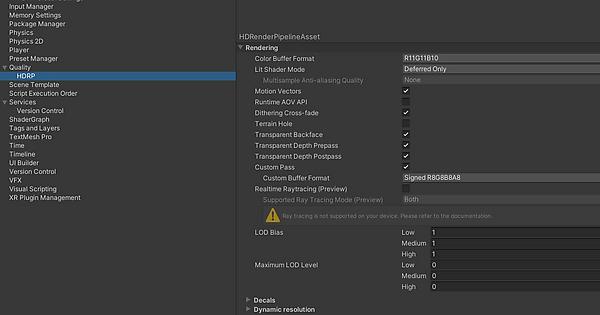
I’ve been trying to find out how to set up the new water system that came initially with 2022.2.0a9. It wasn’t that straightforward, so I thought I’d make a post for others.
Project Settings > Quality > HDRP > Rendering > Water
In case nothing is showing with all those steps, make sure that Water is enabled under
Graphics > HDRP Global Settings, Frame Settings (Default Values) in the “Rendering” Foldout
Also, for the Water Rendering override, you can just add it in a volume to your scene like any override.
You don’t HAVE to use the default volume profile asset in Graphics > HDRP Global Settings.
Hello,
I’ve followed the above and still have no water rendering.
You mention Project Settings > Quality > HDRP > Rendering > Water
There is no option for CPU
If you already checked, Frame Settings, HDRP asset, Volume Override (which technically should be enough), you can try two other things.
Try reimporting HDRP (Right click on Packages/High Definition RP folder and reimport), sometime some shader can be corrupted and prevent some effect to be working properly
I am using Unity 2022.2 beta, and doesnt work, i have all water options activated, i create an Water surface object and no water is rendered. I dont have some of the options shown, also can’t find anywhere the Volume override mentioned in last post. I reinstalled hdrp as mentioned in last post and that just made the project not work at all, there is not global settings for hdrp and get lot of errors.
I removed the project, created a new hdrp project and just activated water system in hdrp global and in quality hdrp, then created a Water surface object of ocean type, pressed play and no water is rendered
anyone knows how too get buoyance on like boats? like they move with the waves?
i know there is 2d buoyance. but i couldnt anything like this for the new water system.
which looks really good. with the caustics and underwater settings.
Depending on which version you are, the WaterSurface script, there’s an API to query the projected position of the current water surface at a specific position (basically to make an object stick to the surface).
After that, it’s up to users to create the buoyancy system depending on their needs !
Depending on which version you are, the WaterSurface script, there’s an API to query the projected position of the current water surface at a specific position (basically to make an object stick to the surface).
After that, it’s up to users to create the buoyancy system depending on their needs
Im on 2022.0b4 beta.
too bad it isnt a physic droppdown option.
like you have with the 2d Buoyancy
Then you should be able to query your WaterSurface with this function FindWaterSurfaceHeight()
Yep, for now it’s completely independent on the Physics system.
This can be revisited in the future but there’s still many important work to do on the water system before that.
Is it expected that water does not work when MSAA is enabled (forward rendering)? I have spent too much time figuring out why water is not rendering and MSAA was the culprit. Is there any way to get water + MSAA? (Unity 2022.2.0b8)