I have a dictionary that holds a reference to an ID and a Scriptable Object on each of type of scriptable object class in my game so I can easily send references to particular scriptable objects between clients and my server in my game. Of course, I can’t serailzie the dictionary, which means that it resets every time the domain reloads, so I need to constantly have my scriptable objects “resubrscribe” themselves every time the domain reolads. Using OnEnable() and Awake() works sometimes, but (usually when I first open a project, or create a new instance of the project using a custom play mode senario) there are edge cases where it just does not work.
So, to get to the point, how can I make a static dictionary get a reference to all scriptable objects of type T every time the domain reloads, or when the game is ran/playmode is entered?
If I understand your problem correctly, you don’t really need a static dictionary. You could use a static instance of a custom class that contains a not static dict that holds the needed information.
You could even serialize the thing by using a [Serializable] class that has a List of tuples of your scriptable objects and the according ids (this data you can use to populate the dictionary if you want to set it up in the inspector first).
Let me know if this helps you find the solution you need or if you need further elaboration.
How would I ensure that all instances are subscribed to this class? Do I make it a scriptable object, and if so, how do I ensure that the static variable always refers to that particular instance? Also, thanks for your time, hopefully I shouldn’t need to take much more of it!
I understand that, but what type of class would said singleton be? Would it be a scriptable object, a pure c# class, a monobehavior, or something else entirely?
If it is a scriptable object, I run back into the same problem since static variables (which I think I would need to store a static reference to said scriptable object) are reset on domain reloads.
If its a monobehavior, there is a little bit more work to do every time I create a new scriptable object since I need to assign it to the relevant monobehavior which is possible but gets kinda messy when you have 5+ scriptable object types that each might store 10+ instances.
It seems to me that a MonoBehavior would be the way to go.
To streamline creating new scriptable objects, there are different ways; I personally like using a editor script that looks for newly added files in the according folders by button press Or just load it every time if you don’t mind the overhead and need to add files more frequently.
Fair enough, its a bit less elegant than what I would like but its a lot more elegant than the goofy stuff I am doing now so I suppose I will go ahead and implement that lol, thanks for your time!
Be careful how much extra work you do that you will now have to maintain. I am strongly allergic to ANY boilerplate ID or GUID that I have to maintain and ALWAYS prefer to use filenames and to keep those filenames unique.
I use collections of ScriptableObjects a lot, and sometimes it is appropriate to keep them in a collection of sorts, eg, just have pre-made packages of relevant ones.
Sometimes however it is best if they are all just in a particular directory and you use Resources.LoadAll<T>() to load them all at runtime, then let the code sort out which one(s) it is interested in.
Downside is that 100% of them and everything they reference will become loaded. If this is a problem, then perhaps use Addressables instead of Resources.Load<T>(), but Addressables have their own massive hierarchy of complexity to deal with, so I never recommend them unless they are the only way.
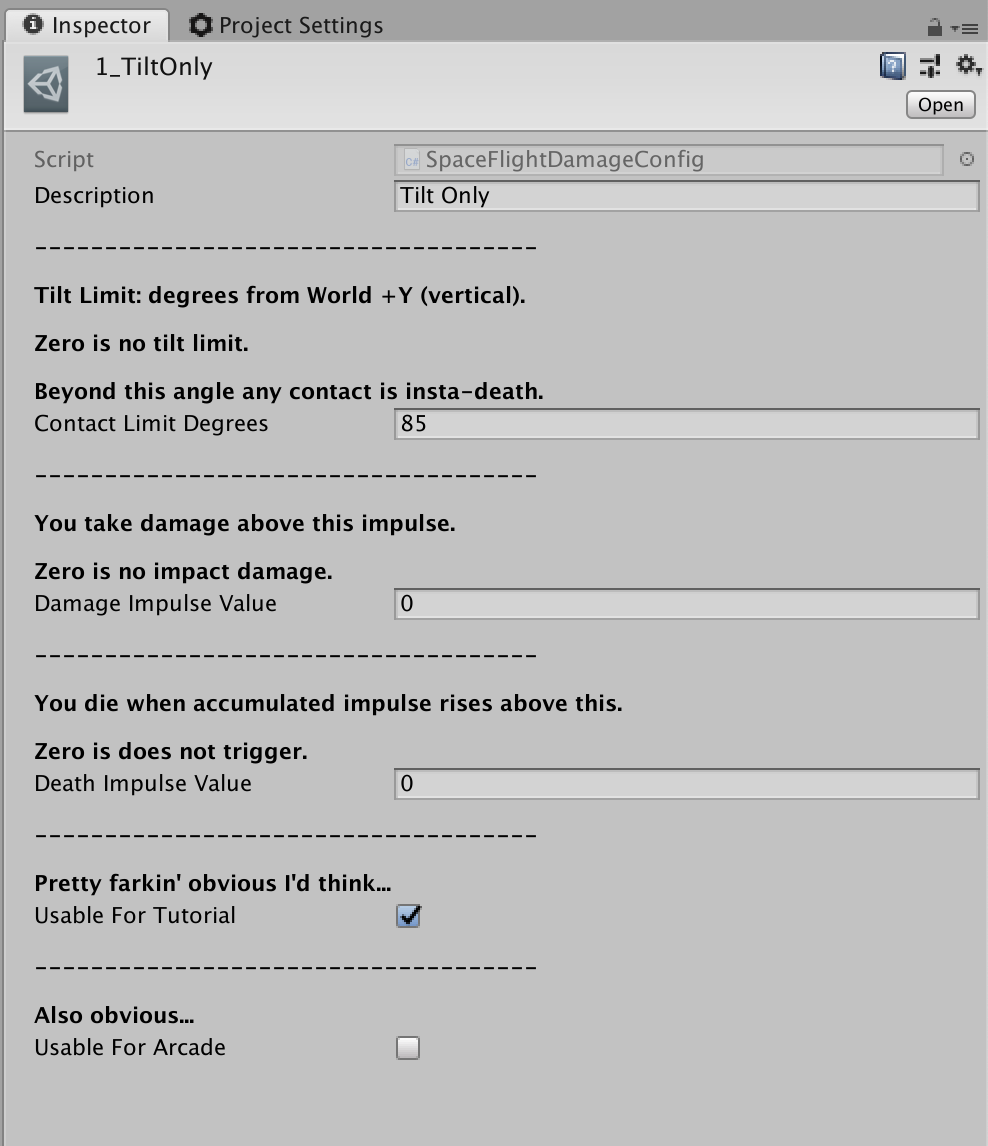
Here’s one example: the Damage Configurations for my Jetpack Kurt Space Flight game. These are ScriptableObjects and each configuration embodies several different parts, as you can see from this one example:
And they are managed by a single class, which I have set up as a partial class:
Here’s the code:
using System.Collections;
using System.Collections.Generic;
using UnityEngine;

[CreateAssetMenu(menuName = "SpaceFlight/SpaceFlightDamageConfig")]
public partial class SpaceFlightDamageConfig : ScriptableObject
{
	public	string	Description;

	[Header( "------------------------------------", order = 1)]

	[Header( "Tilt Limit: degrees from World +Y (vertical).", order = 2)]
	[Header( "Beyond this angle any contact is insta-death.", order = 3)]
	[Header( "Zero is no tilt limit.", order = 3)]
	public	float	ContactLimitDegrees;

	public	float	AngularTiltLimit { get {
			if (ContactLimitDegrees == 0) return 0;
			return Mathf.Cos( Mathf.Deg2Rad * ContactLimitDegrees);
		}
	}

	[Header( "------------------------------------", order = 1)]

	[Header( "You take damage above this impulse.", order = 2)]
	[Header( "Zero is no impact damage.", order = 3)]
	public	float	DamageImpulseValue;

	[Header( "------------------------------------", order = 1)]

	[Header( "You die when accumulated impulse rises above this.", order = 2)]
	[Header( "Zero is does not trigger.", order = 3)]
	public	float	DeathImpulseValue;

	[Header( "------------------------------------", order = 1)]

	[Header( "Pretty farkin' obvious I'd think...", order = 2)]
	public	bool	UsableForTutorial;

	[Header("------------------------------------", order = 1)]

	[Header("Also obvious...", order = 2)]

	public bool	UsableForArcade;

	void Reset()
	{
		Description = "<none>";

		ContactLimitDegrees = 60;

		DamageImpulseValue = 0.0f;
		DeathImpulseValue = 0.0f;
	}

	public bool CanTakeDamage()
	{
		return DeathImpulseValue > 0;
	}
}
And here are all the statics:
using System.Collections;
using System.Collections.Generic;
using UnityEngine;

public partial class SpaceFlightDamageConfig
{
	public	static	Datasack	ControllingDatasack
	{
		get
		{
			return DSM.SpaceFlightDamageConfigSetting;
		}
	}

	public static void AdjustDamageConfigurationUp()
	{
		var x = ControllingDatasack.iValue;
		x++;
		ControllingDatasack.iValue = Wrap( x);
	}

	public static int Count
	{
		get { return AvailableDamageConfigs.Length; }
	}

	static SpaceFlightDamageConfig[] _AvailableDamageConfigs;
	static SpaceFlightDamageConfig[] AvailableDamageConfigs
	{
		get
		{
			if (_AvailableDamageConfigs == null)
			{
				_AvailableDamageConfigs = Resources.LoadAll<SpaceFlightDamageConfig>( "SpaceFlightDamageConfigs/");

				System.Array.Sort( _AvailableDamageConfigs,
					(a,b) => {
						return a.name.CompareTo( b.name);
					}
				);

				Debug.Log( System.String.Format(
					"SpaceFlightDamageConfig: found {0} defined damage settings.",
					_AvailableDamageConfigs.Length));
			}
			return _AvailableDamageConfigs;
		}
	}

	public	static	void	LookupAndConfigureWith( SpaceFlightDamageConfig damage)
	{
		for (int i = 0; i < Count; i++)
		{
			if (damage.Equals( AvailableDamageConfigs[i]))
			{
				ControllingDatasack.iValue = i;
				return;
			}
		}
		Debug.LogError( "SpaceFlightDamageConfig.LookupAndConfigureWith(): did not find instance " + damage.Description);
	}

	public	static	void	SelectTutorialDamageConfig()
	{
		for (int i = 0; i < 1000; i++)
		{
			int n = Random.Range( 0, Count);

			var dc = AvailableDamageConfigs[n];
			if (dc.UsableForTutorial)
			{
				ControllingDatasack.iValue = n;
				return;
			}
		}
		Debug.LogError( "SpaceFlightDamageConfig.SelectTutorialDamageConfig(): unable to find tutorial one!");
	}

	public	static	void	SelectArcadeDamageConfig()
	{
		for (int i = 0; i < 1000; i++)
		{
			int n = Random.Range( 0, Count);

			var dc = AvailableDamageConfigs[n];
			if (dc.UsableForArcade)
			{
				ControllingDatasack.iValue = n;
				return;
			}
		}
		Debug.LogError( "SpaceFlightDamageConfig.SelectArcadeDamageConfig(): unable to find arcade one!");
	}

	public static SpaceFlightDamageConfig GetAvailableDamageConfigs( int n)
	{
		if (n < 0) n = 0;
		if (n >= AvailableDamageConfigs.Length) n = AvailableDamageConfigs.Length - 1;
		return AvailableDamageConfigs[n];
	}

	public static int Wrap( int x)
	{
		if (x < 0) x = AvailableDamageConfigs.Length - 1;
		if (x > AvailableDamageConfigs.Length - 1) x = 0;
		return x;
	}

	public static SpaceFlightDamageConfig Current
	{
		get
		{
			int n = Wrap( ControllingDatasack.iValue);
			return GetAvailableDamageConfigs(n);
		}
	}
}
Everything related to the DSM class above is a codegenned package I wrote and use in a lot of my games for interop, shared variables, persistent state, etc. Here’s more about Datasacks:
If you are using any version of Unity later than Unity2021, it may be necessary to add this line to your Packages/manifest.json, or add it via the Package Mangler:
 Or just load it every time if you don’t mind the overhead and need to add files more frequently.