I want to use the vertex alpha of the imported FBX Mesh.
Hi @kawashima0042 ,
You can use the experimental Shader Graph integration for VFX.
(enabled in Preferences > Visual Effects > Experimental Operators/Blocks)
Create a VFX Shader Graph and assign the vertex colors based on your need. For example:

Then assign the Shader Graph to you VFX Output Particle Mesh context:

And the result will be whatever logic you set in your shader graph:

Hope this helps!
1 Like
Thanks, VladVNeykov
Vertex color was displayed.
1 Like
Hello!
Is there a way to use this before the Output Node? I mean, to use this Shader Graph information in the Update or Initialize nodes? So I can use this color information to drive some other effects
Hi @Rafaelski ,
If you simply want to read some vertex attribute like vertex color and use it in your graph, you can do so via the Sample Mesh operator. In the example below, we are reading the Vertex Color value of vertex 0 in the capsule mesh. It’s important to note that this is just reading vertex attributes which are already present in a mesh, there’s no shader applied to this.
This itself is not possible. A few important things to note here:
- The VFX data flow is top to bottom, so you cannot pass information from Output to Update or from Update to Initialize
- The shader graph information is derived during the rendering of a particle, so you cannot access it anywhere before the rendering happened.
Hope this helps!

In this case, Color is always derived from vertex index 0 (or n), as are all other values, right? While I’ve managed to get per-vertex information to feed into the Initialize context, the workaround is a bit weird (pipe random number from 0 to MeshVertCount-1 into SampleMesh’s index) and I don’t think this is working as one would expect in it’s current incarnation?
Hi @jensVrag ,
In this example, it is. However, you can plug in particleID to specify which vertex each particle should sample from.
What are the expectations? The previous question I believe was about using ShaderGraph information prior to the output, which is not possible for the above-mentioned reasons.
What end result are you aiming for? Here’s a simple practical case:
We use the particleID to sample the vertex position and vertex color from a given mesh. The Sample Mesh operator is set to Wrap so when the particleID goes above the mesh’ vertex count, it will wrap and repeat the sequence.
The result is spawning particles on each vertex of the mesh, and each particle will correctly inherit the vertex position and vertex color of this pyramid mesh:
Do you have a different use case you are trying to achieve?


2 Likes
Hey that looks nice! I don’t have that option ‘vertex placement’ in 10.4. unfortunately - what using ‘particleId’ does now, is to spawn all particles on their respective vertices, and then spawn just a single particle after the ‘successful’ initial spawn…
We’re basically constructing a mesh from outside data (groundwater flow) and would like to use the mesh’s various data channels to store additional date. For now, we are regularly spawning a burst of particles-with-trails from each vertex, setting direction from the vertices’ normal, and I was attempting to use Vertex Alpha as a speed value as well. Using my slightely convoluted method above, it does work as intended. When setting the spawn count in ‘Periodic burst’ to the ‘Mesh Vertex Count’, it does regularly miss - mostly - 4 vertices which I can’t account for.
As for expected behaviour, seeing as ‘Position’ from ‘Sample Mesh’ works fine when piped into a ‘Set Position’ context block (ie, each particle spawns from different position and not from vertex index 0), I would have expected Color etc to be inherited from each vertex as opposed to just index0. But that’s just me.
And sorry for the thread hijack!
Also, as a side note, your support here is much appreciated. Certainly helps a lot to spruce up the WIP documentation 
1 Like
Vertex placement is the only option in 10.4, so that field is not available. In 11.x we added options for surface and edge spawning too, so it shows on my screenshot, but we are using essentially the same functionality 
Check to see if your capacity in Initialize supports the number of particles you are spawning (alive particles + new ones).
Yup, this is absolutely what should be happening. Any sampling in 10.4 is done per-vertex, so if you sample, say, the 4th vertex in a Sample Mesh operator, you should get the 4th vertex’s position, color, normal, etc. Are you connecting the vertex color to a Set Color block like in the example above? Are you possibly overwriting color somewhere further down in your graph? (like in a Color Over Lifetime block in Output perhaps?)
You’re most welcome! 
Yes, @VladVNeykov you might not hear it enough, but your presence and consistent answers is the main reason I continue to use the VFXGraph. It’s very cool, but not intuitive and the docs are a WIP, so you are much appreciated!
4 Likes


10 Likes
Hello @VladVNeykov Is there any way to send Shader data to the emitter? Let’s say I want to emit particles from the alpha edge of my “Dissolve” shader. Or maybe use a texture as an emission map. This is driving me crazy I can’t find a way 
Hi @LuisBocanegra ,
You can’t directly send shader data to the emitter as such as that data is not available on the CPU (where the spawn count is determined). That being said, you can make something like your example of emitting particles from the edge of your dissolve shader work.
The simples way to do this is to just emit particles everywhere on your mesh, and then read the texture the mesh is using to determine which particles to discard during Initialize.
In the example below, A) is just spawning a lot of particles on the mesh.
B) is doing the same thing, but besides setting the position of the particles, we are also sampling the same checker texture the capsule has with the mesh UVs (they are stored in the TexCoord0 vertex attribute). Then we are comparing to see if the texture color is black and are only keeping particles which spawned on a black square, discarding all the rest.
It’s important to note the distinction that this is reading the texture and not the shader the mesh is using. If your dissolve effect has a gradient texture for example, and a dissolve property in a 0-1 range where 0 is your mesh is visible and 1 makes it dissolved, you will need to send that dissolve property both to your shader and the VFX graph so you can compare where the dissolve effect is at the moment. Here’s a pseudo-example where we are only keeping alive particles whose color value sampled from a gradient texture is between the value of dissolve and dissolve + 0.1:
Some other options if you already have the data where exactly you want particles to spawn, you can use event attributes (more info at the bottom of this page) to send the data directly to the VFX Graph. We’ve also added Graphics Buffer support in Unity 2021.2 which gives you another way to send data over to your graph. Both of these approaches would require for you to already have a way of determining outside of the VFX Graph where you want your particles to spawn from.
Hope this helps!


4 Likes
Is there any documentation/example/anything to learn from regarding Graphics Buffer ?
Hey @koirat ,
Check out @PaulDemeulenaere 's post here which includes a graphics test he made (I used it when I first checked the feature out to get me started). We will also try to put together a sample package before the official release with the basics to help get people started
1 Like
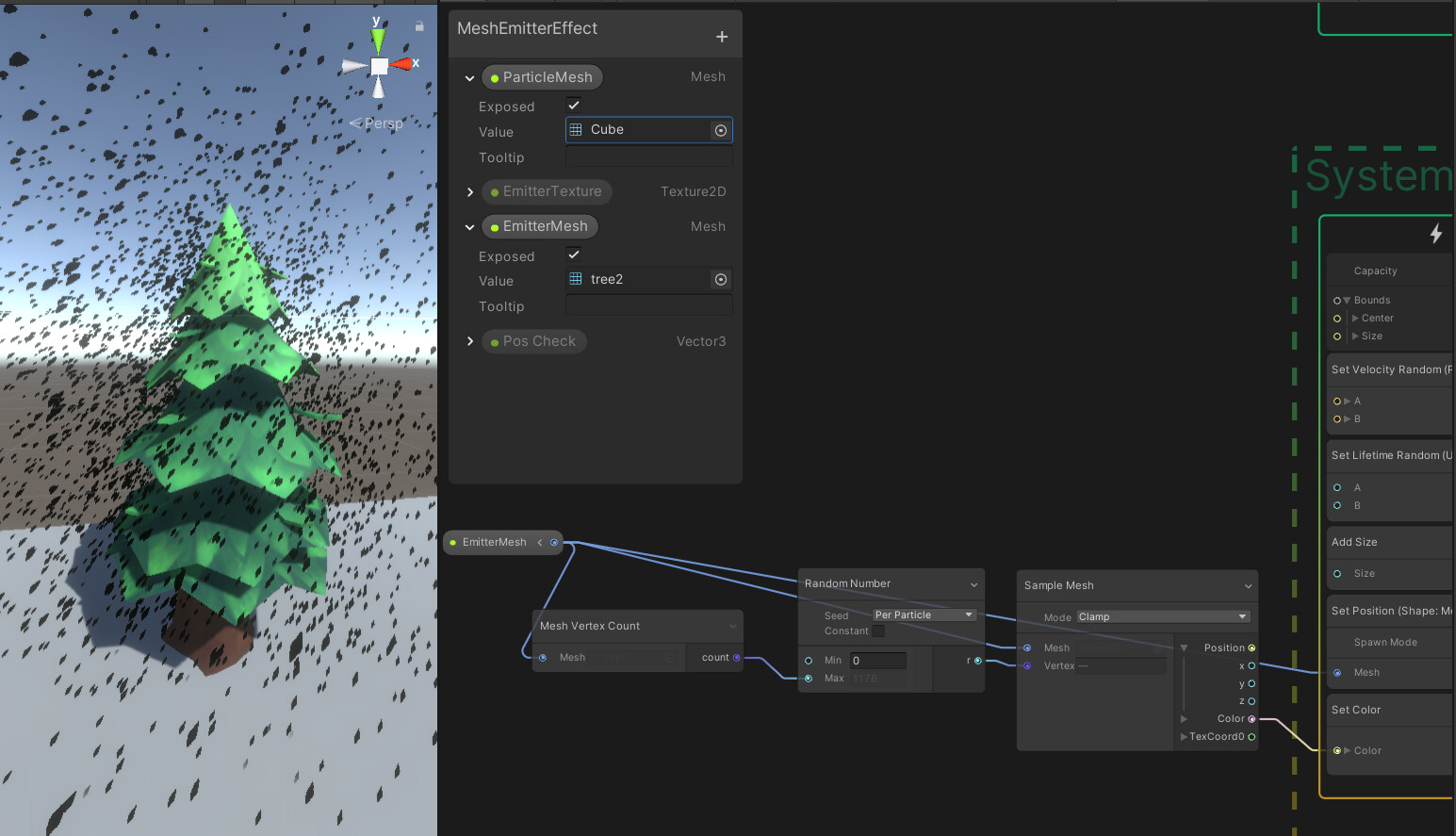
Im trying to get the color from random vertices and apply these to particles. Im clearly doing something wrong. Might be that im trying to do this without a shader? Anyone know what im doing wrong?
Hi @makkenr95 ,
A few things to check:
- Does the mesh you are using have Read/Write enabled in it’s import settings?
- Are you possibly overwriting the color somewhere further down in your graph? (perhaps with a Color Over Lifetime block in your Output)
- Can you confirm that the mesh has vertex colors and is not just using a texture?
I see in your image that you are also setting the position separately from the color, so you might get one random particle for the position and another different random particle for the color, making the color appear random.
Thank you!
The problem was, as you said, Read/write and color not from corresponding vertex/texture position.
Now i have a different more mysterious problem.
It likes to spawn particles particles at the higher vertices more than at the lower vertices.
Seems like it spawns at the lighter colored positions more often?
Any idea why this might be?
And is there a nice way to print or log values in the graph for debugging instead of flooding forums?
Thanks in advance!

Since you are spawning particles on vertices, it looks like you simply have more geometry higher up on your tree so you’ll get more particles there:
A few other observations from your screenshot:
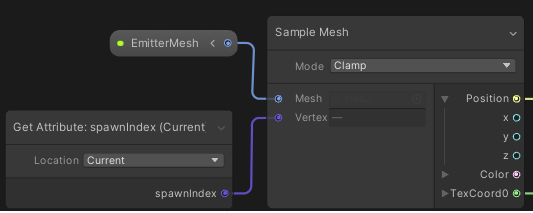
You are using spawnIndex, which is the index of the particle when it spawns in that frame. So if you have a constant spawn rate of 30, and your game runs at 30 FPS, it means you will spawn 1 particle each frame, so each particle for its frame when it spawns will return 0 as its spawn index, as it’s the one and only particle which does spawn in that frame. If you crank up the spawn rate to 60, you’ll get for each frame one particle with a spawnIndex 0 and 1 with a spawnIndex 1. Here’s a demo:
What you most likely want to use is particleID, which is an incremental number to assigned to each new particle:
Your sample mode also is set to Clamp. This means that if your mesh has, say, 2,000 vertices and you are spawning 5,000 in this frame, it will work until you hit 2,000, and then all remaining 3,000 particles will spawn at the same place. I would recommend you set this to Wrap.
Debugging VFX Graph is similar to debugging shaders; there’s no console output, however you can try to visualize some data with colors or textures. There’s a bit more info on this forum post. That being said, we do plan to provide profiling tools in the future to make this easier.
Hope this helps!



1 Like
Is that a sprite sheet with the number 1 - 99 you’re using there? Any chance of sharing it? I was going to make my own.