I’ve been trying and I can’t understand how to programmatically animate bones. The same code seems to work as expected with any other Transform, but not when applied to bones.
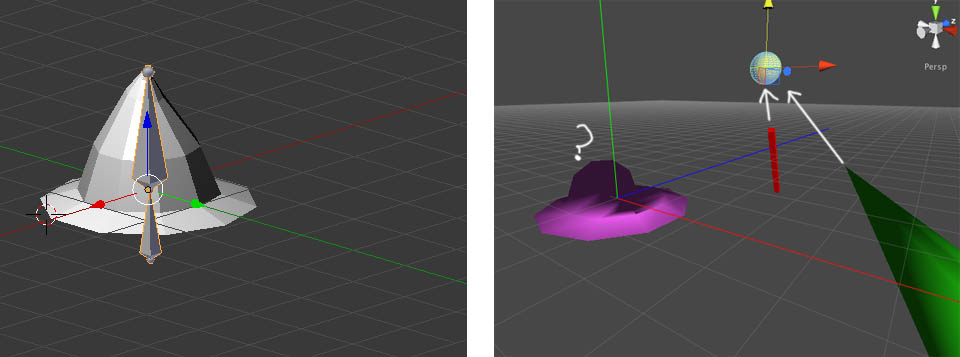
Here you can check a short ==> video <=== of my problem: the same code is attached to those 3 objects: the red stick is cube created directly in Unity (it works fine), the green Cone, is a mesh imported from Blender (fine too), and the purple wizard hat is a mesh created in Blender with an armature and bones.
When applying the code to the bone in the hat, it does not behave as I would expect.
[6706-bones.zip|6706] any help would come really in handy, this is driving me crazy!
Thanks a lot!
Can you build it as a web player and post the 'working' sample? Or describe exactly what's going on? I have seen oddness I can't explain myself (changing a rotation angle also affect translation values????? wtf) Might that be what you are seeing?
The code is: t.LookAt(target.position); t.localScale = new Vector3(1,1, target.position.magnitude/5); //just to make it bigger when the target is further That is why it is scaling, but even if the second line is commented the same issue is happening. What I want to happen is that the top of the hat should point to the draggable target. I dont know if it is a problem with the coordinate system when importing stuff from blender, or if it is me who dont get the concept of bones in unity. Please, download the project if it could help, it is really small. Thank you!!!!
I’ve never seen bones scaled. Generally they are just rotated. Sometimes translated. Looks (the video) like your coordinate systems are off by a 90 degree rotation or something? I would consider a) not scaling, b) rotate the top bone to ‘lean’ toward the target or b2) translate the top bone a little in the direction of the target (you may need to add another small bone at the very tip of the hat)
[Sorry for adding this post as an “answer” instead of using the “comment” option, but I want to add some files and links]
Actually I need an accurate movement, not a slight variation. It is going to be part of some kind of “boob-simulation” as you can see in this video: -----> video here
The goal is to have a couple of capsule-colliders and mimic its rotation in a deformable mesh using bones. I cant achieve it… seems so easy but I can’t make it work.
Source code is attached too:
[6713-boobs.zip|6713]

Can you build it as a web player and post the 'working' sample? Or describe exactly what's going on? I have seen oddness I can't explain myself (changing a rotation angle also affect translation values????? wtf) Might that be what you are seeing?
– DaveAI would check pivots and that you applied rotation/location/scale.
– LovrencThe code is: t.LookAt(target.position); t.localScale = new Vector3(1,1, target.position.magnitude/5); //just to make it bigger when the target is further That is why it is scaling, but even if the second line is commented the same issue is happening. What I want to happen is that the top of the hat should point to the draggable target. I dont know if it is a problem with the coordinate system when importing stuff from blender, or if it is me who dont get the concept of bones in unity. Please, download the project if it could help, it is really small. Thank you!!!!
– hysp