I was reading this book about state driven AI(Programming Game AI By Example) which clearly explains the structure, however it does so in C++.
I want to re-create this structure, however I’m having a plethora of problems already. This is especially complicated for me because I usually do everything in JS.
(Basic structure)
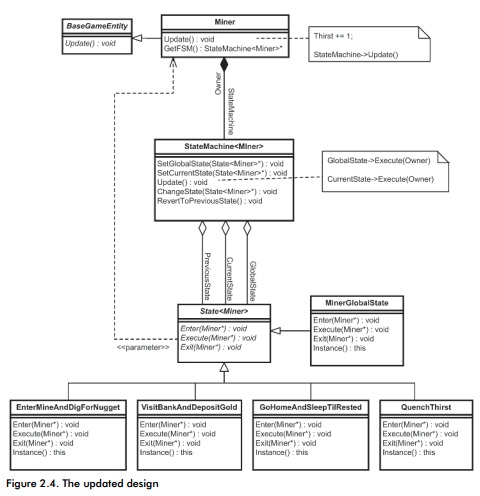
And here’s my code so far:
using UnityEngine;
using System.Collections;
using System.Collections.Generic;

//Imagine that every class here only has a single instance. A singleton without the actual implementation.

public class AI : MonoBehaviour {
    Human human;
    // Use this for initialization
    void Start () {
        human = new Human(); //You are trying to create a MonoBehaviour using the 'new' keyword.  This is not allowed.  MonoBehaviours can only be added using AddComponent().  Alternatively, your script can inherit from ScriptableObject or no base class at all.

//Well, Human inherits AI which inherits MonoBehaviour.

//I thought however that inheritance only inherits and doesn't create a new instance. But now that I think about it, that wouldn't make sense.

//What is the work-around for this problem? I can't fathom one at the moment.

        human.Start ();
    }

    // Update is called once per frame
    void Update () {
        human.Update();
    }
}


class Human : AI{
    StateMachine stateMachine;
    internal void Start(){
        stateMachine = new StateMachine ();

        stateMachine.Start ();
    }

    internal void Update(){
        stateMachine.Update ();
    }
}


class StateMachine:Human{
    State state;
    public pointer globalState; //A pointer to the current instance of any State class that the AI is currently in.

    internal void Start(){
        state = new State ();
    }

    internal void ChangeState(/*pointer*/){ //Pointer to a state's class instance.
        //globalState = /*pointer*/
    }

    internal void Update(){
        //state.Execute(globalState);
    }
}

class State:Human{
    internal void Enter(){

    }

    internal void Execute(/*delegate*/){
        //delegate.Execute;
    }
}

class Idle:State{
    internal void Enter(){
        //Do whatever when starting this state.
    }

    internal void Execute(){
        //Do whatever Idle state does.
    }

    internal void Exit(){
        //Do whatever when exiting this state.
    }
}
So, as you can see there are 2 problems here. The pointer one(which can be solved using a string for the state and a getter that returns the instance of said state. But I didn’t try doing this yet, and it wouldn’t be as elegant.) and the cannot create MonoBehavior(I still want all the state classes to be able to access the MonoBehavior freely.)
So, C# Gurus, what kind of code structure would I have to implement in order to make this kind of higher structure possible? I can’t think of anything that would accommodate for the structure described in the book, but then again I’m very new at C# as a whole.
Thanks.


 I went back to a horror game from when I was still new to unity. I added a state to the monster behavior between tracking and killing the player. I added 1 more case to check for the final listen state in which the player might escape if they make no noise.
