Inside/on surface of my triangle

Hello,

Im having some trouble with this part of my shader. I need some logic from my barycentric co to determined if my point is inside and coplanar to blend color across my 3 verts.

basically find if float3 p is inside and coplanar with triangle float3 a, float3 b, float3 c.

Please help, spinning days on this.

triBlendWeight = float3(0.0, 0.0, 0.0);
triBlendType = float3(0, 1,6);

// This is my triangle point Im checking agains
float3 a = float3(-77.4, -14.1, -54.7);
float3 b = float3(-83.5, -29.9, -60.2);
float3 c = float3(-81.9, -20.1, -44.7);

float3 v0 = b - a, v1 = c - a, v2 = p - a;
float d00 = dot(v0, v0);
float d01 = dot(v0, v1);
float d11 = dot(v1, v1);
float d20 = dot(v2, v0);
float d21 = dot(v2, v1);
float denom = d00 * d11 - d01 * d01;
float v = (d11* d20 - d01* d21) / denom;
float w = (d00* d21 - d01* d20) / denom;
float u = 1.0 - v - w;

[B]//if( inside/on surface of my triangle octahedron shape)// Missing logic. I tried if (0<=u,w,w<=1) but point //are not coplanar to triangle[/B]
if(???????????????????)
{
    triBlendWeight = float3(u,v,w);
}
else
{
    triBlendWeight = float3(0.0, 0.0, 0.0); 
}
[code]

Inside the triangle in the space of the surface’s 2D plane is easy enough. It seems like you’ve already got the barycentric coordinate down.

Coplanar … no chance.

Floating point math is mushy enough that it’s almost impossible for something to be actually coplanar if you’re talking about a triangle made from 3 arbitrary points in 3d space and testing against another arbitrary point in 3d space. The math is almost guaranteed to work out to be just slightly off such that you’ll almost never get it to work out that point X == perfectly coplanar with triangle ABC. Instead you want to test if it’s close to coplanar.

The easiest solution I can think of is to do a distance to plane test and test if you’re within some epsilon. Floats in shaders generally have 7 digits of accuracy, but some extra slop beyond that is probably a good idea most of the time.

float3 planeNormal = normalize(cross(v0, v1));
float planeDist = abs(dot(p - a, planeNormal));
if (planeDist <= 0.00001) // coplanar-ish

Hey bgolus,

Thanks for the reply. Ok what you say make sense so I tried your suggestion which I think should work but looking at my shader something is wrong. Im suspecting it something in my barycentric since its all faces with normal in a similar direction not working. The blend that I do see makes me happy but Im really baning my head here. Do you see any error in my code

float3 resault = (0, 0, 0);
triBlendWeight = float3(0.0, 0.0, 0.0);
triBlendType = float3(0, 1,6);

for(int i=0; i<1620; i++)
{

    int pA = saTriIndex[i].x;
    int pB = saTriIndex[i].y;
    int pC = saTriIndex[i].z;

    float3 a = float3(saTriPos[pA].x,
                        saTriPos[pA].y,
                        saTriPos[pA].z);
    float3 b = float3(saTriPos[pB].x,
                        saTriPos[pB].y,
                        saTriPos[pB].z);
    float3 c = float3(saTriPos[pC].x,
                        saTriPos[pC].y,
                        saTriPos[pC].z);


    float3 v0 = b - a, v1 = c - a, v2 = p - a;
    float d00 = dot(v0, v0);
    float d01 = dot(v0, v1);
    float d11 = dot(v1, v1);
    float d20 = dot(v2, v0);
    float d21 = dot(v2, v1);
    float denom = d00 * d11 - d01 * d01;
    float v = (d11 * d20 - d01 * d21) / denom;
    float w = (d00 * d21 - d01 * d20) / denom;
    float u = 1.0 - v - w;


    float3 planeNormal = normalize(cross(v0, v1));
    float planeDist = abs(dot(p - a, planeNormal));
    if (planeDist <= 0.00001) // coplanar-ish
        {
            triBlendWeight = float3(u, v, w);
            triBlendType = float3(saTriPos[pA].w, saTriPos[pB].w, saTriPos[pC].w);
            return resault;
        }

}

resault = (0.0, 0.0, 0.0);
return resault;

Or since this is alway a kid of sphere-ish shape can I use a cylindrical projection on each triangle point and p before calculating barycentric co ? (any math tips would help )

float ONE_OVER_PI = 1.0 / 3.14159265;

float3 Na = normalize(a); // sphere is at origin so this is "surface normal"

// spherical projection based on the surface normal
float2 coord = float2( 0.5 + 0.5 * atan( Na.x, -Na.z ) * ONE_OVER_PI, 1.0 - acos( Na.y ) * ONE_OVER_PI );

// :( 

[code/]

Okay, instead of trying to figure out what’s wrong with the math you have, lets take a step back and look at what you’re doing.

Every single pixels you’re iterating over every single triangle’s position to try and find one you’re coplanar with, in part to figure out which triangle the current pixel you’re rendering is a part of, and eventually to get the barycentric coordinates.

Don’t do that. The shader already knows which triangle it’s rendering.

float4 frag (v2f i, <strong>*uint pID : SV_PrimitiveID*</strong>) : SV_Target

The SV_PrimitiveID semantic stores the current triangle index being rendered and can be accessed in the fragment shader. That index should exactly match the mesh’s triangle list as you see it from script. So instead of looping over every triangle’s vertices to find which one you’re on, you just need to do this:

int pA = saTriIndex[pID].x;
int pB = saTriIndex[pID].y;
int pC = saTriIndex[pID].z;

However even this isn’t really the best way to go about this. Since all you really want is the barycentric coordinates, the most straightforward solution in Unity is to use a geometry shader. There are plenty of examples for that, however I wouldn’t necessarily recommend that option, as there’s an even cheaper solution. Just store the barycentric coordinates in the vertices. Assuming you’re generating your own mesh, the simple way is to have each triangle’s vertices be unique and store (1,0), (0,1), and (0,0) in the three vertices of the triangle, either in an extra UV channel or the vertex color. The resulting interpolated value can be used to determine the barycentric coordinate. The geometry shader technique works exactly the same way, only these values are injected into the mesh at render time by the shader rather than being stored in the mesh.

The slightly harder way is to not break up the triangles and just make sure each triangle’s vertices have only one of those three values. I know of at least two assets on the store that come with utilities to do just that.

https://assetstore.unity.com/packages/vfx/shaders/wireframe-shader-the-amazing-wireframe-shader-18794
https://assetstore.unity.com/packages/tools/terrain/megasplat-76166

That second asset, MegaSplat, is specifically designed to do exactly what you’re doing in a hyper efficient way.

However all of this might still be completely unnecessary depending on what exactly you need. If you only need a total of 4 or 5 texture layers you could just use the vertex colors as a mask. I’m going to guess based on how you were trying to calculate the barycentric coordinates that every pixel is already sampling all of the textures all of the time anyway.
1 Like

This is super useful thank you very much. I’ll go experiment and see if this works. I did wonder how the uint pID would change when I using tessellation in my shader. Please please tell me it will be ok

Thanks so much for the help, I implemented your suggestions and it is working :slight_smile:

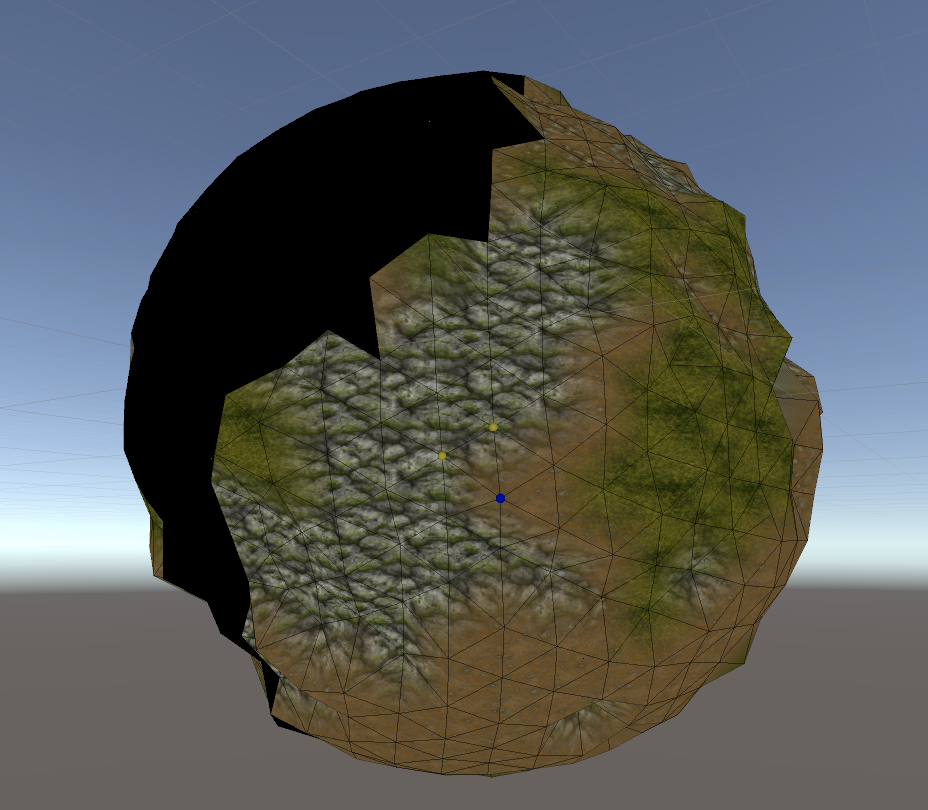
Here is one of my test, really appreciate the help.
3806650--320044--16C92211-1171-4E47-B6BB-B047E70ACF05.png

1 Like