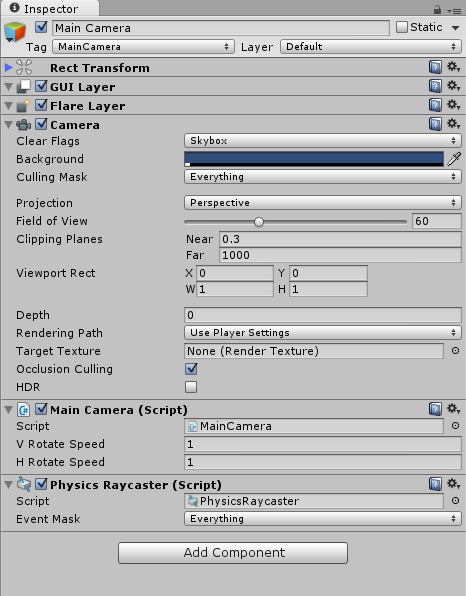
So I’ve got a event system setup and the UI responds correctly to OnPointerClick. But when I click a 3D object with OnPointerClick attached to it nothing happens. OnMouseClick works perfectly fine but I need to be using OnPointerClick.
Yes I’ve included the interfaces in my script. The issue seems to be related to the physics raycaster on my main camera but I cannot figure out why its not working.
So basically what I’m trying to achieve is being able to tap/click and drag a block/box. I want to use the eventsystem and also be able to use OnDrop for the trashcan if I’d like to delete a box object.
I was able to do it with the OnMouse events functions but it is not expandable to touch devices.
I don’t think the OnMouse events are part of the new event system. (I cannot remember seeing any OnMouseClick at all, only OnMouseDown/Up)
Either way, to use OnPointerClick you will need to implement the IPointerClickHandler.
using UnityEngine;
using UnityEngine.EventSystems;
using System.Collections;

public class ClickEvent : MonoBehaviour, IPointerClickHandler {
    public void OnPointerClick(PointerEventData eventData) {
        Debug:Log("Clickety");
    }
}
The objects you are clicking are on a layer included by the PhysicsRaycaster event mask?
No other colliders are blocking the view?
The UI canvas does not block/eat the click either?
Each block refers to the
public class DragAndDropBlocks : MonoBehaviour,IPointerEnterHandler,IPointerExitHandler, IPointerUpHandler, IPointerDownHandler, IPointerClickHandler
{
}
This is what I’m trying to find out. I’ll be back and see what I can find.
You should be able to turn off your canvas and or graphic raycaster to make sure it’s not blocking the clicks.
You can put your objects in their own layer and put the mask to just that layer to test if they’re blocked by something.
So that worked. The graphics raycaster is blocking my 3D object from the physics raycast. theres a rect transform because i need to be able to translate the object around the environment.
Fixed my issue. On top of the canvas I had a image object that covered the entire area of that canvas. So it blocked all clicks to the 3D objects behind the UI. Deleting that and rearranging my UI with panels did the trick.