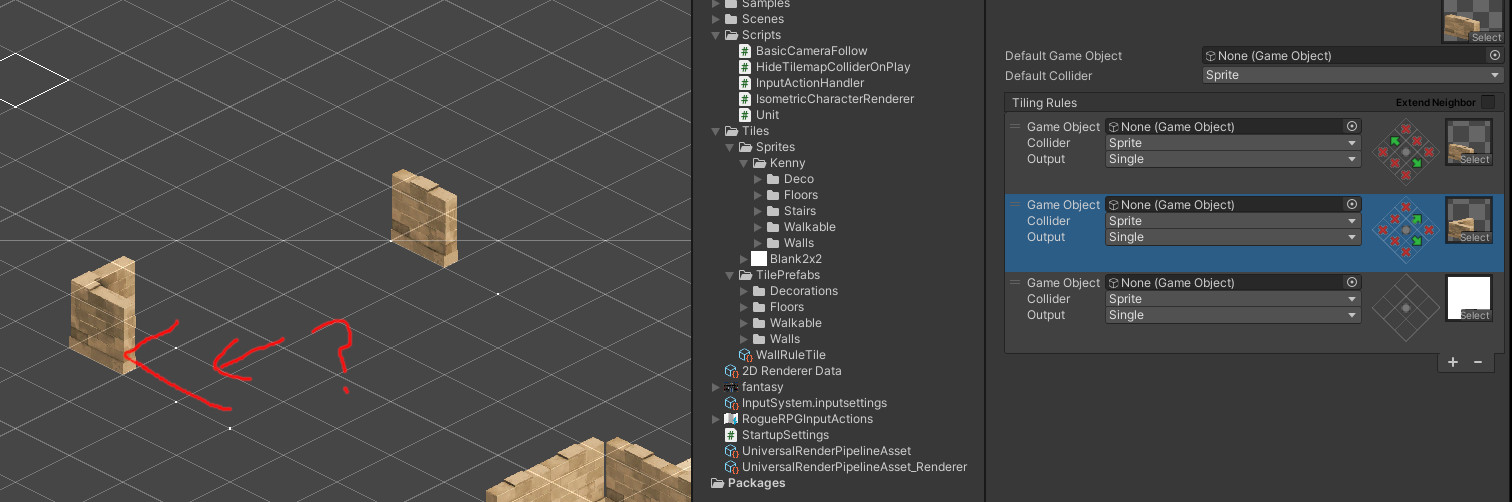
Hopefully somebody can help me understand what I am doing wrong. First time using rule tiles. Screenshot shows what I have setup. White dot is the catch all tile just so I can see whats going on.
My rule tile has 3 rules, if a wall is running nw to se it shows a wall, this is working in the top example which has 3 of my rule tiles in a row diagonally.
My 2nd rule is if its a corner shape, put the corner piece. This is working as expected in the bottom left example.
Where I don’t get what is happening is after the corner shape, I added one more tile. Now beside my corner I now have 3 in a row diagonally. Why is it not using the diagonal wall like the one in the top right? If I put another one after that it does put a wall in the next space, leaving one blank. Its almost like the corner piece doesn’t count as one of my rule tiles even though it is.