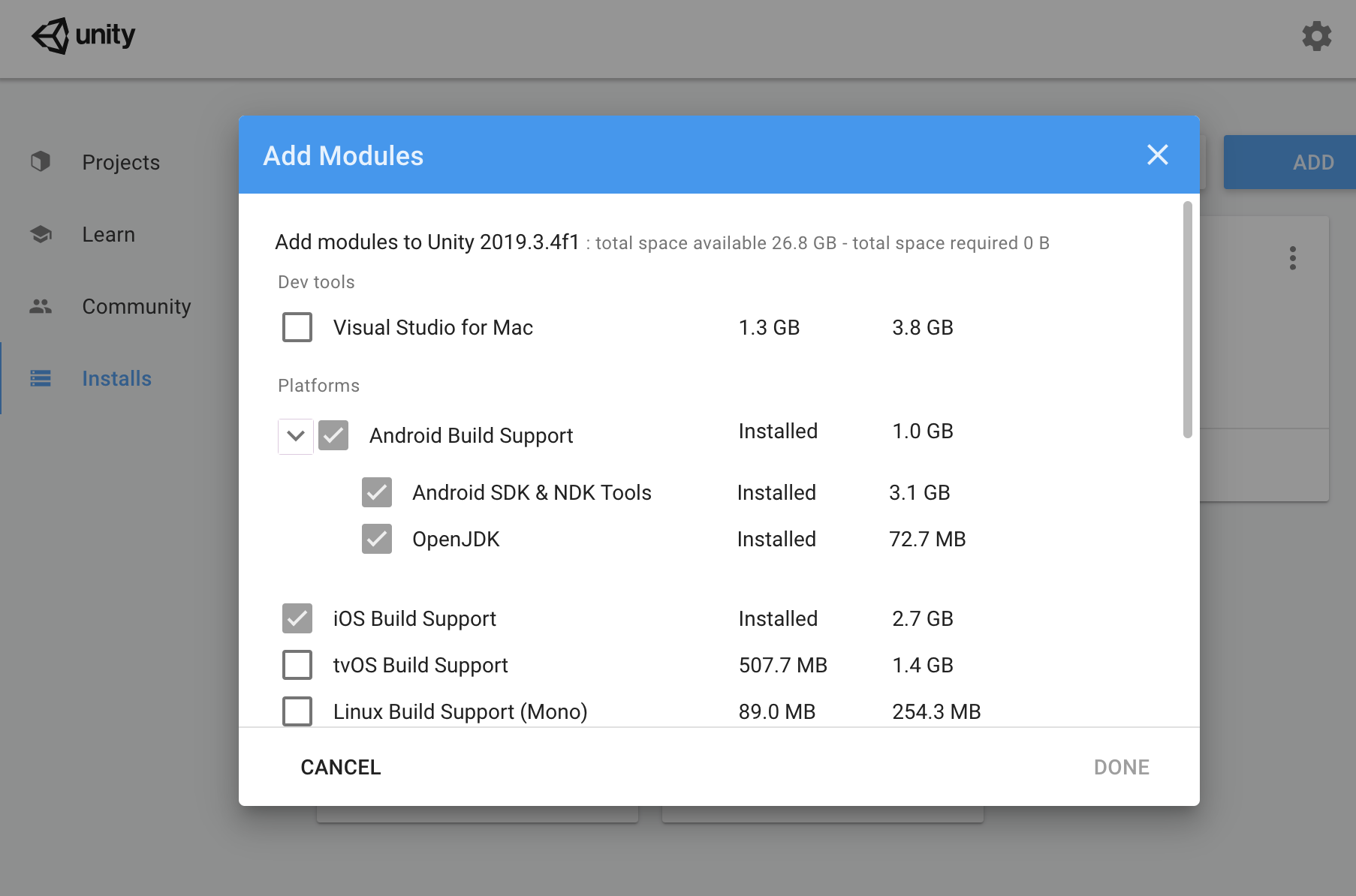
I have installed latest unity version ( 2019.3.4f1) with android module. But in preference-> External tools its says JDK , SDK and NDK missing.
How to solve this?
I have installed latest unity version ( 2019.3.4f1) with android module. But in preference-> External tools its says JDK , SDK and NDK missing.
How to solve this?
When installing the android module, make sure to select the SDK, NDK and JDK options separately. Even if you tick the top level Android Build Support module for installation, these options stay unselected.
No. I have ticked that also. I’m 100% sure about it
Have you looked at their installation directories to confirm they actually exist?
I checked that. directories not there.
That’s weird. Have you tried uninstalling that Unity version including the modules, then reinstalling them? Seems like the simplest thing to try for now.
I’m also facing this issue, it seems like unity Hub doesn’t download proper things… you should download Modules Manually.
Your Unity and modules working Good ? if yes then please compress the file and share with us!
Waiting for your Response!
I have uninstalled all versions, then reinstall again. Now its working.
Had a similar problem here. Installed, everything fine. Built, everything fine. Tried to build again (without shutting down Unity Editor or anything, just two plain consecutive builds) and everything shows as missing (sdk, ndk, jdk).
It happened with 2019.4.1f1, 2019.4.12f1 and 2019.4.8f1 (shouldn’t those versions be stable?). Uninstalled and reinstalled, keeps happening. Simply cannot build twice. It would be funny if it wasn’t happening at work.
Quote here from another thread that may be useful:
So… no. Using the Hub isn’t useful.
Up to a few months ago we had been using 2019.4.8f1 without any problem. We had a problem with a package (those terrible Firebase packages) that broke Unity Editor, so we uninstalled it and installed it back. From that moment, trying to do anything has been a complete nightmare. Up to the point in which there’s no possibility of building an apk from an empty project on a fresh install.
Evidence here (recorded this morning):
https://www.youtube.com/watch?v=jXeFEjiMNNA
Since the warning said domething about Tools version 25, I set the Android minimum api level to 25 (just in case) and tried building again.
Now it says that the SDK cannot be found.
Unity Hub 2.4.2
Unity Editor v2019.4.8f1
Fresh install from hub (with all android modules)
Empty project.

[Edit] I did check that the installation created the SDK and NDK folders. It seems Unity Editor has a problem updating its tools, but I don’t know how to solve that.
[Update] So I checked those SDK and NDK folders to see if they looked like the ones from the Android Studio ones and… there was one .bat missing: sdkmanager.bat

On the left, there’s the Unity SDK folder as installed from Hub. On the right, Android Studio same folder with the sdkmanager.bat. I was dumb enough to take the screenshot after copying the file from right to left.
I copied that sdkmanager.bat from Android Studio to Unity’s SDK folder and at least it started building. It now spits a ‘repositories.cfg could not be loaded’ error.
[Update 2] Every time I close and open Unity Editor again, the sdkmanager.bat disappears…
In your video, it can be seen that Unity is not capable of updating SDK in Program Files, since that requires elevated privileges. Long story short, when Unity 2019.4.8f1 was released, Android SDK was already updated on google’s side, Unity detects that and tries to update it, but at that time Unity was not able to modify files in Program Files without administrative permissions.
In https://unity3d.com/unity/whats-new/2019.4.15, there was an improvement in this area
Android: Enabled Unity perform Android SDK update with elevated privileges on Windows. Previously if Android SDK/NDK would be installed in folder like Program Files, Unity wouldn’t be able to update Android SDK. With new behavior user will be prompted with a dialog where Unity will ask - if it can run sdkmanager.bat with elevated privileges.
Try installing Unity 2019.4.15 or higher and see if it helps with your issue.
Ok, I’ll try with 2019.4.15 and let you guys know. Thanks @Tomas1856
Also, this gets popped out too often.
[Update] Yeah… After trying to install 2019.4.15 from Hub (with a lot of errors), I got to the very same point. No JDK, SDK nor NDK.
So I uninstalled everything (again), gave administrator permission to Unity Hub, and installed recomended version from Hub, ie 2019.4.18 with full Android modules. Threw installation error 3 times, so I went in one step at a time: first just the editor, then the Android module (no submodules), then the JDK submodule and finally the SDK and NDK submodule (the 3 GB one). Everything installed successfully without any error. I opened one project and Editor said all three SDK, NDK and JDK were fine. So I went to build the empty project and… same error!!!
[Update 2] Uninstalled everything, icluding Android Studio. Reinstalled. Unity shows that SKD installed from Hub cannot be found.
It took me a really long time to get Unity installed in the first place. I couldn’t install it from Unity HUB. The download kept getting corrupted or just not working. I was excited when I found out about the LTS version on the Unity archives. I was finally able to get Unity version 2019.4.17f1. But then my joy turned to grief when it told me I was missing JDK, SDK, and NDK. I’m in the same boat.
Sorry to hear you’re having rough experience, if I understand correctly, something on your system keeps deleting sdkmanager.bat ? Do you by any chance have antivirus installed, can you exclude the Unity folder and see if it helps?
Alternatively, you see sdkmanager showing an error, open CMD with Administrator and execute the command line manually
<...>\sdkmanger.bat --list
Also according to google, you seem to have set JAVA_TOOL_OPTIONS in your environment variables, if that’s the case, can you remove that variable, restart Unity and try again.
First of all, thanks again @Tomas1856 for answering.
Ok, went to check and there’s no JAVA_TOOL_OPTIONS environment variable. Is it weird? I’ve never set that variable up.
Thanks, man. Once I read this I thought that perhaps the Windows Defender might be deleting some files (there’s something to be blamed for this, why not Defender?).
So I excluded the Unity folder on Defender. I uninstalled every Unity Editor and reinstalled latest recommended LTS version from Hub (with admin permission) which is 2019.4.18f1. I installed it one step at a time again, just in case. Checked wether the SDK folder existed and the sdkmanager.bat was created. Everything looked fine. Opened the empty project and… JDK, SDK and NDK references seemed fine.
BUT
Got the warning saying that the SDK Tools could not be found and one error stating that repositories.cfg could not be found. Went to check and found out (again) that the sdkmanager.bat that had been installed previously (when installing v2019.4.18f1) got deleted upon opening Unity Editor (again). So, there is something deleting that file on Unity Editor start up.
Since there’s something also deleting the repositories.cfg, I closed Unity Editor, created the empty repositories.cfg file and reopened Unity Editor. Error was gone, repositories.cfg file was still in its place, sdkmanager.bat still missing and so the warning was still there. So I closed Unity Editor, copied sdkmanager.bat from the Android Studio SDK installation to the Unity Editor SDK folder and reopened Unity Editor. No error, no warning and Preferences showed that NDK, SDK and JDK were fine. Went on to build (the empty project) and… it built!!!
Ok, excitement at its highest point. Closed Unity Editor (without touching anything after successful build) and reopened it (without doing anything else)… And this happend:

Went to check in again and yes, sdkmanager.bat is missing. Something is deleting sdkmanager.bat during Unity Editor loading process. But it seems it only happens after I build an apk (I haven’t checked yet, but I believe it’ll also happen when resolving dependencies or any other android sdk related stuff).
This needs to be addressed.
I’ll try this temporary fix on our app project (with 2019.4.8f1 editor) to see if it allows us to build the apk.
Ok, this one is interesting. I did and got an error:

I think this may be related to a Java update a couple weeks ago, because I started looking for the error and I got some answers (this one, or this other too) relating that problem to different versions of Java beyond Java 8.
I updated Java a few weeks ago:
java 14.0.1 2020-04-14
Java(TM) SE Runtime Environment (build 14.0.1+7)
Java HotSpot(TM) 64-Bit Server VM (build 14.0.1+7, mixed mode, sharing)
Perhaps this has something to do with all this madness.
So, still a lot of work to do here. I’ll keep you updated.
i have a similar problem then i had to go and download manually they all worked expect the sdk it is telling me the version needed is sdk 21.3
how can i fix this
Are you talking about NDK ? that one is needed only if you use Unity 2021, you should install it via HUB
i tried downloding unity 2021 via hub then 2018 now 2019 but non are working
all from the hub
Did you select SDK, NDK in Hub along with Android?