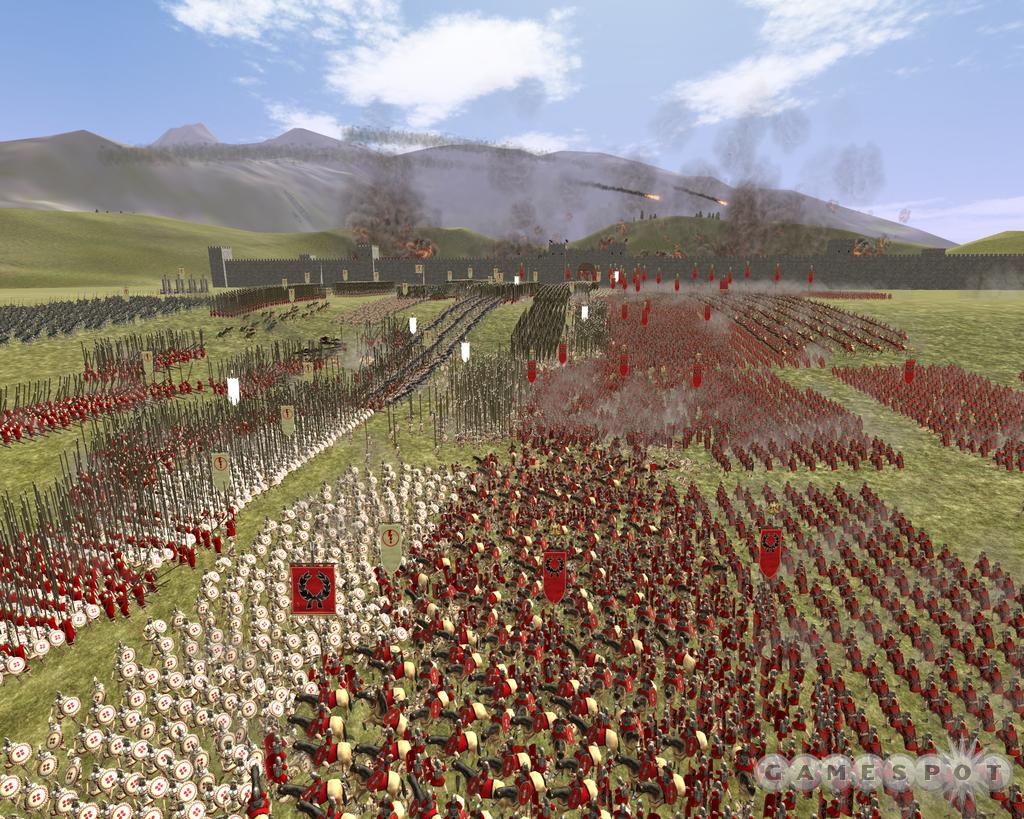
I have started creating an RTS in unity (yes I know what I’m getting myself into ;D ), and I am currently getting lower and lower fps when I have greater than 1000+ animated objects in the world.
Currently the scene just has a camera, light and flat plane. I am just doing some early performance testing to see how many units I can get into the game and so far I have been disappointed.
The models have 820 verts each (halved from my first model testing), and multiple animations. They also have a script attached to each of them controlling the running of animations and movement. (Even when disabling the scripts, the fps isn’t great.)
I am instantiating the units using a prefab, so the materials are all the same to reduce draw cells.
Here is my stats screen with 1000 units, while playing animations (don’t currently have PRO):
I was expecting better performance for only 1M vertices!
When I disable both animations and scripts I can get to around 2k units before I drop below 30fps (which is unacceptable as obviously I need animations)
I would just like a bit of help with finding whether I am doing something wrong, or I have found the limit of units I can have in a game. I’m starting to worry I can’t use Unity.
My PC specs for those wondering:
Windows 7 Home Premium 64-bit
Intel Core i7 2600K
8GB DDR3 RAM
ASUSTeK Computer INC. P8Z68-V GEN3
3072MB ATI AMD Radeon HD 7970
238GB Samsung SSD 840 PRO
its funny to see the stat window without showing us what you did there in that screen
also 1k seems like a really big number… is there any RTS games performs well with 1000 visible objects??
Thanks for your replies guys, I have tried building and running, and using my own FPS counter, which gives roughly the same performance as the editor (a couple more FPS, but not enough ).
And a good example of a game with massive amount of units is Rome Total War 2, apparently it handles over 50k units. Literally no idea how it does that!
Not sure if anyone has created a game in unity with as many 3D units on screen (I know about a few 2D games), and my ultimate goal is to allow up to about 3k on screen and 8k in one game (would probably work fine with 5k).
I will have a go at these tips when I get home later. Does anyone else have any more tips? I think I need all the help I can get!
Do these games actually have all these units visible and on-screen?
I know in Supreme commander, you can zoom all the way out to see the whole map, but past a certain distance, all units get heavily lod’ed, and further still, they are replaced with icons, and it can handle quite a lot of guys.
The Total War games always replaces units with sprites when you zoom out a bit. If you want tons of units on screen at once, you will need to find or build a tool that lets you easier convert your 3d models into a sprite sheet with lots of angles.
For your animated models you also want to make sure you have the quality settings to only 1 bone, and simplify the bones for each character as much as possible. Use one bone for the entire hand; get rid of fingers and facial animation bones for lower LOD.
Getting lots of units on screen at once will be lots of very aggressive LOD work. The challenge is getting rid of as much detail as soon as you can, but still keeping a good image quality without jarring transitions.
GPU skinning is on, and turning off and on batching doesn’t make any difference unfortunately.
Currently set to 1 bone, and I think the models are quite simple at the moment but I may have to massively reduce the vertex count if there is a high number of units (maybe dynamically?).
The frames are OK up until about 1.5k units, which is well off what I was hoping for. Are there are other things I can try before I take drastic measures like dynamically switching models to sprites? I knew this was an option, but I was hoping it didn’t have to come to that.
Rome Total War, uses LOD. So when you zoom out, these models far away becomes only few polygons. Also they turn off animations if unit is very far (because you can’t see the animation anyway).
So basically you see max 300 animated models with full detail.
I think thats what I am going to have to do aswell. What is the best way of dynamically switching models? Should I load all the different LOD models at start and just switch them out when necessary? Or load them dynamically (might be too slow)?


 ).
).